In this guide
Marketplace settlement reconciliation is the process of matching each payout you receive from Amazon or Flipkart to the underlying orders, commission, fulfilment fees, returns and taxes withheld, so that every rupee credited to your bank can be traced back to an invoice in your books. It is the single control that tells an online seller whether the money received is correct, whether the platform has deducted the right fees, and whether the GST and income-tax credits due to you have actually been passed on. This guide walks through where the reports live, the join key that makes matching work, the tax lines that trip sellers up, and a full worked cycle you can copy.
What is marketplace settlement reconciliation?
A settlement is the platform's act of paying you; reconciliation is your act of proving that payment is right. They are not the same thing, and treating them as the same is where most seller books go wrong. The marketplace nets your gross sales against its commission, shipping and fulfilment charges, customer refunds, GST collected at source and TDS, then transfers the balance in a batch identified by a settlement ID. Reconciliation opens that batch back up, line by line, and checks that the sales figure agrees with what you already reported in GSTR-1, that the deductions are backed by tax invoices, and that the residual matches the bank.
This is a bookkeeping discipline, not a sales pitch, and it sits inside the wider discipline of accounts reconciliation and audit. If you sell across several platforms, or run inventory alongside your storefront, it connects directly to inventory accounting and costing, because a return that is refunded in a settlement report must also flow back into stock.
Where to find your Amazon and Flipkart settlement reports
On Amazon, settlement reports sit in Seller Central under Payments, then Reports Repository, and can be pulled by settlement period either as a summary or as a full transaction view. On Flipkart, the equivalent lives in Seller Hub under Payments, then Generate Report. Both export as CSV or Excel, keyed by settlement ID, and both should be saved locally every cycle rather than left on the portal, because your books must be preserved for eight financial years under Section 128(5) of the Companies Act (see the Ministry of Corporate Affairs).
The step-by-step settlement reconciliation process
The process is the same every cycle, and the value comes from doing it the same way every time. Getting the sequence right also keeps it fast: most of the effort is in the first import, not the matching.
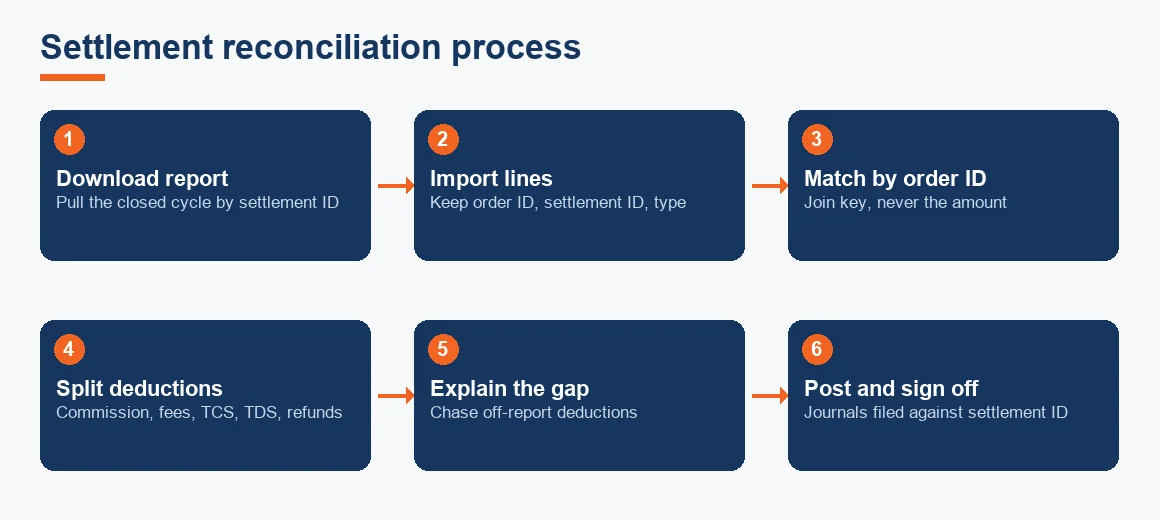
- Download the settlement file for the closed cycle by settlement ID and save a copy.
- Import the lines into your books or a working sheet, keeping order ID, settlement ID and transaction type as columns.
- Match each line to an order using the order ID as the join key.
- Split the deductions into commission, fulfilment, GST TCS, Section 194-O TDS and refunds, and post each to its own ledger.
- Explain the residual against the bank credit, chasing any off-report deductions.
- Post the journals and sign off, then file the CSV against the settlement ID.
Which fields match an order to a settlement line
The order ID is the join key, with settlement ID and transaction type as secondary keys. This matters because a single order rarely appears once: it shows up as a sale line, a commission line, a shipping line, and often a refund or reimbursement line in a later cycle. Matching on amount alone breaks the moment a partial refund lands, because two different orders can share the same rupee value. The reliable test is a pivot by order ID that nets every line for that order back to the invoice value you reported in GSTR-1.
The three types of reconciliation, and where marketplace fits
Sellers often ask how many kinds of reconciliation there are and which one applies here. In practice, the three you meet are bank reconciliation, settlement (or ledger-to-statement) reconciliation, and three-way matching, with POS reconciliation being a retail-counter cousin of settlement work. A three-point, or three-way, reconciliation matches three independent records against each other, which is exactly what marketplace work becomes once you add GST: the settlement report, your books, and the operator's GSTR-8 data all have to agree.
| Type | What it matches | Marketplace equivalent |
|---|---|---|
| Bank reconciliation | Cash book against the bank statement | Net payout against the bank credit |
| Settlement reconciliation | A platform statement against your ledger | Settlement report against GSTR-1 sales |
| Three-way (3-point) matching | Three independent records at once | Report, books and GSTR-8 TCS data |
| POS day-end reconciliation | Till takings against sales and card settlements | Storefront orders against gateway payouts |
Why the settlement report never equals the bank credit
A recurring frustration is that the report says one number and the bank shows another. The gap almost always comes from deductions that sit outside the settlement file: advertising invoices billed separately, storage and long-term storage fees, seller-finance or loan repayments, and adjustments the platform carries into the next cycle. Amazon also holds a reserve against pending returns and disputes, so cash is withheld against sales you have already recognised. Each of these belongs in a clearly named ledger, an advertising expense, a storage expense, a loan account, a reserve, rather than being quietly netted against your revenue line. Returns and RTO deserve their own treatment too, covered in our note on accounting for e-commerce returns, RTO and credit notes.
GST TCS, Section 194-O TDS and input credit on marketplace fees
Two taxes are withheld inside every settlement, and both are credits you reclaim rather than costs you bear. GST TCS under Section 52 is collected by the operator at 0.5% of the net value of taxable supplies (returns removed) and reported in GSTR-8; you see it credited in your electronic cash ledger on the GST portal, and the mechanics are set out in our explainer on TCS under Section 52 for e-commerce sellers. Income-tax TDS under Section 194-O is deducted at 0.1% of the gross sales amount and appears in your Form 26AS, with the detail covered in the Section 194-O seller guide and confirmed against the Income Tax Department.
The commission and fulfilment fees carry 18% GST, and that GST is input credit you can claim, but only against the operator's monthly tax invoice appearing in your GSTR-2B. The settlement CSV is not a valid document for input tax credit, a point worth remembering when the CBIC rules on documentation are applied at audit. If GST registration itself is still a question for you, we cover the threshold in whether GST registration is mandatory to sell on Amazon or Flipkart.
Worked example: reconciling one settlement cycle
Take a fortnightly cycle with gross orders of INR 5,00,000, of which INR 50,000 was returned, leaving net taxable supplies of INR 4,50,000. Commission runs at 15% and fulfilment at a flat fee, both plus 18% GST; TCS is 0.5% and TDS 194-O is 0.1% of the net value. The table rebuilds the payout from the top down. All figures are indicative and fee rates are Exl GST where noted.
| Line | Basis | Amount (INR) |
|---|---|---|
| Gross order value (GSTR-1) | Invoiced sales | 5,00,000 |
| Less: returns / RTO credit notes | Refunded to customers | (50,000) |
| Net taxable supplies | Basis for TCS and TDS | 4,50,000 |
| Less: commission | 15% of 4,50,000, Exl GST | (67,500) |
| Less: GST on commission | 18% of 67,500 | (12,150) |
| Less: fulfilment fee | Flat, Exl GST | (20,000) |
| Less: GST on fulfilment | 18% of 20,000 | (3,600) |
| Less: GST TCS (Section 52) | 0.5% of 4,50,000 | (2,250) |
| Less: TDS (Section 194-O) | 0.1% of 4,50,000 | (450) |
| Expected net payout | Should match the report | 3,44,050 |
If the bank actually credited INR 3,38,150, the INR 5,900 difference is not an error in the sales: it is an advertising invoice of INR 5,000 plus INR 900 GST that the platform billed separately and deducted outside the settlement file. That INR 5,900 goes to an advertising expense ledger, the INR 2,250 TCS and INR 450 TDS go to their tax-credit ledgers, and the GST of INR 15,750 on fees is claimed through GSTR-2B, not written off.
How to prepare a reconciliation statement each month
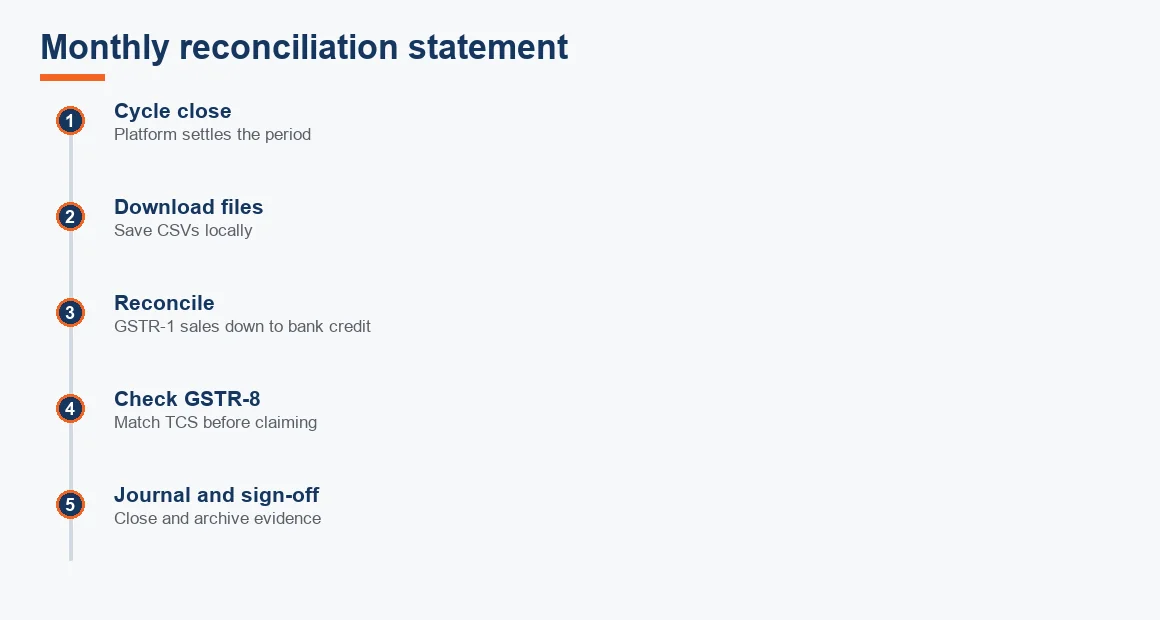
A reconciliation statement is simply the bridge from one number to another with every difference named. For a marketplace seller it starts at GSTR-1 sales, subtracts the settlement deductions above, and lands on the bank credit, with any residual explained by off-report items. Running it on a fixed monthly rhythm keeps the differences small and the evidence fresh.
The same monthly close applies whether you sell physical goods or, in adjacent models, software and subscriptions. Sellers who also run a services arm often pair this with SaaS accounting or broader IT and software company accounting, and early-stage founders juggling both should read our approach to startup accounting. For the marketplace side itself, the full service view sits on our e-commerce accounting services page, which is where commercial questions belong rather than in this workflow.
Key terms
- Marketplace Settlement Reconciliation: matching a platform payout to the orders, fees and taxes behind it.
- Section 52 TCS under GST: the 0.5% tax the operator collects on your net taxable supplies.
- GSTR-2B Input Tax Credit Matching: the statement against which fee GST becomes claimable credit.
- Return to Origin (RTO) Provisions: accounting for goods refused or returned before delivery.
- Bank Reconciliation: tying the cash book to the bank statement, the final step of the cycle.
Key takeaways
- Reconcile every settlement by order ID, never by amount, and net each order back to its GSTR-1 invoice value.
- Expect the report and the bank to differ; name each off-report deduction in its own ledger instead of hiding it in revenue.
- GST TCS at 0.5% and Section 194-O TDS at 0.1% are credits to reclaim, backed by GSTR-8 and Form 26AS.
- Claim input credit on commission and fulfilment GST only through the operator's invoice in GSTR-2B, not from the settlement CSV.
- Keep the settlement files and tax invoices for eight financial years and run the statement on a fixed monthly rhythm.
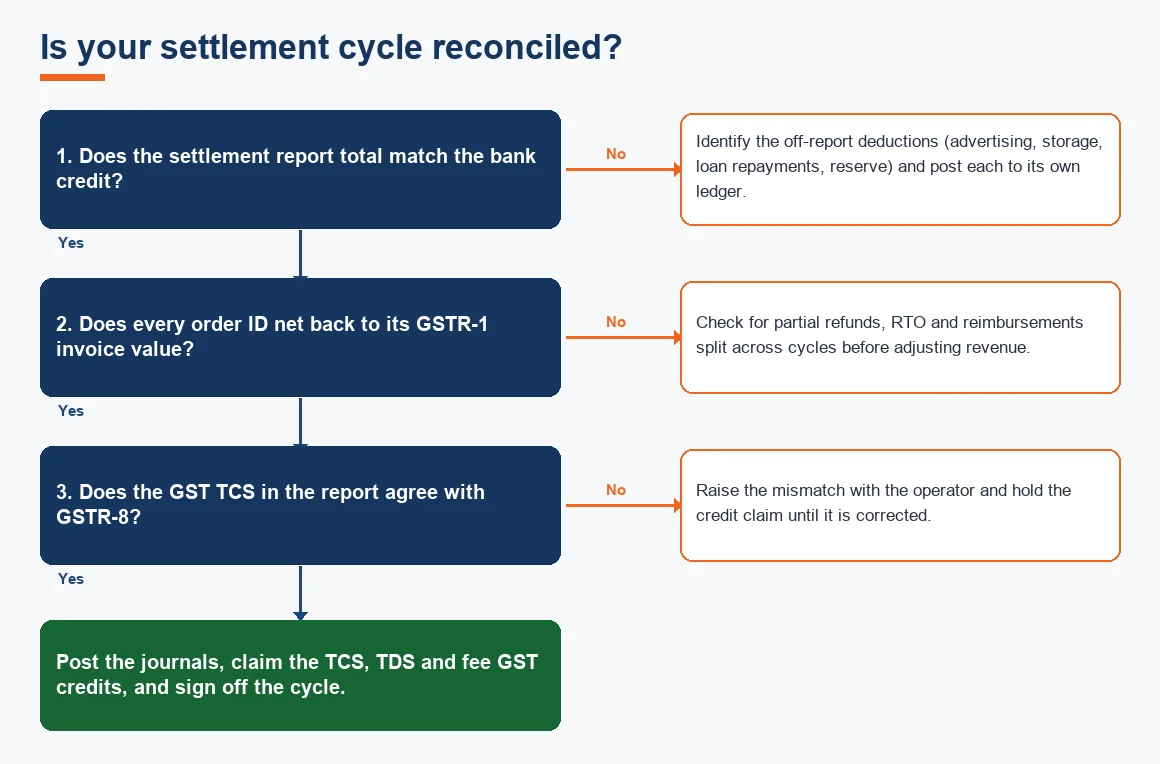
Decision guide