


Talk to an Expert
Talk to an Expert ✆ +91 945 945 6700
Trusted by 10,000+ Businesses

Tally to Odoo Migration Services

Reviewed by CA and CS Team, Patron Accounting LLP ICAI & ICSI Registered| 15+ Years Experience| Last Updated: July 2026 Verify Credentials →

Opening balances that clear to nil: Customer and vendor balances land in Odoo as individual open invoices, not two lump sums. The temporary waiting account is proved empty before.

History you can still query: Purchase history, item costs and prior year figures come across with the balances. Last year's numbers answer a question from inside Odoo.

E-invoicing live before cutover: We re-point your e-invoice and e-way bill credentials to Odoo. They are tested on one live invoice and one delivery while Tally still runs.

A chart built for Odoo: You get a chart of accounts Odoo can read, with Tally ledgers mapped to Odoo accounts and each account type set deliberately.

15+ YearsIndustry Experience
CA & CSCertified Experts
4.9
Based on real Google reviews

Get Free Consultation

Talk to a CA/CS expert today

🇮🇳 +91

Our team will get back to you shortly. No spam.

Real Stories from Real People

Verified Google reviews from founders and businesses Patron works with across India.

Join 3,000+ Founders and Businesses on Patron

Rated 4.9 on Google - trusted for startup accounting since 2019.

Talk to an Expert
10,000+Businesses ServedGST compliance and litigation support across India.
15+Years ExperienceDeep expertise in IP registration, GST & business compliance.
50,000+Documents FiledReturns, appeals, and filings handled accurately.
4.9★Client RatingTrusted by entrepreneurs, startups, and growing businesses.
ISO CertifiedProfessional standards and documented processes.
SSL SecureYour financial and business data is fully protected.

What Tally to Odoo Migration Covers — Scope, Deliverables and Who It Suits

📌 TL;DR - Tally to Odoo Migration Services at a Glance

A Tally to Odoo migration has to carry the operational data too, not just the finance ledger: items, bills of material, warehouses and party records. Patron maps the Tally groups onto Odoo's chart and fiscal positions, then runs a parallel month before cut-over. Stock valuation is proved to agree on both sides, and the Rule 3(1) log carries across, before the old system is retired. Works well for manufacturers and distributors outgrowing Tally.

The usual failure is a go-live where only the opening trial balance came across. Purchase history is gone, item costs restart from zero and last year's figures can no longer be pulled without opening the old software. Patron moves masters, balances and transaction history together, reconciles each ledger group after the load, and keeps the old data readable. Comparing the two systems is worth doing before any of this starts.

Inside scope: data extraction, mapping, the load itself, the reconciliation after it and post-load sign-off. Outside it: Odoo licensing, custom module development and staff training. What drives the work is the years of history you carry forward and the count of item and party masters. Registration of the new system with the GST e-invoicing portal is handled separately.

What Is Tally to Odoo Migration?

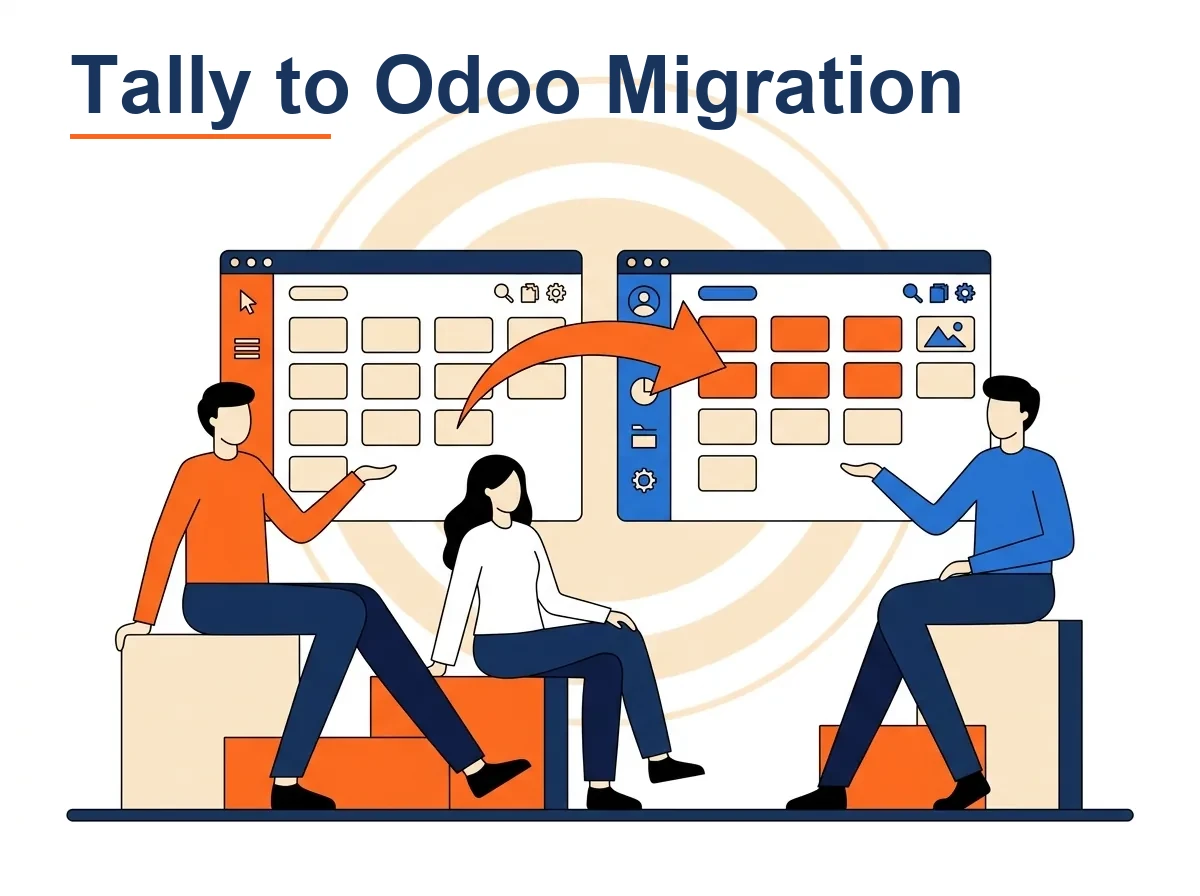
A migration is only trustworthy if it is held to one rule: nothing is retired until both systems reconcile to the last audited figure. Tally to Odoo migration is the project that meets that rule. Because no vendor tool moves Tally into Odoo, it is built by hand, mapping the Tally groups onto Odoo's chart of accounts and tax positions.

Unlike a finance-only switch, this one carries the operational data too: stock items, bills of material, the warehouses and the party masters, so production and dispatch keep posting after go-live. It extracts the masters, loads balances and transaction history together, then reconciles each ledger group once loaded. Every voucher type in Tally is matched to an Odoo document that behaves the same way. Stock valuation is confirmed to match on both sides before the old file is closed. This is a one-time engagement, not a monthly retainer; registering the new system on the GST portal is handled separately.

Key Terms for Tally to Odoo Migration:

What Is Tally to Odoo Migration. A migration is only trustworthy if it is held to one rule: nothing is retired until

Who Needs Tally to Odoo Migration in India?

Businesses reach for this migration when Tally can no longer hold the operations side alongside the ledger. The organisations below share one signal: items, warehouses and manufacturing have outgrown what Tally was carrying for them.

  • Manufacturers running bills of material that Tally cannot link to consumption and costing.
  • Distributors managing several warehouses that need one system for stock and finance.
  • Businesses moving to Odoo who must carry item and party masters, not just balances.
  • Firms wanting years of purchase history to stay queryable after the old system retires.
  • Companies whose opening entry must clear through a waiting account to nil.
  • Growing operations where dispatches and manufacturing orders should post to the ledger themselves.
  • Businesses needing GST and e-invoicing reconnected on the new system before cut-over.
  • Owners planning a parallel run to prove stock valuation agrees on both sides.

The software and platforms we work with

TallyOdoo

Our Tally to Odoo Migration Services

ServiceWhat We Do
Source extraction and clean-upTally data extracted and audited before any Tally to Odoo migration begins, with duplicates and stale balances cleaned first One-time (setup)
Chart of accounts mappingTally ledgers mapped to an Odoo chart of accounts, covered in mapping Tally ledgers to Odoo, before import One-time (setup)
Master and opening-balance migrationCustomers, vendors, items and opening balances imported with External IDs, posted through a suspense account that clears to nil One-time (setup)
Transaction history migrationPrior period vouchers loaded to an agreed cut-off date, so earlier years stay queryable inside Odoo after cutover One-time (setup)
GST and e-document reconnectionGST configuration, e-invoicing and e-way bill links rebuilt in Odoo and tested live before the cutover date One-time (setup)
Parallel run and go-liveBoth systems run in parallel and reconciled to agree, then Odoo locked and the team trained at go-live One-time (setup)
Our Process

How Tally to Odoo Migration Works — Our Process

How Patron delivers tally to odoo migration, step by step from onboarding to a clean monthly close.

Step 1

Deciding the ERP scope

First we settle which Odoo apps go live at cutover: accounting alone, or sales, purchase, inventory and manufacturing with it. That decision changes what has to migrate, because products, warehouses and bills of material are only in scope if the operational apps are.

Illustration for Deciding the ERP scope: First we settle which Odoo apps go live at cutover: accounting alone, or sales,
Step 2

Source extraction and audit

Masters, trial balance, party outstandings and stock are exported out of Tally and audited before loading. We look for duplicate ledgers, parties without GSTIN, negative stock, and items whose Tally unit of measure will not survive in an inventory-valued system.

Illustration for Source extraction and audit: Masters, trial balance, party outstandings and stock are exported out of Tally
Step 3

Target build before data

The Indian localisation modules, chart of accounts, GST taxes and fiscal positions are configured on the target database first. Tally ledgers are then mapped onto Odoo accounts with the correct account type, since Odoo derives statement placement and reconciliation behaviour from it.

Illustration for Target build before data: The Indian localisation modules, chart of accounts, GST taxes and fiscal
Step 4

Importing with External IDs

Data is loaded through Odoo's CSV and XLSX import with an External ID on every record. Partners, products and journal items then link to each other, and a failed load can be re-run without creating duplicates. Imports are staged: partners, products, then documents.

Illustration for Importing with External IDs: Data is loaded through Odoo's CSV and XLSX import with an External ID on every
Step 5

Opening entry through a waiting account

Opening balances are posted as a journal entry: general account balances first, then customer and vendor balances as individual open invoices. The entry is balanced through a temporary waiting account that must clear to nil before go-live.

Illustration for Opening entry through a waiting account: Opening balances are posted as a journal entry: general account
Step 6

Reconnecting GST and e-documents

NIC e-invoice and e-way bill API credentials are created or re-pointed for the new system, the sales journal is enabled for e-invoicing, and invoice numbering continues the existing series. One live invoice and one delivery are tested through the portals before cutover.

Illustration for Reconnecting GST and e-documents: NIC e-invoice and e-way bill API credentials are created or re-pointed
Step 7

Parallel run, lock and sign-off

One period runs in both systems and we compare trial balance, ageing, bank balances, stock valuation and GST output. On sign-off the Odoo lock date is set at the cutover date and Tally is archived read-only as history.

Illustration for Parallel run, lock and sign-off: One period runs in both systems and we compare trial balance, ageing, bank
Client Portal

How You Work With Patron

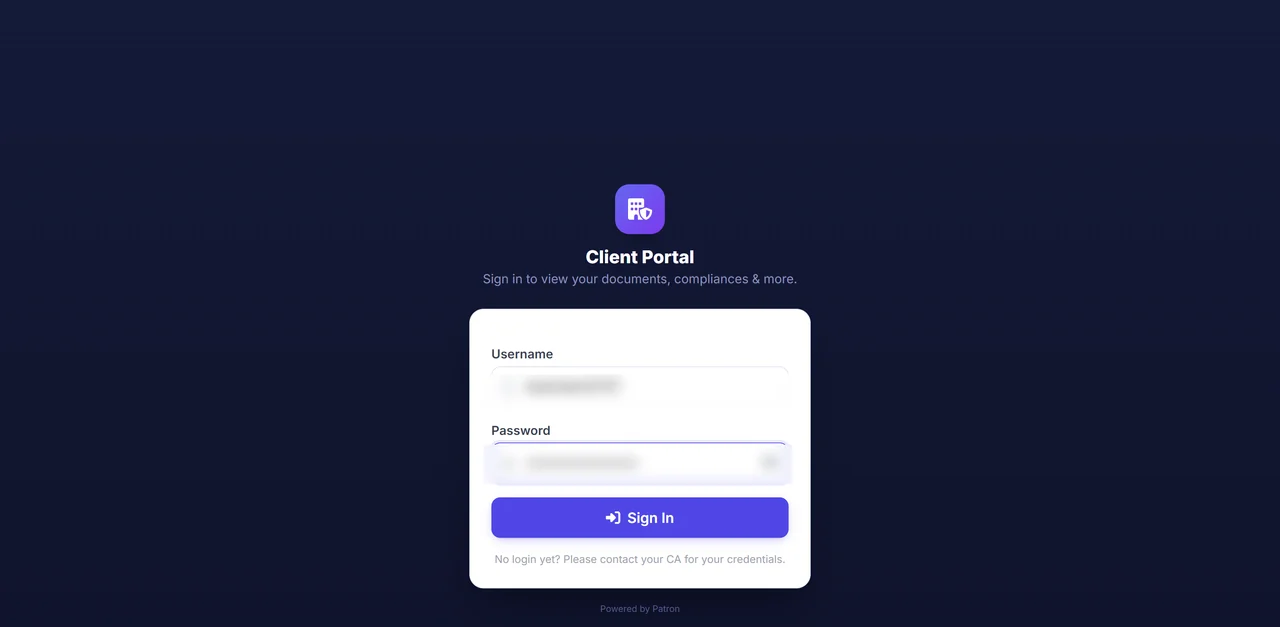
Everything happens in one secure login. You can see your active services, the Patron team on your account, and anything still pending. Once you raise a request, it moves through the same clear steps every time, so you always know exactly where your work stands.

Secure client portal login screen
1

Sign in securely

Your books, documents and requests all sit behind one private, password protected login. The team handling your account is shown on screen, so nothing sensitive ever needs to travel over email or WhatsApp.

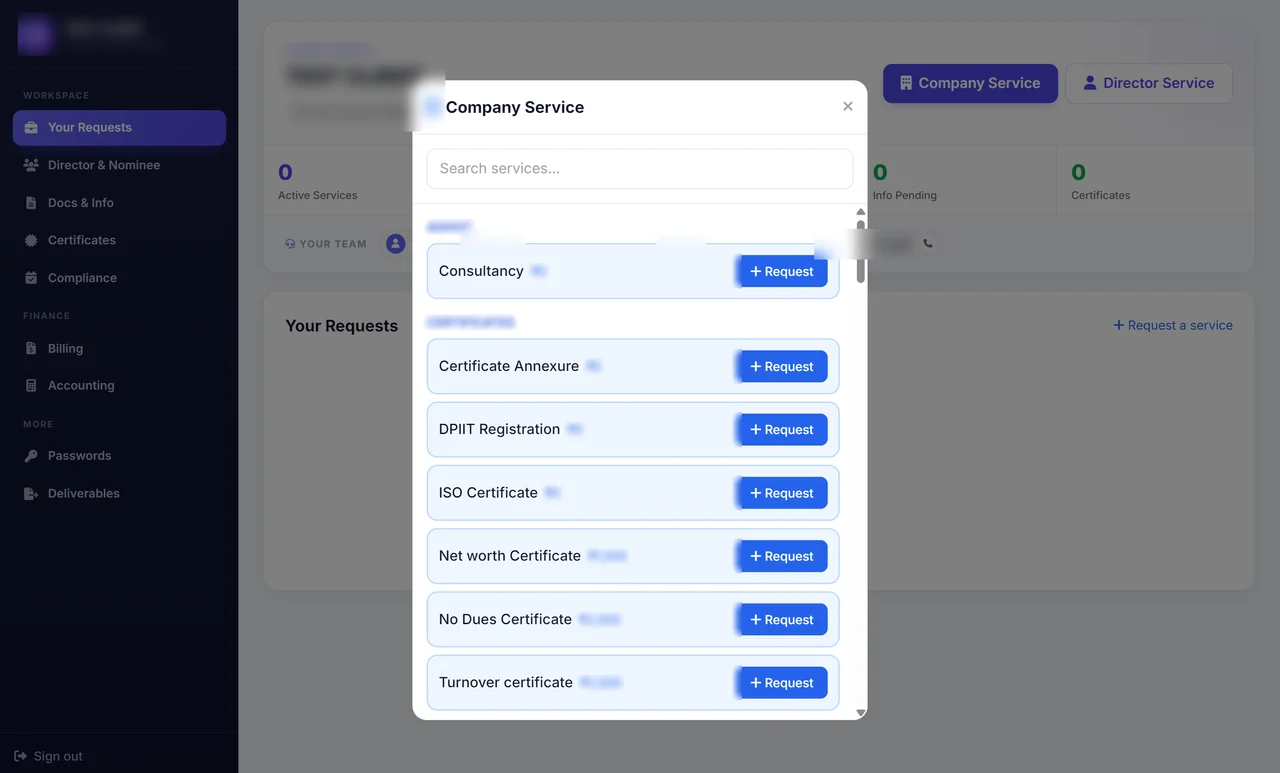
Service catalogue inside the client portal
2

Raise your request

Choose the service you need from the menu inside the portal, where the price is shown before you go ahead. Your request is logged the moment you send it, with no phone calls or reminder emails to wait on.

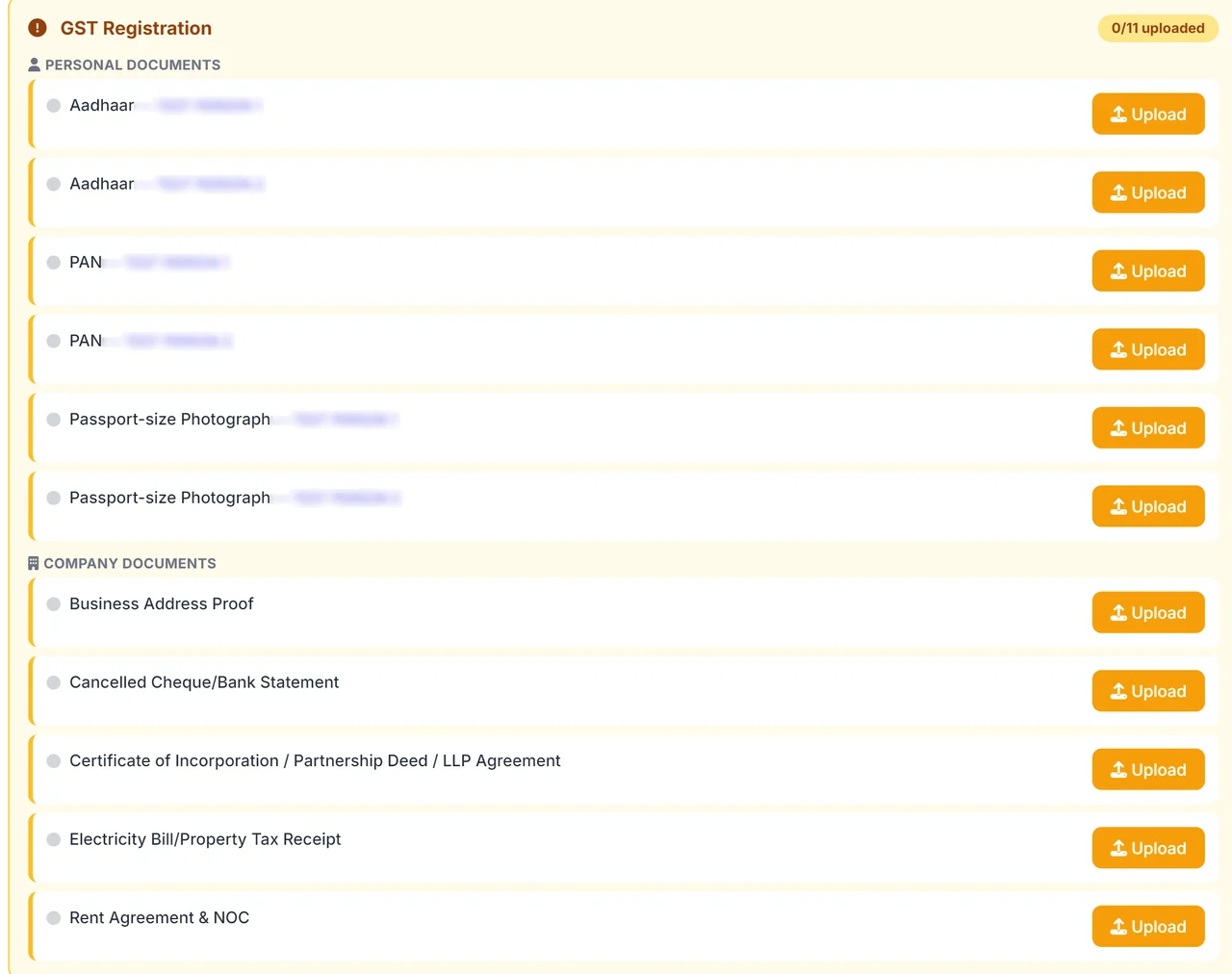
GST registration document checklist in the client portal, with an upload button beside each item
3

Share what the service asks for

For every service, the portal lists the exact documents it needs, each with its own upload button. The example shown here is the GST registration checklist. When a service needs nothing from you, it simply asks for nothing.

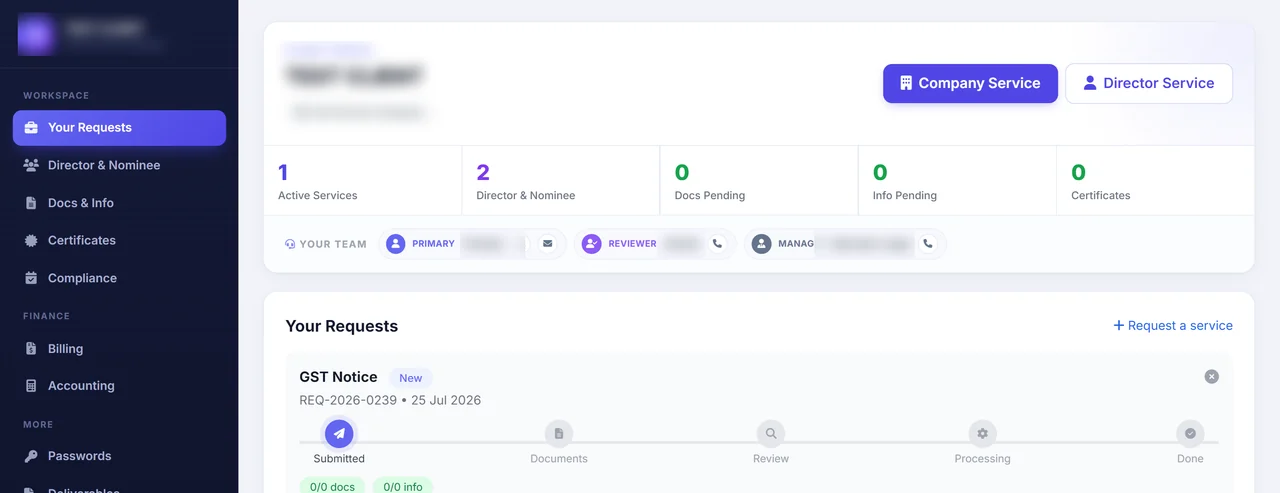
Live request tracker inside the client portal
4

We review, prepare and file

Once your documents are in, your team checks them, prepares the work and files it for you. A live tracker shows each stage as it happens, from review to processing to done, so you never have to ask where things stand.

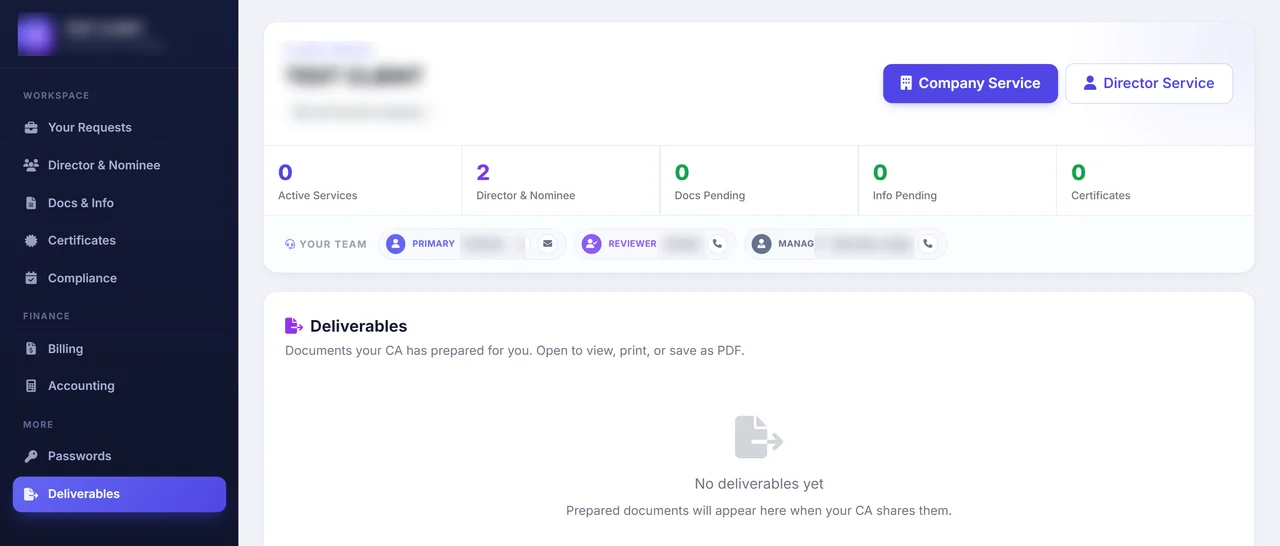
Deliverables area of the client portal
5

Collect your finished work

Every completed return, computation and certificate is placed in your Deliverables area. You can open, print or download any of them as a PDF whenever you need a copy.

Common Tally to Odoo Migration Challenges and How We Solve Them

ChallengeImpactHow Patron Accounting Solves It
Opening balances migrate but bill-wise and item-wise detail is lostOutstanding invoices and stock lots vanish, so ageing and reorder logic break at go-live.Import open invoices bill by bill and stock lot-wise, not merely the net balances.
GST rates and HSN masters not aligned between Tally and OdooPost-migration invoices carry the wrong tax, so returns will not reconcile.Rebuild tax and HSN masters in Odoo and test on sample invoices before cut-over.
Historical transactions left behind at cut-overComparatives and item cost history disappear, so costs restart from zero.Carry at least the prior year of posted history so margins and trends survive; see how to migrate data from Tally to Odoo.
Duplicate or misspelt party and item masters carried across as-isBalances split and stock counts double, making every Odoo report unreliable.De-duplicate and standardise masters before import, merging each variant into a single record.
Audit trail continuity broken between the old and new systemA Rule 3(1) edit-log gap opens across the switch, creating compliance exposure.Archive the Tally trail, enable Odoo's log from day one, and document the cut-over date.

Tally to Odoo Migration Fees

Fee ComponentAmount
Standard — up to 1,000 vouchers migrated with opening balancesINR 9,999
Excl. GST & Government Charges
Complex — larger data volume, deeper history or extra Odoo modulesOn quote

A standard Tally to Odoo migration is a one-time INR 9,999 for up to 1,000 vouchers with opening balances carried across. What lifts the fee is the number of records migrated and the Odoo modules configured. Book a scope call on +91 94594 56700.

Fees exclude GST and government charges. Final quote confirmed after a scoping review.

All fees and charges listed are indicative only and do not constitute a binding offer. Final amounts may vary depending on the volume of work and the complexity involved.

Professional accounting and compliance charges are scoped to your number of entities, funding stage and monthly transaction volume, and are separate from statutory and government charges. Contact us for a detailed, fixed quote.

Get a free Tally to Odoo Migration consultation - Call +91 945 945 6700 or WhatsApp us. No-obligation assessment.

Key Benefits

Why Professional Tally to Odoo Migration Matters

Opening balances that clear to nil

Customer and vendor balances land in Odoo as individual open invoices, not two lump sums. The temporary waiting account is proved empty before go-live.

  • Balances loaded as individual open invoices
  • Waiting account proved empty before go-live
  • Without it, an unowned suspense balance sits behind every later reconciliation

History you can still query

Purchase history, item costs and prior year figures come across with the balances. Last year's numbers answer a question from inside Odoo.

  • Purchase history, item costs and prior year figures migrated
  • Tally archived read-only as history
  • Without it, the first stock valuation has nothing to compare against

E-invoicing live before cutover

We re-point your e-invoice and e-way bill credentials to Odoo. They are tested on one live invoice and one delivery while Tally still runs.

  • E-invoice and e-way bill credentials re-pointed to Odoo
  • Tested on one live invoice and one delivery
  • Without it, a rejected first invoice holds up dispatches at go-live

A chart built for Odoo

You get a chart of accounts Odoo can read, with Tally ledgers mapped to Odoo accounts and each account type set deliberately.

  • Tally ledgers mapped to Odoo accounts, account type set
  • Account type governs where a balance sits and reconciles
  • Without it, a copied name list produces reports that cannot be fixed entry by entry

A reload that creates no duplicates

We import every record carrying an External ID. A load that fails halfway can be corrected and run again against the same rows.

  • Every record imported with an External ID
  • A failed load reruns against the same rows
  • Without them, a second attempt leaves two of each partner and product

A cutover you can prove

You run one period in both systems before Tally is locked read-only. The comparison covers trial balance, ageing, bank balances, stock valuation and GST output.

  • One period run in both systems and compared
  • Trial balance, ageing, bank, stock and GST output reconciled
  • Without it, the gap shows in the first close with nothing to fall back on

Why Businesses Choose Patron Accounting for Migration: Tally to Odoo

Five things a founder can check before handing over the books. Each is a claim with the proof behind it.

Masters, balances and history moved, not just an opening balance

We carry item and party masters, ledger balances and full history when moving Tally data to Odoo, not merely an opening balance. This migration depth comes from 15+ years of experience.

Audit trail preserved so the prior year stays provable

We preserve the audit trail across the cut-over, so the prior year in Tally stays provable to any auditor or officer. Careful statutory handling backs 25,000+ filings completed.

Odoo Inventory and Manufacturing mapped to your Tally stock structure

We map Odoo Inventory and Manufacturing to your existing Tally stock structure, item by item. We run Tally Prime, Odoo, Zoho Books and Xero daily.

A planned cut-over with a parallel run

We run the new Odoo system in parallel with Tally before cut-over, following a tested migration checklist. No lost period is the standard behind our 4.9 star Google rating.

Tally-to-Odoo migrations completed without a lost period

Businesses moving from Tally to Odoo are among the 3,000+ we have served since 2019. Our in-house team of CAs and CS, 15+ years of experience, handles every migration end to end.

Figures reflect Patron Accounting LLP engagements since 2019. Scope and turnaround are confirmed in your engagement letter.

Stay on Tally vs Migrate to Odoo

CriterionStay on TallyMigrate to Odoo
Upfront effort and costNo migration project, no one-time data mapping costUpfront mapping, data cleaning and implementation effort required
Capability gainedAccounting and inventory only, no wider process modulesFull ERP with CRM, sales and manufacturing modules
Compliance and e-invoiceDeep native GST, mature e-invoice and e-way already workingGST and e-invoice via localisation, needs testing before cutover
Multi-user and remoteRemote access needs cloud hosting or add-onWeb-based multi-user access with role permissions
Reporting depthStandard financial reports, limited cross-department analyticsCross-module reporting spanning finance, sales and operations
Data continuity and historyAll history stays in place, nothing to re-mapOpening balances and history need careful mapping and reconciliation
VerdictTally to odoo migration pays off once operations span multiple departments or many concurrent users. Below that scale, staying on Tally is rational and cheaper. Migrate when process complexity, not just size, outgrows Tally. Consider Tally to Zoho Books migration.

Legal and Regulatory Framework for Tally to Odoo Migration

A migration keeps the numbers to one standard above all: the destination ledger must reconcile to the last audited figure the source system reported, and Rule 3(1) of the Companies (Accounts) Rules is what makes that continuity legally material, because the edit log cannot simply restart. Section 128 then requires the eight-year archive to survive the move intact.

So a Tally to Odoo migration is governed data work, not a file import. Opening balances, historical vouchers and the GST registers all have to arrive whole and tie back to what was already filed, which is why a disciplined Ledger Mapping Schema and a fixed Historical Data Cut-off Date are the controls that matter. Odoo's own posting engine has to keep the trail alive from go-live. The provisions below are what the project answers to.

  • Rule 3(1), Companies (Accounts) Rules 2014The audit trail must be live in the destination system from go-live, and the legacy edit log preserved rather than discarded - upheld by the Odoo Double-Entry Engine.
  • Section 128(5) and Section 128(1), Companies Act 2013Opening balances, historical vouchers and the eight-year archive carry across intact, so the books stay continuous through the cut-over - the point of clean ERP Open Balances.
  • Section 35 and Section 36, CGST Act 2017The GST accounts, ITC registers and record-retention obligation continue unbroken across the migration, tied to the same GSTIN.
  • Section 44AB, Income-tax Act 1961Where a tax audit applies, the migrated figures must reconcile to the audited balances the earlier system reported.
  • Section 44AA, Income-tax Act 1961The ongoing obligation to maintain complete books does not pause for the cut-over, so no period is left unrecorded. The parallel Zoho route is covered on Tally to Zoho migration.

Official sources: Ministry of Corporate Affairs · Income Tax Department · GST Portal · Startup India (DPIIT)

How long does a Tally to Odoo migration take?

A standard Tally to Odoo migration takes 4 to 8 weeks, with data extraction and cleaning in the first two weeks, configuration and mapping in weeks three and four, and parallel running in the final phase. Businesses with inventory, manufacturing or several GST registrations should plan for 10 to 12 weeks including user training.

What data can actually be moved from Tally to Odoo?

Masters move in full, including ledgers, customers, vendors, items, tax rates and opening balances, along with open invoices, open bills and stock quantities as on the cut over date. Historical vouchers are usually carried across as summaries rather than line by line, because loading several years of detail into Odoo slows the system and adds little practical value.

Is old Tally data still accessible after moving to Odoo?

Yes, your Tally company file stays with you and remains readable in the licensed version, and we archive a dated backup plus PDF exports of the trial balance, ledgers and filed GST returns for every migrated year. Income tax assessments and GST audits reaching back several years are exactly why the old data must never be deleted.

What does a Tally to Odoo migration cost?

A Tally to Odoo migration typically costs Rs 1,20,000 to Rs 3,50,000 as a one time project fee, depending on data volume, the number of modules and how much work the Indian localisation needs. Odoo subscription or hosting is billed separately by the vendor, and support after go live is quoted as a monthly retainer.

Is it better to migrate from Tally to Odoo mid year or wait until 1 April?

The cleanest cut over is 1 April, because opening balances match the finalised previous year and the whole year of GST returns is filed from one system. Mid year migration works too, and we then use 1 July or 1 October so that a full GST quarter runs in one system, with earlier months left in Tally.

Does Odoo handle Indian GST, e-invoicing and TDS after migration?

Odoo supports Indian GST through its India localisation, covering rate configuration, place of supply, GSTR-1 and GSTR-3B data extraction, e-invoice IRN generation and e-way bills through a registered provider. TDS is handled through configured tax heads and reports, though the quarterly return itself is prepared outside Odoo using the department's utility.

Will opening balances and stock match Tally after migration to Odoo?

Opening balances and stock are signed off against the Tally trial balance and stock summary before go live, and any difference is resolved rather than parked in a suspense account. We run a three way check covering the trial balance total, party wise balances, and item wise closing quantity and value, then share the reconciliation for your approval.

Will the accounts team need training on Odoo?

Yes, and we run 3 to 4 training sessions of about 2 hours each covering daily entry, invoicing, bank reconciliation, GST reports and month end closing, followed by a written process note for your team. Most Tally trained accountants become comfortable with Odoo within one full month end cycle when both systems run in parallel.

What happens to the Tally licence after moving to Odoo?

The Tally licence remains yours, and we recommend keeping it active for at least one full year after migration so past year data can be opened during audits and assessments. Renewal after that becomes optional, since the licence can be reactivated later if an old company file ever has to be examined again.

How do you protect against data loss during the migration?

Nothing is ever migrated out of a live file. We work on a copy, keep dated backups at each stage, and run the new system in parallel with Tally for one full month before entry in the old software is switched off. A documented rollback point exists at every stage, so the project can pause without losing transactions.

Quick Answers

The usual failure is a go-live where only the opening trial balance came across. Purchase history is gone, item costs restart from zero and last year's figures can no longer be pulled without opening the old software. Patron moves masters, balances and transaction history together, reconciles each ledger group after.

Tally to Odoo Migration Deadlines You Cannot Afford to Miss

Patron tracks each against your books so nothing is reconstructed after the fact. Call +91 94594 56700 to set up a filing-reminder schedule.

Start Your Tally to Odoo Migration with Patron Accounting

After cut-over the month runs from the operations side. A dispatch confirms and the sale posts itself; a manufacturing order closes and consumption lands in the ledger without a second entry. The work at month end shifts from retyping what already happened elsewhere in the business to checking that what posted itself is right.

An auditor's first question after any system change is where the comparatives came from. With the history loaded and prior years tied back to the last audited set, that question is answered from inside Odoo itself. There is no need to reopen software the business was meant to have retired.

The question we put early is who is implementing Odoo and what they have already configured, because a chart of accounts built after the fact rarely fits. We also ask how many years of Tally data must stay queryable, and whether moving to a cloud ledger was considered.

Book a Free Consultation - No Obligation.

Explore Our Accounting Services

Related services our CA-led team delivers for businesses across India.

Reviewed by the CA & CS Team, Patron Accounting LLP
ICAI & ICSI registered  ·  15+ years in Indian accounting & compliance  ·  Last reviewed 23 July 2026  ·  Next review 23 October 2026