In this guide
Multi-currency Xero bookkeeping lets a Mumbai firm raise invoices in USD, GBP or EUR while keeping its base ledger in INR, with the software recording the exchange difference automatically when the receipt is matched. The feature is useful, but it does not replace the accounting judgement that AS 11 demands at the year end. This explainer walks Mumbai service exporters through how multi-currency actually works in Xero, the rule that governs foreign invoices, and how the resulting gains are taxed. If you want the software set up and run for you, that sits with our Xero Accounting Services; here we stay on the how and the why.
What multi-currency in Xero actually does
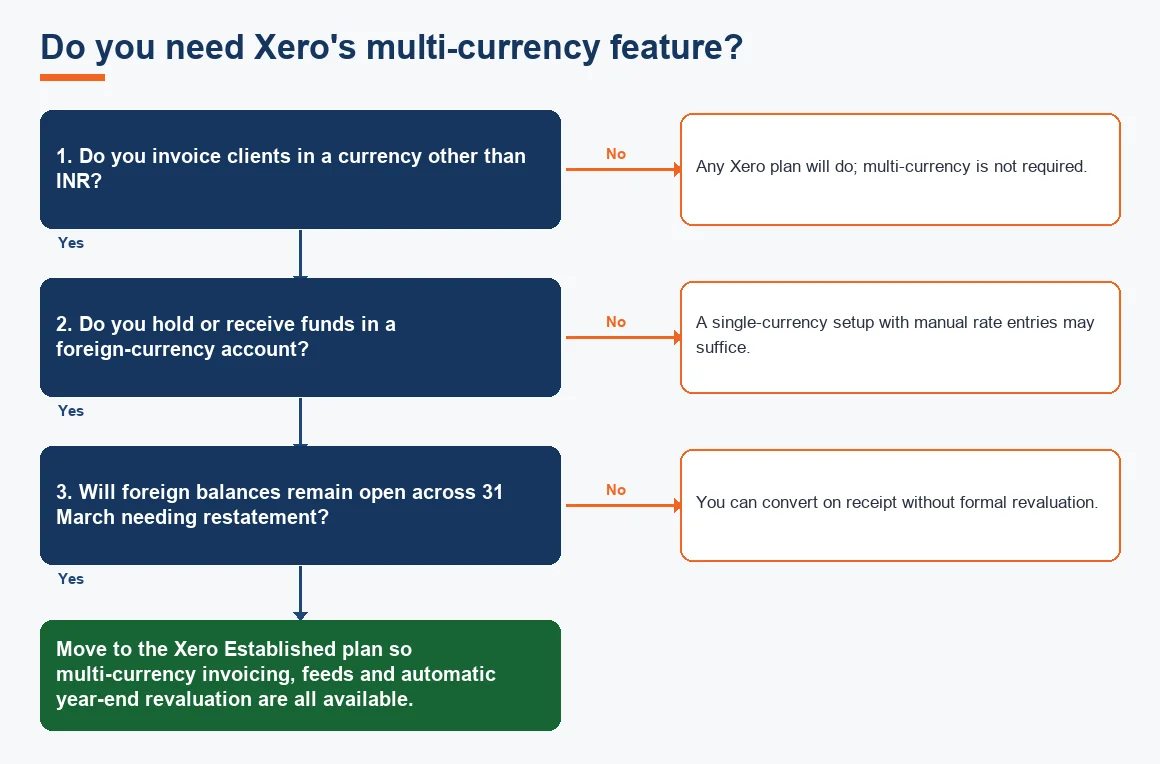
Multi-currency is not switched on in every Xero plan. It sits inside the Established plan and covers more than 160 currencies, drawing daily market rates in automatically so you do not have to key them. Your organisation keeps a single base currency, INR for a Mumbai company, and each foreign invoice carries its own transaction currency alongside. When you raise a USD 10,000 invoice, Xero shows it in USD on the customer document and simultaneously converts it to INR in the general ledger at that day's rate.
The multi-currency bank feed is the other half of the picture. A foreign-currency EEFC or nostro account can feed into Xero in its native currency, and when the export receipt lands, Xero matches it and posts the realised exchange difference for you. This is where Xero bank rules save time, coding recurring receipts to the right ledger without a manual touch. If your books are behind, that clean-up is a separate exercise and our audit-readiness and book-cleanup checklist for Mumbai businesses covers it.
The AS 11 rule Mumbai exporters must follow
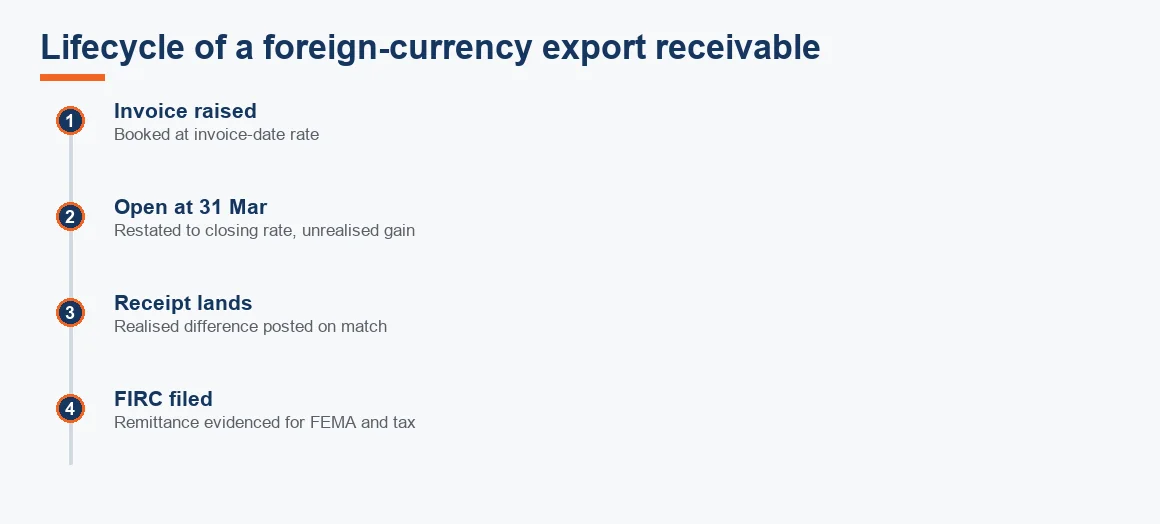
Software posts the entries, but the rule behind them is Accounting Standard 11, The Effects of Changes in Foreign Exchange Rates. AS 11 asks you to do two things. First, record the transaction at the exchange rate on the date it takes place, so a USD invoice is booked at the invoice-date rate. Second, restate every monetary balance still outstanding at the balance-sheet date, 31 March for most Indian companies, at the closing rate on that day. The difference between the two goes to the statement of profit and loss. You can read the standard in full through the Institute of Chartered Accountants of India.
Realised versus unrealised exchange differences
The distinction that trips people up is realised against unrealised. A realised difference arises when money actually moves: you raised the invoice at one rate and the rupees hit your account at another. An unrealised difference is only on paper, created when an invoice is still open on 31 March and you restate it to the closing rate. Both hit the profit and loss under AS 11, but only the realised one involves cash. Xero labels these clearly once the revaluation is posted, and each posting is a standard journal entry you can drill into.
Worked example: forex gain on a USD export invoice
Take a Mumbai SaaS firm that raises a USD 10,000 invoice on a US client. Assume the rate is Rs 83 on the invoice date, the closing rate on 31 March is Rs 86, and the client finally pays in the next year when the rate is Rs 85. The table tracks the INR value at each point and the exchange difference recognised.
| Event | Rate (INR/USD) | INR value of USD 10,000 | Exchange difference to P&L |
|---|---|---|---|
| Invoice raised | 83.00 | 8,30,000 | Nil (initial recording) |
| Year-end restatement, 31 Mar | 86.00 | 8,60,000 | +30,000 unrealised gain |
| Receipt in following year | 85.00 | 8,50,000 | −10,000 realised loss |
| Net gain over both years | n/a | n/a | +20,000 |
Year one shows a Rs 30,000 unrealised gain because the debtor is restated from Rs 8,30,000 to Rs 8,60,000. Year two shows a Rs 10,000 loss, being the fall from the Rs 8,60,000 carrying value to the Rs 8,50,000 actually received. Across the two years the net recognised gain is Rs 20,000, which is simply Rs 8,50,000 received less the Rs 8,30,000 first booked. The arithmetic reconciles, which is exactly what your auditor will test.
How the year-end revaluation runs in Xero
The mechanics inside the software follow a set order, and it helps to know the sequence before you rely on the numbers.
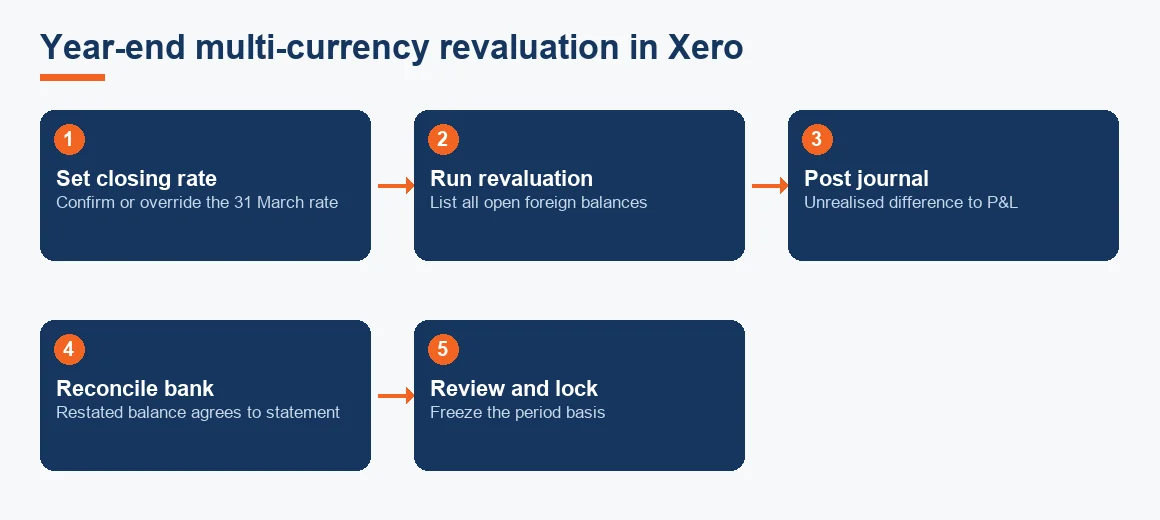
- Set the closing rate. Confirm the 31 March rate Xero will apply, or override it with your chosen RBI-based rate.
- Run the foreign currency revaluation. Xero lists every open foreign balance across debtors, creditors and bank.
- Post the revaluation journal. The software creates the unrealised difference entry to the profit and loss.
- Reconcile the foreign bank. Complete the bank reconciliation so the restated balance agrees to the statement.
- Review and lock. Check the entries, then lock the period so the basis cannot drift.
The lifecycle of a single export receivable, from the invoice going out to the rupees arriving and the year-end sitting in between, looks like this.
How forex gains on exports are taxed in India
A gain on realisation of export receivables is ordinary business income, taxed at your normal rate, because it arises from a revenue transaction and not a capital one. The notional year-end restatement gain is taxable too, following the treatment in Income Computation and Disclosure Standard VI, which broadly aligns tax with the AS 11 books rather than deferring the gain to receipt. The Central Board of Direct Taxes notifies ICDS, and the standards are available on the Income Tax Department portal.
One point that reassures exporters: the forex gain carries no GST, because it is not consideration for any supply. It is a movement in the rupee value of money owed, not a sale. Where the books and the tax computation diverge in timing, a deferred tax entry may follow, and our deferred tax calculator helps you size the DTA or DTL. If your export earnings run through an SEZ unit, the interaction with Section 10AA relief needs a closer look than a blog can give.
Multiple companies and the consolidation limit
Each company needs its own Xero subscription and organisation, because one subscription covers one set of books. A Mumbai firm running an Indian private limited company and an overseas subsidiary therefore pays for two organisations, although both can be reached from a single login. Xero has no built-in group consolidation, so combined accounts need a separate tool or a manual working. If you are weighing platforms for a group structure, our Zoho Books Accounting, Odoo Accounting Services and Tally Prime Accounting Services pages set out the alternatives.
Xero, Zoho Books or Tally for Indian exporters
All three handle foreign-currency invoicing, but they diverge on GST filing and on how much of the year-end work is automated. For a Mumbai exporter also filing Indian GST, that difference decides the fit.
| Capability | Xero (Established) | Zoho Books | Tally Prime |
|---|---|---|---|
| Multi-currency invoicing | Yes, 160+ currencies | Yes | Yes |
| Automatic year-end revaluation | Yes | Yes | Manual workflow |
| Native Indian GST return filing | No | Yes | Yes |
| Typical exporter setup | Xero plus a GST filing tool | Standalone | Standalone |
Firms billing overseas clients while filing Indian GST usually run Zoho Books, or Xero paired with a GST filing tool. The choice is a genuine trade-off rather than a clear winner, which is why it belongs in a comparison and not a sales line.
The Mumbai angle: SOFTEX, EDF and export realisation
Mumbai's service exporters, concentrated in BKC, Andheri and the SEEPZ and Powai belts, carry an extra layer beyond the accounting. Software and service export proceeds must be tracked against SOFTEX, moving to monthly EDF filing from 1 October 2026, and realised within the timeline the RBI sets under FEMA. Your foreign currency receivables ledger in Xero should reconcile to what the AD bank and STPI expect, and the current framework sits on the Reserve Bank of India site. For staffing the function locally, our guide on choosing an accountant in Mumbai and the 2026 Mumbai price benchmarks are the practical companions, and Maharashtra employers should not lose sight of professional tax and Shops Act compliance while chasing dollars. The full commercial setup for the city lives on our Xero Accounting Services Mumbai page.
Key terms
- Multi-Currency Bank Feed: a bank feed that imports transactions in their native foreign currency for automatic matching.
- Foreign Currency Receivables: amounts owed by overseas customers, restated to the closing rate at year end.
- STPI / SOFTEX Export Filing: the declaration route certifying software and service exports for FEMA realisation.
- Software Export Revenue (Section 10AA SEZ): the profit-linked deduction available to eligible SEZ export units.
Key takeaways
- Multi-currency needs the Xero Established plan; the base ledger stays INR while invoices go out in USD, GBP or EUR.
- AS 11 requires invoice-date recording and 31 March restatement at the closing rate, with the difference to profit and loss.
- Both realised and unrealised forex gains are taxable business income under ICDS VI, and no GST applies.
- One subscription equals one organisation; consolidation is a separate exercise.
- For a Mumbai exporter filing GST, weigh Xero-plus-GST-tool against Zoho Books before committing.
Used well, multi-currency Xero gives a Mumbai exporter a clean, current view of foreign earnings in rupee terms. The software does the posting; AS 11, ICDS VI and your FEMA obligations decide whether the numbers are right. If you would like that judgement applied to your own books, start from the Xero Accounting Services page or the Mumbai accounting services team, and IT and SaaS exporters can go straight to SaaS accounting services in Mumbai.
Decision guide