In this guide
Setting up Xero for a Delhi business with overseas clients means adapting a foreign cloud accounting tool to Indian statutory reality: you rebuild the chart of accounts around Schedule III, invoice exports in the client's currency as zero-rated supplies, keep every FIRC, and run GST outside Xero because the software does not file Indian returns. This is a local how-to for owners in Delhi who bill abroad; if you want the service itself, that sits with our Xero Accounting Services and the Xero Accounting Services Delhi page.
Why Delhi exporters end up on Xero
Xero is cloud accounting software used mainly in the United Kingdom, Australia, New Zealand and the United States. It offers multi-currency invoicing, automatic bank feeds and a large app ecosystem. Very few Indian businesses adopt it on their own initiative. In Delhi the usual trigger is a client relationship: a design studio in Hauz Khas working for a London agency, a software team near Nehru Place serving a US parent, or a consultancy in Connaught Place whose overseas investor wants to log in and see the books. When the person paying you keeps their own accounts in Xero, they often ask you to do the same so that reporting lines up.
That is a reasonable reason to use it, provided you go in knowing what Xero will and will not do. It will give your overseas client clean, shared, real-time numbers. It will not handle Indian GST, TDS or the export documentation the RBI expects. Those you run alongside. If your work is squarely IT or SaaS, the SaaS Accounting Services in Delhi page covers that flavour, and early-stage founders may find the Startup Accounting Services in Delhi page closer to home.
What to prepare before you switch on Xero
Most of the pain in a Xero setup comes from skipping the preparation and discovering gaps three months later. Before you subscribe, gather the following:
- Your GST registration certificate and LUT reference for the current financial year, so export invoices can quote it.
- A cut-off date for opening balances, usually the first day of a financial year or quarter, with a signed trial balance as at that date.
- Bank statements for every account, including the current account that receives foreign remittances.
- A chart of accounts mapped to Schedule III heads, because Xero's default template is built for UK or US reporting and is not India-specific.
- A list of overseas clients with their billing currency and payment terms.
The chart of accounts is the part people underestimate. Fixed asset heads, for instance, need to align with the way you claim depreciation under Schedule II at the year end, so it is worth structuring them correctly at the start rather than reclassifying later.
How to set up Xero for a Delhi business, step by step
Once the preparation is done, the setup itself follows a predictable order. Working through it in sequence keeps the file clean from day one.
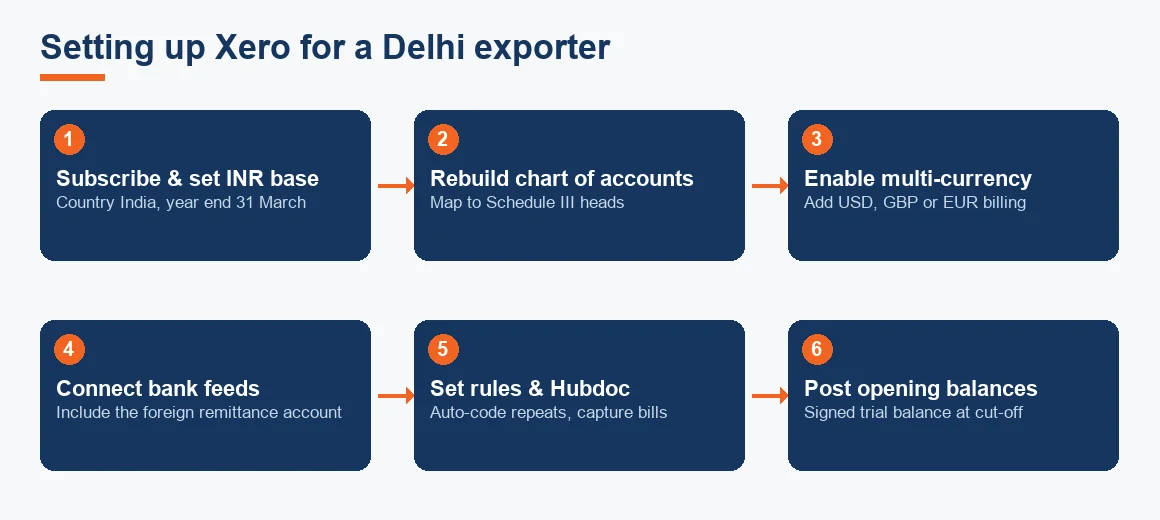
- Subscribe and set the organisation details. Set the base currency to INR, the financial year end to 31 March, and the country to India.
- Rebuild the chart of accounts. Import your Schedule III-aligned template, replacing Xero's defaults. Add ledgers for export revenue, exchange gain or loss, and the GST payable and input tax credit accounts.
- Enable multi-currency and add your billing currencies. This lets you raise invoices in USD, GBP or EUR while the rupee equivalent posts automatically.
- Connect bank feeds. Link each bank account so transactions flow in daily. The foreign remittance account is the one to watch, since inward payments arrive net of bank charges.
- Set bank rules and connect Hubdoc. Bank rules code your repeating transactions automatically, and Hubdoc captures purchase bills so you are not typing them in by hand.
- Post opening balances. Enter the signed trial balance as at your cut-off date, then check that the Xero balance sheet agrees to it line by line.
- Reconcile and go live. Reconcile each bank feed against the statement, confirm the trial balance ties out, and start invoicing.
Reconciliation is done line by line against the feed, exactly as it would be in any double-entry system. If you are moving off Tally or comparing tools, our notes on Tally Prime Accounting Services, Zoho Books Accounting and Odoo Accounting Services set out how each handles the same steps.
Recording export invoices to overseas clients
This is where a Delhi exporter's books differ most from a domestic business. Export of services is zero-rated under GST, which means you charge no GST but the supply still counts and still needs documentation. In practice:
- Raise the invoice in the client's currency with the LUT reference and no GST.
- Record the rupee value at the exchange rate on the invoice date. That figure is your revenue.
- On receipt, the bank credits a slightly different rupee amount because the rate has moved. Post the difference as an exchange gain or loss.
- Keep the FIRC (Foreign Inward Remittance Certificate) or bank realisation advice. Any refund claim, and any FEMA query, will ask for it.
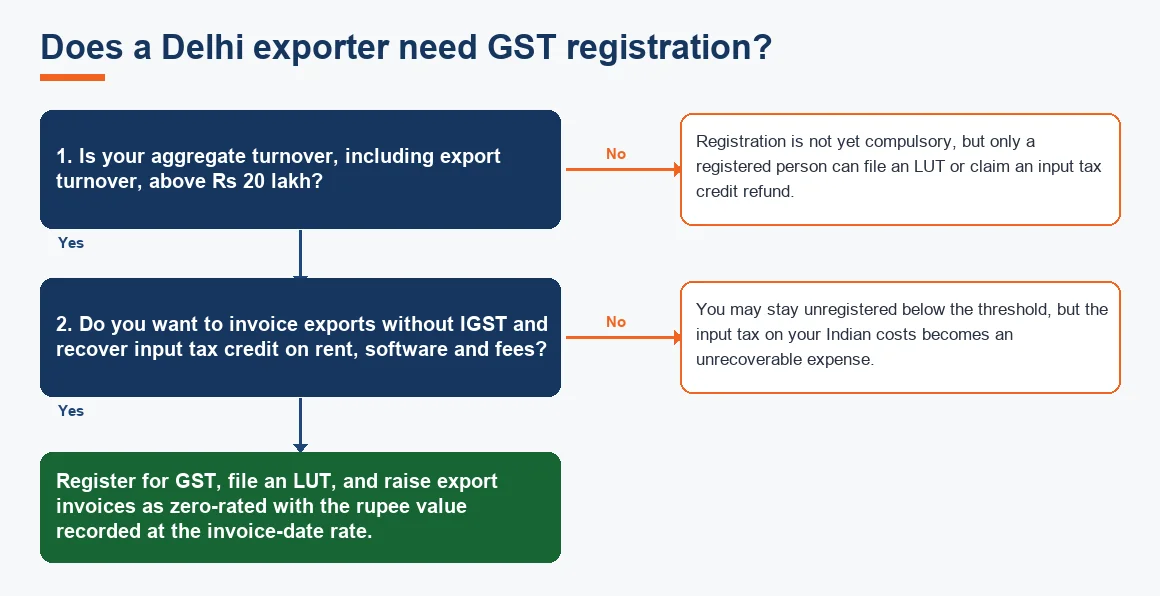
The reason exporters bother to register even below the threshold is that only a registered person can file an LUT or claim a refund of input tax credit on rent, software subscriptions and professional fees. The zero-rating framework and LUT procedure are set out by CBIC, and the realisation timeline for export proceeds is governed by RBI under FEMA. If your export is software, the STPI / SOFTEX export filing route may also apply.
How GST returns are filed when the books sit in Xero
Xero does not file Indian GST returns, so GST is handled outside it. The rhythm is straightforward once you set it up:
- Export sales and purchase data from Xero to Excel, or to a GST suite or GSP portal.
- File GSTR-1 and GSTR-3B on the GST portal, and reconcile GSTR-2B input tax credit against your purchase register.
- Update the tax ledgers inside Xero with the filed figures, so the balance sheet agrees with the electronic credit ledger.
Because your export invoices carry no GST, your GSTR-1 shows them under zero-rated supplies, and your GSTR-3B claims input tax credit on your Indian costs. That is the refund the LUT lets you recover. For a broader compliance sweep, the GST and TDS health-check for Delhi MSMEs walks through the common gaps.
Worked example: a USD invoice from raise to receipt
Suppose a Delhi consultancy raises an invoice of USD 10,000 on a US client on 5 July 2026, when the rate is Rs 83.50 to the dollar, and receives payment on 5 August 2026, when the rate has moved to Rs 84.20. The entries look like this.
| Date | Entry | Debit (Rs) | Credit (Rs) |
|---|---|---|---|
| 05 Jul 2026 | Accounts Receivable | 8,35,000 | |
| 05 Jul 2026 | Export Revenue (zero-rated, no GST) | 8,35,000 | |
| 05 Aug 2026 | Bank (foreign remittance account) | 8,42,000 | |
| 05 Aug 2026 | Accounts Receivable | 8,35,000 | |
| 05 Aug 2026 | Exchange Gain | 7,000 |
Revenue is fixed at USD 10,000 times Rs 83.50, or Rs 8,35,000. The bank credits USD 10,000 times Rs 84.20, or Rs 8,42,000. The Rs 7,000 difference is an exchange gain, and no GST touches any line because the supply is zero-rated. In practice bank charges would reduce the credit slightly, and those go to a bank charges account.
Xero, Zoho Books and Tally compared for Delhi exporters
Xero is not the only choice, and the right fit depends on how much of your work is overseas versus domestic. This summary is a starting point, not a recommendation.
| Feature | Xero | Zoho Books | Tally Prime |
|---|---|---|---|
| Multi-currency invoicing | Strong, built in | Strong, built in | Available, less fluid |
| Files Indian GST returns | No, run separately | Yes, India edition | Yes, with add-ons |
| Automatic bank feeds | Extensive | Growing | Limited |
| Best fit | Overseas client expects Xero | Mixed India and export work | Domestic-heavy books |
If most of your revenue is domestic and only a slice is export, an India-native tool that files GST directly can save the parallel workflow. If the overseas relationship drives the decision, Xero usually wins on shared access and app integrations.
Delhi-specific points to remember
Two local facts matter for a Delhi exporter. First, registration for GST becomes compulsory once aggregate turnover crosses Rs 20 lakh, and export turnover counts towards that figure. Most exporters register earlier anyway to file an LUT and claim refunds. Registration status can be confirmed on the GST portal. Second, Delhi levies no professional tax on the business or its staff, which removes one monthly payroll obligation that businesses in states like Maharashtra or Karnataka carry. The Delhi Shops and Establishment plus GST/TDS guide for employers sets out the rest of the local employer picture.
Beyond that, a Delhi business billing abroad is on the same footing as any other exporter. What you are really buying by choosing Xero is a shared window your overseas client can trust, which you then wrap in Indian compliance run in parallel. If you are weighing up the cost of doing this in-house against outsourcing, the 2026 price guide for accounting services in Delhi and the note on choosing an accountant in Delhi are useful next reads, and the general accounting and bookkeeping services in Delhi page gives the wider view.
Key terms
- Multi-Currency Bank Feed: a bank connection that imports foreign-currency transactions and posts the rupee equivalent automatically.
- Xero Bank Rules: preset conditions that code repeating bank transactions to the right ledger without manual entry.
- Hubdoc Automation: Xero's document capture tool that reads purchase bills and pushes them into the books.
- Foreign Currency Receivables: amounts owed by overseas clients, revalued on receipt to record exchange gains or losses.
- Schedule III Balance Sheet: the statutory Indian format your chart of accounts must map to, unlike Xero's default template.
- Bank Reconciliation: matching the Xero ledger to the bank feed line by line so the two agree.
Key takeaways
- Adopt Xero because an overseas client expects it, and rebuild the chart of accounts around Schedule III before you post anything.
- Invoice exports in the client's currency with the LUT reference and no GST, and record the rupee value at the invoice-date rate.
- Post the difference on receipt as an exchange gain or loss, and keep every FIRC.
- Run GST outside Xero: file GSTR-1 and GSTR-3B on the portal, then update Xero's tax ledgers to match.
- Register for GST once turnover crosses Rs 20 lakh, and remember Delhi charges no professional tax.
Decision guide