In this guide
The vendor reconciliation process is the routine check that agrees each supplier's ledger balance in your books with the statement that the supplier sends you, so that what you believe you owe and what they believe you owe are the same figure before a payment goes out or the year closes. In India a third record now sits beside those two: the GSTR-2B, which decides whether you can claim the input tax credit at all. This guide covers the steps, the documents, the Excel format, the three-way idea and a worked example, and it stays on the how-to. If you would rather hand the routine to a team, our Accounts Payable Outsourcing service owns that.
What is the vendor reconciliation process?
Vendor reconciliation is a form of ledger control: you take the closing balance of a supplier in your general ledger, place it next to the closing balance on that supplier's statement of account, and explain every rupee of difference between the two. It sits inside accounts payable as the last gate before a payment is released. Done supplier by supplier, it catches the same invoice booked twice through two approval routes, an advance that was never applied, a credit note the supplier issued but you never recorded, and a payment you made that the supplier has not yet posted. It is the payables cousin of a bank reconciliation: same discipline, different counterparty.
The point is not to make the two balances look equal on paper. It is to find out why they differ, decide which side is right for each item, and correct the books so the figure you carry into the balance sheet is the real liability. For the wider payables picture, our explainer on the accounts payable process and the full P2P cycle sets the context this control lives in.
Which two records are compared, and the third one in India
Classically, supplier statement reconciliation compares just two records: the supplier's statement of account and the purchase ledger for that supplier in your books. In India a third comparison is now standard because your input tax credit depends on it. The table below sets out what each record tells you and what a mismatch means.
| Record | What it shows | What a mismatch signals |
|---|---|---|
| Supplier statement of account | Invoices, credit notes and receipts as the supplier has recorded them | Invoices you have not booked, payments not yet posted by them, disputed rates |
| Your purchase ledger | The liability and payments as recorded in your books | Duplicate bookings, missed credit notes, wrong GSTIN or ledger mapping |
| GSTR-2B for that GSTIN | Whether the supplier actually reported tax on those invoices | Input credit at risk: the supplier has not filed, or filed against a wrong period |
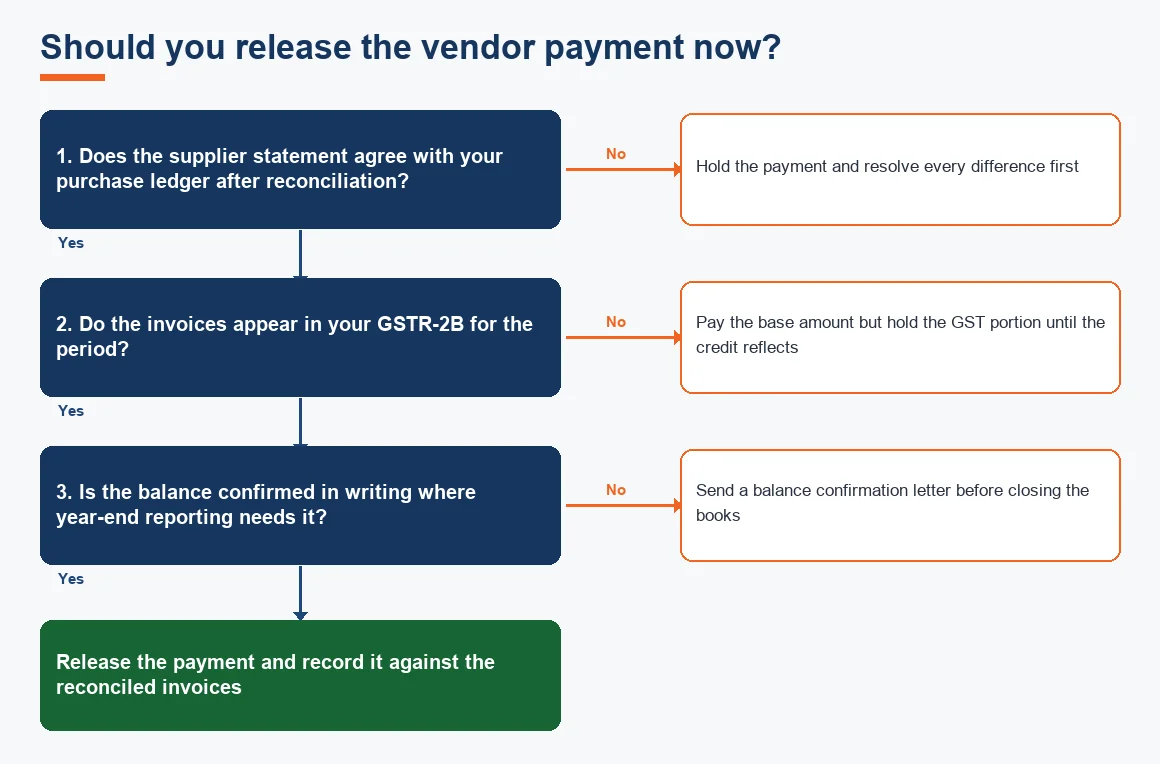
The third row is the one that costs real money. Under the GST law your credit is available only when the invoice appears in your auto-drafted 2B, so a supplier who is slow to file quietly parks your working capital. Matching the 2B alongside the statement, using the GST portal data and the rules explained by CBIC, turns a bookkeeping chore into a cash protection habit.
How to do vendor reconciliation: the steps
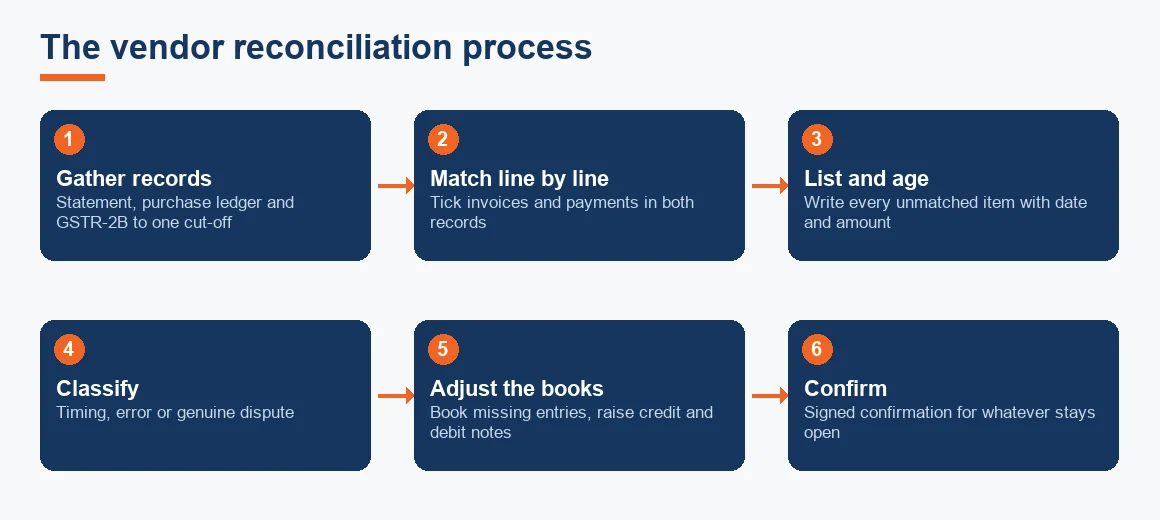
People ask for anything from three to five steps; the honest answer is that a clean reconciliation has five, and skipping any one of them is where errors survive. These are the vendor reconciliation steps in order.
- Gather the records. Pull the supplier statement, your purchase ledger for that supplier and the GSTR-2B for the period, all to the same cut-off date.
- Match line by line. Tick off each invoice and each payment that appears in both the statement and your ledger. What remains unticked on either side is a difference.
- List and age the differences. Write every unmatched item into a reconciliation sheet with its date, reference and amount, so you can see how old each open item is.
- Classify each difference. Sort it into timing (payment or invoice in transit), error (duplicate or missed booking, wrong ledger) or dispute (short supply, rate or GST rate disagreement).
- Adjust and confirm. Book the genuine missing entries, raise or accept the credit and debit notes, and obtain a signed confirmation for whatever stays open.
The classify step is what separates a reconciliation from a staring contest. A timing item will clear itself next period and needs only a note; an error needs a correcting entry now; a dispute needs an email to the supplier and a debit note. Related controls such as three-way matching of PO, GRN and invoice stop many of these differences arising in the first place, and AP automation shrinks the duplicate-booking category almost to nothing.
What documents are needed for reconciliation
You do not need much, but you need all of it to the same date. The working set is: the supplier's statement of account; your purchase ledger extract for that supplier; copies of the disputed or missing invoices and any credit or debit notes; payment proofs such as bank advices or UTR numbers for cheques and transfers in transit; the GSTR-2B for the GSTIN; and, where tax is deducted, the TDS working showing amounts withheld under Section 194Q on goods so the supplier's gross figure and your net payment can be tied out. Keeping these in one folder per vendor per period is what makes next quarter's reconciliation quick.
Vendor reconciliation in Excel: the format
Most Indian businesses still reconcile in Excel, and there is nothing wrong with that for a manageable vendor list. A workable vendor reconciliation format uses one tab per vendor with columns for the particulars, the reference or invoice number, the date, the amount as per the supplier, the amount as per your books, the difference, the reason and the action owner. The single rule that keeps the sheet honest is that the difference column must net to zero once every reconciling item is explained. If it does not, you have missed an item, not found a rounding quirk. For teams cleaning up months of arrears before they can even start, backlog bookkeeping and catch-up is the sensible first step, and the same Excel discipline applies to accounts receivable on the collections side.
Three-way reconciliation and the types of reconciliation
Three-way reconciliation, sometimes called a three-point reconciliation, means agreeing three records rather than two. In Indian payables the three points are your purchase ledger, the supplier statement and the GSTR-2B, and a balance is trustworthy only when all three tell the same story. It should not be confused with three-way matching, which is the separate purchase-order control of matching a PO, a goods receipt note and the invoice before booking.
More broadly, the three types of reconciliation a business runs are: vendor (payables) reconciliation, customer (receivables) reconciliation and bank reconciliation, each agreeing your ledger to an outside record. Our bank and credit card reconciliation service and the payables routine here are two of that trio, and the internal audit view of all three sits within accounts reconciliation and audit.
Worked example: reconciling a supplier statement
Suppose your books show a closing credit balance of INR 7,12,000 for a supplier, but their statement shows INR 8,45,000 as at 31 March. The difference of INR 1,33,000 is not an error until you prove it is; here is how it resolves. All figures are indicative.
| Particulars | Amount (INR) | Type |
|---|---|---|
| Balance as per supplier statement | 8,45,000 | Starting point |
| Less: Payment in transit (cheque issued 31 Mar, not yet posted by supplier) | (95,000) | Timing |
| Less: Debit note for short supply, raised by you, not yet accepted | (18,000) | Dispute |
| Less: Over-billing on a GST rate mismatch, credit note awaited | (20,000) | Dispute |
| Balance as per your purchase ledger | 7,12,000 | Agreed |
Only the timing item needs no action; it clears when the cheque is presented. The two disputes need a debit note and a follow-up email, and the balance you carry to the accounts is INR 7,12,000, not the supplier's INR 8,45,000. Had you paid against the statement, you would have overpaid by INR 1,33,000.
What about vendor reconciliation in SAP and other software?
The concept does not change with the tool. In SAP the FBL1N vendor line-item report and the F.2E balance confirmation programme do the mechanical matching, and Tally, Zoho Books and Xero all offer a supplier ledger against which a statement can be ticked. What software cannot decide for you is the classify step: whether a difference is timing, error or dispute is a judgement, and a signed confirmation is still needed for the genuinely open items. The tool speeds up steps one and two; steps three to five remain yours.
Key terms
- Vendor Balance Confirmation: a letter signed by the supplier agreeing the balance owed as at a date, used as audit evidence.
- GSTR-2B Input Tax Credit Matching: checking that a supplier's invoices appear in your auto-drafted 2B so the credit can be claimed.
- Three-Way Matching: agreeing the purchase order, goods receipt note and invoice before an invoice is booked.
- Accounts Payable: the ledger of what a business owes its suppliers and the process that controls it.
Year end: confirming vendor balances
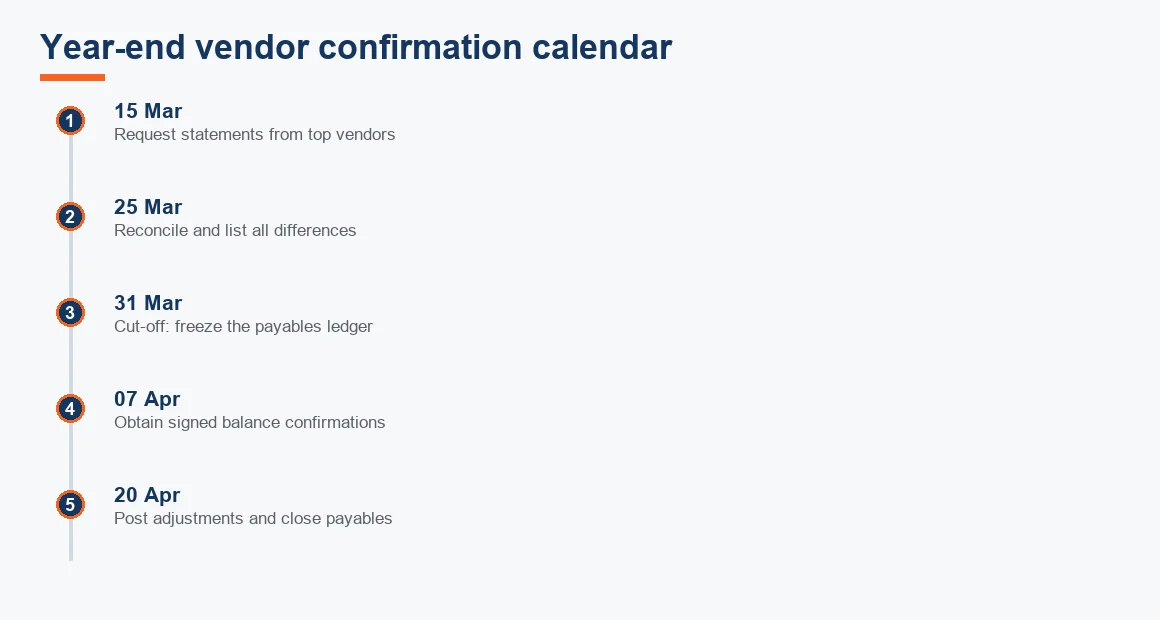
At the year end, reconciliation goes one step further into external confirmation. A balance confirmation letter signed by the supplier as at 31 March is the evidence auditors look for under the ICAI standard SA 505 on external confirmations, and it settles disputes before they age into write-offs. The practical rule is to send confirmations for the largest balances covering at least 70 percent of total creditors, then follow up non-responders with a statement of their payment history. This is also when the MSME clock matters: dues to a supplier registered under the MSMED Act must be cleared within the Section 43B(h) 45-day window or the expense is disallowed for that year, a point we cover in full in our note on paying MSME vendors within 45 days. Where 194Q applies, cross-check the deduction against the deductee's records via the Income Tax portal.
Key takeaways
- Vendor reconciliation agrees your supplier ledger to the supplier's statement, and in India to the GSTR-2B as well, before you pay or close.
- The five steps are gather, match, list and age, classify and adjust; the classify step is where genuine control happens.
- Every reconciling item must be named as timing, error or dispute; never bury the net difference in one journal.
- The Excel difference column must net to zero, or an item has been missed.
- At year end, obtain signed confirmations for the largest balances and watch the 43B(h) 45-day MSME deadline.
Reconciliation is a habit, not an annual scramble. Run it monthly for your top vendors, keep one folder of documents per supplier per period, and the year-end confirmation becomes a formality rather than a fire drill. For a fuller managed payables function, see our accounting services.
Decision guide