In this guide
The main benefits of AP automation are speed and control: invoices are captured, coded and routed for approval the day they arrive instead of during a month-end sweep, and every step leaves an audit trail. In an Indian context the gains are largely compliance-led. Automation shortens the path from invoice receipt to a GSTR-2B match, keeps TDS coding consistent, and helps you pay registered micro and small vendors inside the 45-day window that now carries a direct income-tax cost. What automation does not do is replace judgement: someone still decides the ledger code, the tolerance limit and whether a bill is genuinely payable.
What is AP automation and how does it work?
AP automation is software that carries a supplier invoice through the accounts payable cycle with as few manual steps as possible. A bill is emailed or scanned into an optical character recognition (OCR) engine that reads the vendor name, GSTIN, invoice number, amount and line items. The system then codes the invoice, checks it against the purchase order and goods receipt note, routes it to the right approver by rule, and posts it to the ledger ready for payment. The underlying accounts payable process does not change; the keying and the chasing do. If you want the full cycle laid out, our explainer on the accounts payable process and the P2P cycle walks through each stage.
In India the e-invoice IRN is the quiet enabler. Where a supplier is required to generate an Invoice Reference Number, the buyer receives structured, machine-readable data at the point of capture, which removes most of the manual keying that OCR alone would still need to correct.
What are the benefits of AP automation?
The benefits are practical rather than glamorous, and they compound over a year of invoice volume.
- Fewer errors in the ledger. Rule-based coding means the same vendor lands in the same general ledger account every time, so the trial balance stays clean and the TDS return reconciles to it.
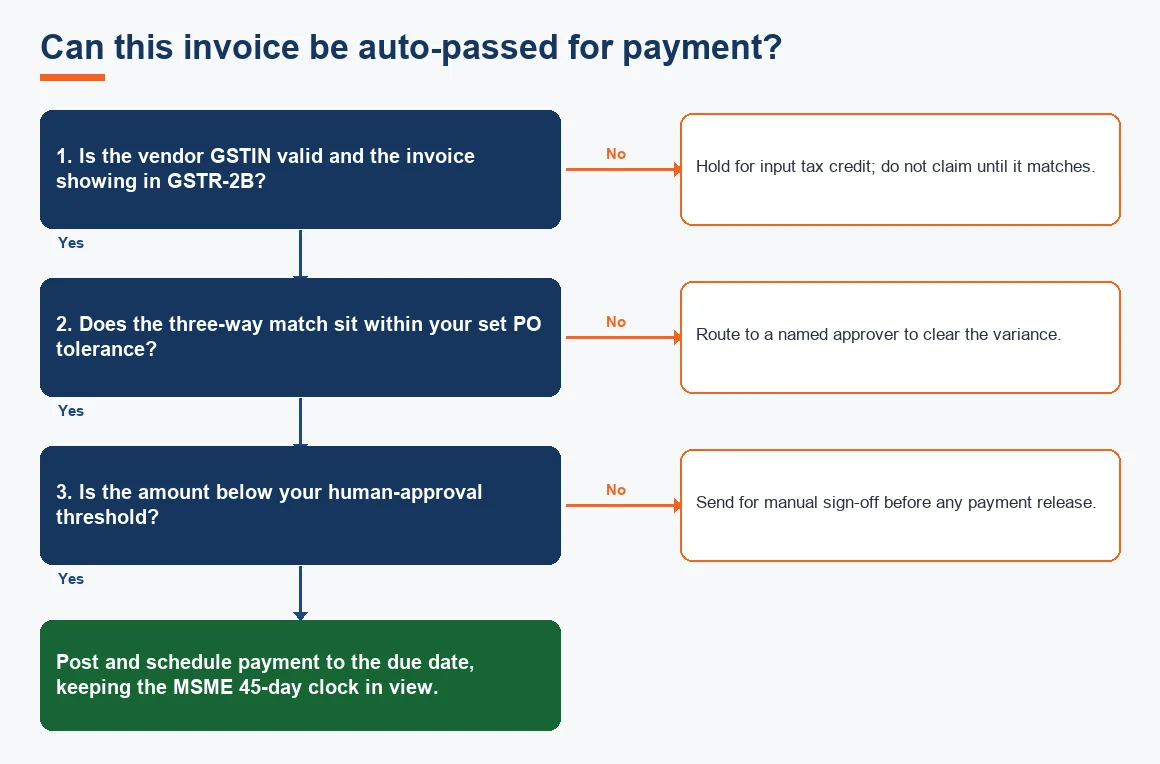
- Faster input tax credit. Automated capture lets you match a purchase invoice against GSTR-2B early in the month rather than in a scramble before filing, so credit is claimed only on invoices that have actually appeared.
- Fewer late payments. Invoices are routed on arrival and due dates are flagged against vendor terms, which matters when a registered MSME vendor must be paid within 45 days.
- An audit trail from day one. Approval history, edit logs and matching evidence exist automatically, which is exactly what an auditor asks for.
- Time back for the finance team. A two-person team can clear several hundred bills a month without a dedicated clerk, freeing hours for review rather than data entry.
Capital-goods invoices carry an extra benefit: a bill coded to fixed assets rather than expense drives depreciation correctly, and you can sanity-check the resulting charge with our depreciation calculator before you close the month.
How does AP automation work step by step?
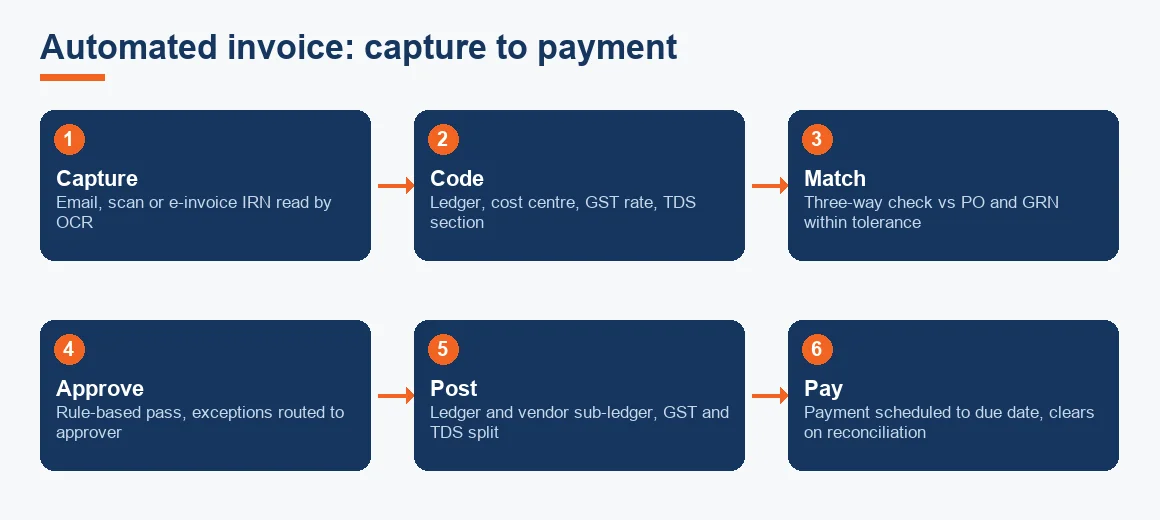
A well-run automated cycle follows the same six stages a manual one does, with the software doing the fetching and matching.
- Capture. The invoice arrives by email or scan, or as an e-invoice, and OCR reads the key fields.
- Code. The system tags the ledger account, cost centre, GST rate and TDS section, usually from the vendor's saved defaults.
- Match. It runs a three-way match against the purchase order and goods receipt note, within a set tolerance. Our guide to three-way matching in accounts payable covers how PO, GRN and invoice line up.
- Approve. Anything outside tolerance is routed to a named approver; anything inside can pass on rules.
- Post. The invoice hits the ledger and the vendor sub-ledger, with GST and TDS split out.
- Pay. A payment file is prepared for the due date, and the bank line later clears in your bank and credit card reconciliation.
Worked example: coding one contractor invoice
Automation only helps if the coding rule behind it is right. Take a Rs 2,00,000 (Exl GST) works-contract bill from a company vendor, GST at 18%, TDS under Section 194C at 2%. The figures below show what a correctly coded invoice produces. TDS is deducted on the value excluding GST because the tax is shown separately on the invoice.
| Line | Basis | Amount (Rs) |
|---|---|---|
| Invoice value (taxable) | Base | 2,00,000 |
| GST at 18% | 2,00,000 x 18% | 36,000 |
| Invoice total | Base + GST | 2,36,000 |
| TDS under 194C at 2% | 2,00,000 x 2% | 4,000 |
| Net paid to vendor | 2,36,000 - 4,000 | 2,32,000 |
| Input tax credit (on GSTR-2B match) | GST amount | 36,000 |
The automation books the Rs 2,00,000 expense, holds Rs 4,000 as a TDS liability for the challan, parks Rs 36,000 as credit pending the GSTR-2B match, and schedules Rs 2,32,000 for payment. Coding this once, as a vendor default, is what makes every later bill from the same contractor land correctly.
What is the software for accounts payable automation, and does QuickBooks have it?
In India the common platforms are Tally, Zoho Books and Xero, each supporting OCR capture, rule-based approval and three-way matching either natively or through add-ons and APIs. Zoho Books handles this within its own suite; Xero pairs with capture tools for the same effect; Tally does it through connectors. QuickBooks did offer AP features, but Intuit withdrew QuickBooks in India, with access ending on 30 April 2023, so it is not a live option for Indian books. Businesses that were on it have generally migrated to Zoho Books or Tally.
Whichever platform you choose, the deciding factor is not the feature list but how cleanly your vendor masters, GSTINs and TDS sections are set up. If those are a mess, tidy the ledger first; a period of backlog bookkeeping and catch-up before you switch on automation saves months of correction later.
How is AI used in accounts payable?
AI in accounts payable is mostly pattern recognition applied to two jobs. First, extraction: reading a scanned or PDF invoice and predicting which field is the GSTIN, which is the invoice number and which line is tax, more reliably than fixed-template OCR. Second, coding suggestions: proposing the ledger account and TDS section based on how similar invoices from that vendor were treated before. It is a suggestion engine, not an approver. The person reviewing still confirms the code, because an AI that has seen a vendor coded to the wrong account will happily suggest the same error. Treat it as a fast first draft that a reviewer signs off, and keep the vendor reconciliation discipline that catches what slips through.
AP automation versus outsourcing accounts payable
These are often confused, but they answer different questions. Automation is software that speeds up your own team. Outsourcing hands the whole run to an external provider who does the work for you, often using the same software. You can do either, both or neither.
| Point of comparison | AP automation (software) | AP outsourcing (service) |
|---|---|---|
| Who does the work | Your in-house team, faster | An external provider's team |
| What you are buying | A tool and licences | Capacity and expertise |
| Best when | You have staff but too much manual keying | You lack the staff or want it off your plate |
| Control of coding | Stays fully with you | Shared, governed by an SOP |
| Typical cost basis | Per user per month | Per invoice or monthly retainer |
If the honest answer is that you do not have the people to run the cycle at all, the software is not the fix; that is the point at which accounts payable outsourcing earns its place, and the same logic applies on the collections side through accounts receivable outsourcing. What is the difference between AP and AR automation? AP automation manages money you owe suppliers; AR automation manages money customers owe you, chasing invoices and applying receipts. The mechanics rhyme, but the direction of cash is opposite.
How much does AP automation cost?
Pricing is usually per user per month and is indicative and Exl GST: entry tiers of Indian accounting suites start at a few hundred rupees per user per month, and dedicated capture-and-approval add-ons run into the low thousands per user per month depending on invoice volume and integrations. Do not judge it on licence fee alone. The saving that matters is clerk hours removed from keying and, more concretely, the late-payment tax cost avoided when a genuine expense is no longer disallowed for paying an MSME vendor beyond 45 days. On any meaningful volume, that avoided disallowance usually dwarfs the subscription.
Key terms
- Accounts Payable: the money your business owes suppliers for goods and services received but not yet paid.
- Three-Way Matching: checking an invoice against its purchase order and goods receipt note before approval.
- Purchase Order (PO) Tolerance: the small variance allowed between PO and invoice before a bill is flagged for review.
- GSTR-2B Input Tax Credit Matching: confirming a purchase invoice appears in GSTR-2B before you claim the credit.
- Section 43B(h) MSME Clock: the rule disallowing an expense if a registered micro or small vendor is paid late.
Key takeaways
- AP automation removes keying and routing, not judgement: coding, tolerances and approval stay with people.
- In India the real prize is compliance: earlier GSTR-2B matching, consistent TDS coding and paying MSME vendors within 45 days.
- Clean the vendor masters, GSTINs and TDS sections before switching automation on, or the software repeats your errors at speed.
- Automation speeds up your team; outsourcing replaces it. Choose by whether you have the people, not the tooling.
- Judge cost by clerk hours saved and disallowed expense avoided, not the licence fee alone.
Getting AP automation right also depends on the discipline around it: paying MSME vendors on time (see our note on Section 43B(h) and the 45-day rule), and matching supplier statements regularly so nothing sits unrecorded. Statutory positions cited here follow the Income Tax Department on TDS and Section 43B(h), the CBIC and GST portal on GSTR-2B and e-invoicing, and the Ministry of Corporate Affairs on the software edit-log requirement.
Decision guide