In this guide
GSTR-2B reconciliation is the monthly discipline of matching your purchase register against the static GSTR-2B statement on the GST portal so that you claim only the input tax credit the law actually allows, and no more. For a trading business, where thin margins ride on goods bought and resold in volume, every rupee of credit blocked by a supplier's mistake is a rupee of working capital gone. This guide explains the purpose of the exercise, how to run it in practice, and how to keep GSTR-2B, your books and GSTR-3B all telling the same story.
What is the purpose of GSTR-2B reconciliation?
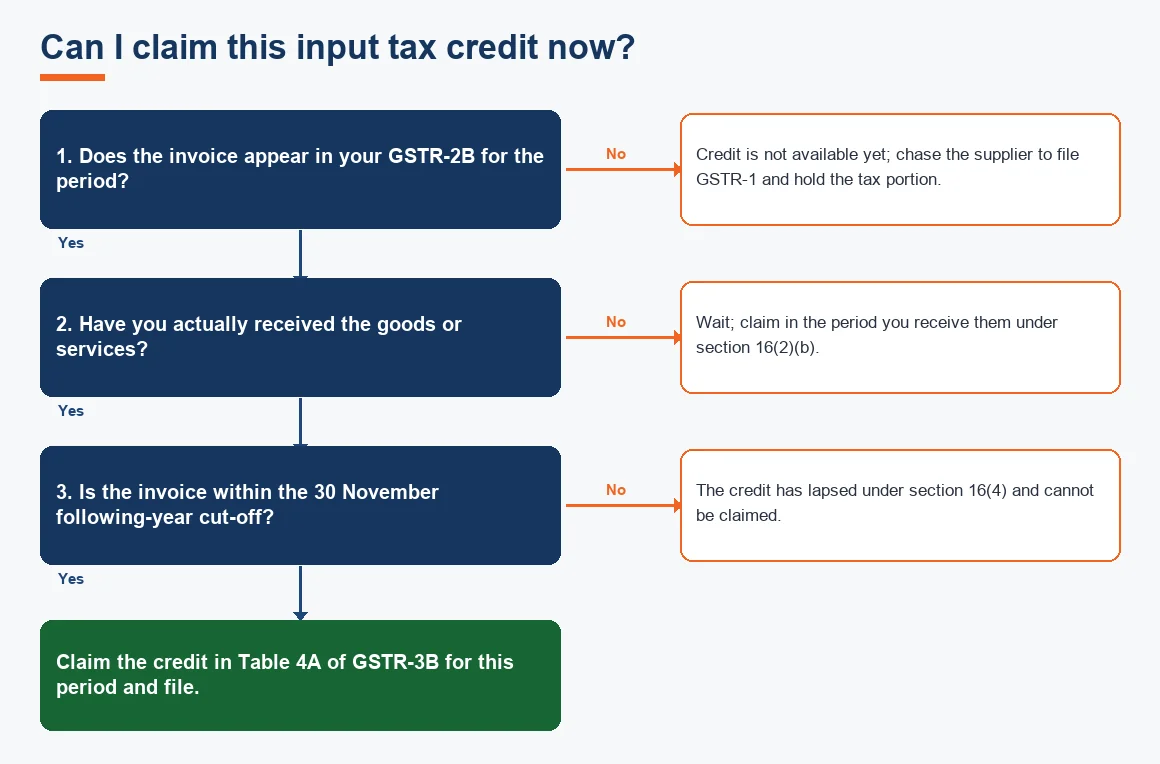
The purpose is simple: to prove that the credit you take in GSTR-3B is credit you are entitled to. Since 1 October 2022, section 16(2)(aa) of the CGST Act allows input tax credit only where the supplier has furnished the invoice in its GSTR-1 and it appears in your GSTR-2B. In other words, your own tax invoice is no longer enough. The credit becomes valid only when the supplier reports the same invoice. Reconciliation is how a trader catches the difference between what the books say is claimable and what the portal actually permits, before that difference becomes a demand notice. The GSTR-2B Input Tax Credit Matching process is now the backbone of GST compliance for buyers.
What is 2A and 2B in GST return, and how do they differ?
Both GSTR-2A and GSTR-2B are auto-drafted purchase statements built from your suppliers' filings, but they behave very differently. GSTR-2A is dynamic: it keeps updating as suppliers file late, so the figure you saw yesterday may change tomorrow. GSTR-2B is static: it is generated once for a tax period and never changes afterwards. Because it is fixed, GSTR-2B is the figure the department expects you to reconcile against and the figure that ties to Table 4 of GSTR-3B.
So when clients ask which ITC they should take, 2A or 2B, the answer for return filing is always 2B. GSTR-2A is a useful tracking tool, not the basis of your claim.
When is GSTR-2B generated, and why does credit arrive a month late?
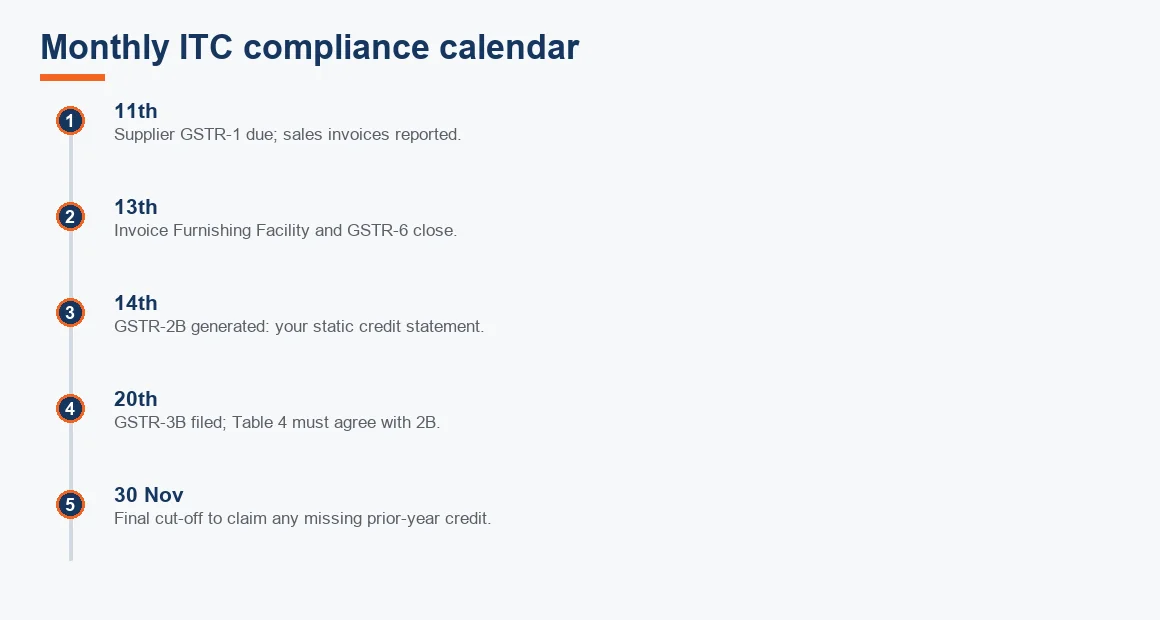
GSTR-2B is generated on the 14th of the month following the tax period. It captures supplier GSTR-1 filed up to the 11th, plus the Invoice Furnishing Facility and GSTR-6 up to the 13th, and import data from ICEGATE. Any invoice a supplier uploads after the 14th rolls into the next month's GSTR-2B. This single timing rule explains the most common trader complaint: a genuine purchase made in April, invoiced by a slow supplier on the 20th, does not show up until the May statement. The goods and the cash left in April, but the credit lands in May. Planning your cash flow around this one-month drift is part of the job.
How do you reconcile GSTR-2B with the purchase register?
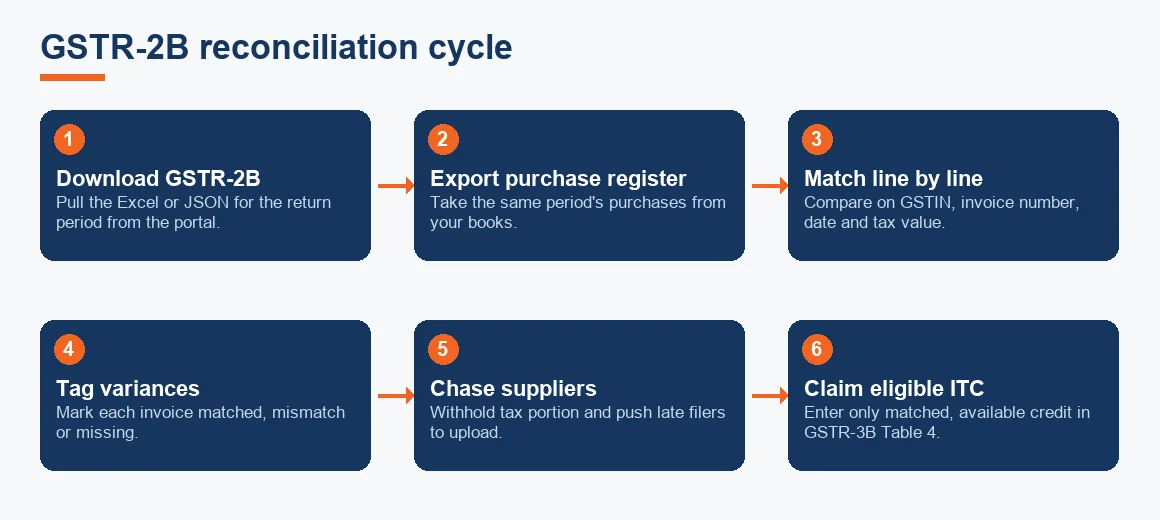
The mechanics are the same whether you use accounting software or a spreadsheet. The goal is to place every purchase invoice in one of three buckets: matched, mismatched, or missing. This is a form of Three-Way Matching applied to tax data rather than to goods receipt.
- Download the GSTR-2B Excel from the portal for the return period.
- Export your purchase register for the same period from your books.
- Match line by line on supplier GSTIN, invoice number, invoice date and tax amount.
- Tag each invoice: matched (agrees on all fields), mismatch (present in both but the tax figure differs), or missing (in your books but absent from GSTR-2B, or the reverse).
- Claim only the matched and available credit in GSTR-3B; park the rest and chase it.
A trader running hundreds of invoices a month will not do this by eye. Software that imports the GSTR-2B JSON and auto-tags variances turns a two-day chore into a two-hour review, but the review still needs a human who understands why a mismatch happened.
How to do GSTR-2B reconciliation in Excel
If you prefer a spreadsheet, build one sheet from the GSTR-2B download and one from your purchase register, create a matching key by joining GSTIN and invoice number, then use a lookup to flag rows that fail to match on tax value. A simple status column (Matched, Mismatch, Missing) lets you filter to just the problems. The template at the end of this article gives you the exact columns to start with.
GSTR-2B vs 3B reconciliation: keeping the return honest
Reconciling GSTR-2B against your books is only half the task. The eligible figure then has to agree with GSTR-3B. Table 4A of GSTR-3B reports credit available, Table 4B captures reversals under rule 42, rule 43 and section 17(5), and Table 4D reports ineligible credit. Where the credit claimed in Table 4 runs materially ahead of GSTR-2B, the portal now issues an automated DRC-01C intimation asking you to explain the excess or pay it back with interest. Answering that notice is far easier when your monthly reconciliation working papers already show exactly which invoices drove the gap.
What happens if a supplier does not upload an invoice?
The credit never appears in GSTR-2B and cannot be claimed, because the law ties your credit to the supplier's compliance. The remedy is commercial before it is legal: chase the supplier to file, and hold back the tax portion of the payment as leverage until the invoice shows up. This is the same withholding logic traders already apply for TDS and TCS on purchases and sales and for Section 194Q TDS on Goods. There is a hard stop: under section 16(4), a missing invoice for a financial year must be corrected by 30 November of the following year (or the date of the annual return, whichever is earlier). Miss that window and the credit lapses for good.
Worked example: a trader's monthly reconciliation
Suppose a trading firm's purchase register for the month shows total GST of Rs 4,86,000 across four suppliers, while GSTR-2B shows Rs 4,32,000. The reconciliation below shows where the Rs 54,000 gap sits and how much can be safely claimed now. Figures are illustrative.
| Supplier | ITC per books (Rs) | ITC in GSTR-2B (Rs) | Status | Action |
|---|---|---|---|---|
| Supplier A | 1,80,000 | 1,80,000 | Matched | Claim in 3B |
| Supplier B | 1,44,000 | 1,26,000 | Mismatch (one invoice short by 18,000) | Chase supplier |
| Supplier C | 90,000 | 90,000 | Matched | Claim in 3B |
| Supplier D | 72,000 | 36,000 | Missing invoice (36,000) | Withhold tax, chase |
| Total | 4,86,000 | 4,32,000 | Gap 54,000 | Claim 4,32,000 now |
The firm claims Rs 4,32,000 in Table 4A of GSTR-3B this month, matching GSTR-2B exactly, and carries the Rs 54,000 forward on its credit-held schedule. The Rs 18,000 from Supplier B and Rs 36,000 from Supplier D become claimable in whichever month those invoices finally appear in GSTR-2B, provided that happens before the 30 November cut-off.
A note on capital purchases
When the same reconciliation covers plant, fittings or equipment, remember section 16(3): you cannot both claim input tax credit on the GST and also charge depreciation on that tax component. Pick one. Our Depreciation Calculator helps you compare the two routes before you decide.
Key terms
- GSTR-2B Input Tax Credit Matching: matching purchase-register invoices against the static GSTR-2B to decide claimable credit.
- Three-Way Matching: cross-checking invoice, purchase order and goods receipt before a payable is approved.
- Section 52 TCS under GST: tax collected by e-commerce operators that reflects into a seller's GST credit ledger.
- Bank Reconciliation: the sister control that agrees your ledger cash to the bank statement each month.
- Cost of Goods Sold: the direct purchase cost of goods resold, where blocked ITC quietly inflates the figure.
Is it mandatory to file GSTR-2B?
No. GSTR-2B is not a return you file; it is a statement the portal generates for you to read and reconcile. There is nothing to submit. What is effectively mandatory is that the credit you do claim in GSTR-3B, which you must file, agrees with GSTR-2B. Treating the monthly reconciliation as optional is what leads to DRC-01C notices and reversed credit down the line. For a growing trader, folding this into a proper month-end routine alongside stock valuation and e-way bill and e-invoicing discipline is what keeps the books audit-ready.
Where this fits in your wider accounting
ITC reconciliation is one control among several that traders lean on, from presumptive taxation under section 44AD for the smallest firms to full ledger and reconciliation work for larger ones. If the monthly matching, supplier chasing and DRC-01C responses are eating your team's time, our Trading Business Accounting Services handle the reconciliation cycle end to end, and our broader accounts reconciliation and audit and accounting services extend the same discipline across your books. The same reconciliation rigour underpins how we support startups, SaaS businesses and IT and software companies, each of which faces its own credit-matching quirks.
Key takeaways
- Claim only what appears in GSTR-2B; section 16(2)(aa) makes the supplier's filing the gate for your credit.
- GSTR-2B is static and generated on the 14th; reconcile against it, and use GSTR-2A only to track late filers.
- Every month, sort purchases into matched, mismatch and missing, then agree the eligible total to Table 4 of GSTR-3B.
- A gap between GSTR-2B and GSTR-3B triggers a DRC-01C intimation, so keep working papers that explain any difference.
- Chase missing credit before 30 November following the financial year, or it lapses for good.
Statutory references are drawn from the CBIC GST portal and the reconciliation statement is available under the auto-drafted ITC section of the GST portal returns dashboard.
Decision guide