In this guide
An e-invoice in Tally is an ordinary GST sales voucher that TallyPrime transmits to the government Invoice Registration Portal (IRP), which validates it and returns three things the software writes straight back into the voucher: a unique Invoice Reference Number (IRN), a digitally signed QR code, and, where transport details are supplied, the e-way bill number. In other words you do not create a separate document. You record the sale as usual and let Tally exchange the data with the portal, so the printed invoice already carries the IRN, the QR code and, on a moving consignment, the e-way bill, without leaving the voucher screen. This guide explains the rule, the turnover threshold and the practical steps for both e-invoices and e-way bills. If you want a team to run your books and file for you, that sits with our Tally Prime Accounting Services.
What is e-invoicing in Tally?
E-invoicing is the process of reporting a B2B invoice to a government portal at the moment it is raised, rather than filing it later in a return. The portal authenticates the invoice, stamps it with the IRN and QR code, and pushes the same data into your GSTR-1 and the buyer's records. TallyPrime is not the portal; it is the accounting layer that packages the voucher into the required JSON schema, sends it, and stores the response. Because the invoice is validated the moment it is created, the buyer's GSTR-2B input tax credit matching becomes far cleaner, since the same figures appear on both sides from the start.
This is a feature how-to, not a return-filing guide. Once your invoices carry IRNs, the monthly GSTR-1 largely auto-populates, and we cover that separately in how to file GST returns using Tally Prime.
Who is eligible for e-invoicing? The turnover limit
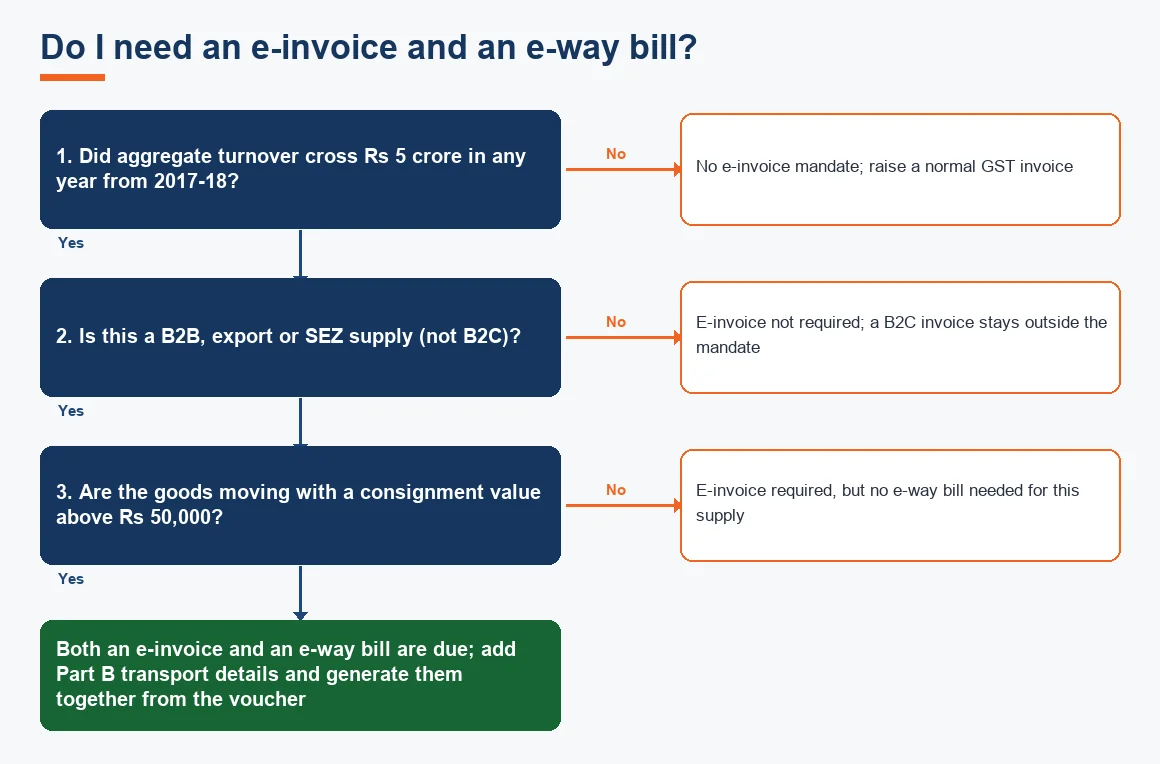
E-invoicing is mandatory for a GST registered business whose aggregate turnover crossed Rs 5 crore in any financial year from 2017-18 onward. Once you cross the line in any year, the obligation stays with you even if turnover later falls below Rs 5 crore. So the common question, "is e-invoicing mandatory for 5 crore turnover?", has a plain answer: yes, at Rs 5 crore aggregate turnover the mandate applies.
It applies to B2B supplies, exports and supplies to SEZ units. B2C invoices stay outside the mandate. A short list of businesses is exempt whatever their turnover: banks and financial institutions, insurers, goods transport agencies, passenger transport operators, cinema multiplex operators and SEZ units. Note that the exemption is on the supplier's status, not the customer's. The threshold and the current list are maintained on the government GST portal and the CBIC site, and it is worth checking them each year because the figure has been lowered in stages.
How do I enable e-invoicing in Tally Prime?
Enabling is a one-time setup on the company. The steps are the same on a fresh company or one you have used for years.
- Open the company, press F11 for Features, and set Enable Goods and Services Tax (GST) to Yes.
- In the GST details screen, set e-Invoicing applicable to Yes, and enter your applicable-from date and the bill-from place.
- Set Send e-Way Bill details with e-Invoice to Yes if you want both generated together.
- Confirm your GSTIN and the registered e-invoice user credentials, which Tally uses to authenticate with the portal through the connected GST Suvidha Provider (GSP).
That is all the configuration needed. On older TallyPrime releases the labels differ slightly, and the earlier Tally.ERP 9 handled e-invoicing through an add-on rather than natively, which is one of several reasons to move up: we compare the two in Tally Prime vs Tally ERP 9: what actually changed.
E-invoice process in Tally: how to generate one step by step
With the feature enabled, generating an e-invoice is part of recording the sale. There is no separate menu to hunt for.
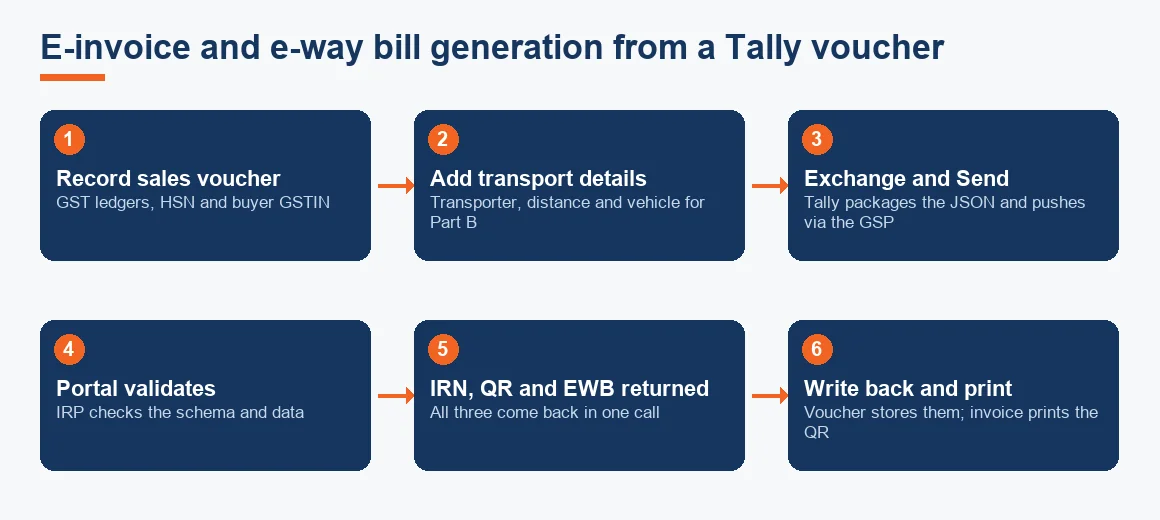
- Record the sales voucher as normal, with the correct GST ledgers, HSN codes and the buyer's GSTIN.
- If the goods are moving, add the transporter name, distance in kilometres, mode of transport and vehicle number in the voucher's e-way bill details.
- Accept the voucher, then choose Exchange and Send for e-Invoicing (or Send for e-Way Bill).
- Tally converts the voucher into the JSON schema and transmits it to the IRP through the GSP. This step is the same Tally XML export mechanism, wrapped for the portal.
- The portal validates and returns the IRN, the signed QR code and, where Part B is present, the e-way bill number and validity date.
- Tally writes all three back against the voucher, and the printed invoice carries the QR code so it is a valid tax invoice.
To do this the machine needs live connectivity to the portal, whether that is direct or via remote Tally access on a networked server. Keyboard-driven users will find the whole flow quicker with the muscle memory covered in our common Tally shortcuts and data entry tips.
What is an e-way bill, and how does it fit in?
An e-way bill is an electronic document raised before goods worth more than Rs 50,000 move. It carries a 12-digit e-way bill number the transporter must produce on demand. Rule 138 of the CGST Rules makes it compulsory for inter-state movement and for intra-state movement above the state threshold. Part A holds the invoice and party details; Part B holds the vehicle and transport details. Because the e-way bill draws on the very invoice data already sitting in Tally, generating it from the voucher avoids re-keying and the transposition errors that come with it. Where a transporter moves several consignments in one vehicle, each consignment still carries its own e-way bill, and the transporter combines them into a consolidated e-way bill in Form GST EWB-02 on the portal. If the movement is by a goods transport agency under reverse charge, the e-way bill obligation and the RCM tax treatment are separate points to get right.
Does an e-invoice create the e-way bill automatically?
Yes, where Part B transport details accompany the invoice. In that case the portal returns the IRN, the signed QR code and the e-way bill number in a single call, and TallyPrime stores all three against the voucher. If the vehicle number is not ready when you raise the invoice, the portal issues only the IRN, and Part B is filled in later on the e-way bill portal before movement starts. This split matters for a warehouse that invoices in the morning and despatches in the afternoon: the IRN can go out early, and the e-way bill can be completed once the vehicle is assigned.
What is the 30-day limit for an e-invoice?
The portal will not accept an invoice reported too late. Businesses with an aggregate turnover of Rs 10 crore or more must report each invoice to the IRP within 30 days of the invoice date. Report it on the 31st day and the portal rejects it, leaving you with an invoice that cannot legally carry an IRN. The practical discipline is simple: send invoices for IRN daily, not in a month-end batch. For a business near the threshold this is the single most common cause of blocked invoices, and it is entirely avoidable with a daily Exchange run.
How to check e-invoice details in Tally
TallyPrime keeps a running status for every voucher. From the Gateway of Tally, open the GST reports and the e-Invoice report, which lists invoices by status: pending, exported, and accepted with IRN. You can drill into any voucher to see the IRN, the acknowledgement number, the acknowledgement date and the e-way bill number and its validity. A voucher that failed validation shows the portal's error message, so you can correct the GSTIN, HSN or value and resend. Keeping these records safe matters as much as filing them; our note on Tally data backup and security best practices and the built-in Tally Vault password both help here.
One clarification worth making, since it confuses people: e-invoicing is not the same as your withholding obligations. Charges such as Section 194Q TDS on goods and Section 52 TCS under GST apply to different transactions and are recorded separately, whatever the e-invoice status of the underlying bill.
Worked example: an invoice that triggers both an IRN and an e-way bill
Suppose a Maharashtra manufacturer with turnover above Rs 5 crore raises an inter-state B2B sale of machine parts to a buyer in Gujarat and despatches the goods the same day. Because turnover is above the mandate and this is a B2B inter-state supply of moving goods, both an e-invoice and an e-way bill are due. The consignment value for the e-way bill test is the invoice value including GST. The figures below are illustrative.
| Line | Amount (Rs) |
|---|---|
| Taxable value of goods | 1,20,000 |
| IGST at 18% | 21,600 |
| Total invoice value (consignment value) | 1,41,600 |
| E-way bill threshold | 50,000 |
| E-way bill required? | Yes (1,41,600 is above 50,000) |
| E-invoice required? | Yes (B2B, turnover above Rs 5 crore) |
In Tally the manufacturer records the sale, adds the vehicle number and distance in the e-way bill details, and runs Exchange and Send. The portal returns the IRN, the QR code and the e-way bill number in one call, with the e-way bill validity calculated from the distance. The printed invoice then carries the QR code and the e-way bill number, and the transporter can produce it on demand.
Key terms
- Tally XML Export: the structured data export Tally wraps into the JSON schema sent to the invoice portal.
- GSTR-2B Input Tax Credit Matching: reconciling purchase credits against the auto-drafted GSTR-2B, which e-invoicing makes cleaner.
- Goods Transport Agency (GTA) RCM: reverse-charge GST on freight, a separate point from the e-way bill itself.
- Tally Vault: the password feature that encrypts company data at rest.
Key takeaways
- An e-invoice in Tally is a normal sales voucher sent to the portal, which returns the IRN, QR code and, with transport details, the e-way bill number.
- The mandate applies at Rs 5 crore aggregate turnover in any year from 2017-18, for B2B, export and SEZ supplies.
- An e-way bill is required above Rs 50,000 consignment value, tested on the invoice value including GST.
- Enable both under F11, add transport details in the voucher, and use Exchange and Send.
- Report invoices within 30 days if turnover is Rs 10 crore or more, so send for IRN daily.
The same reporting logic exists in other packages, so if you are weighing up a change, our informational overviews of Zoho Books accounting, Xero accounting services and Odoo accounting services set out how each handles GST and e-invoicing, and the statutory positions above are always worth confirming against the live CBIC GST notifications.
Decision guide