In this guide
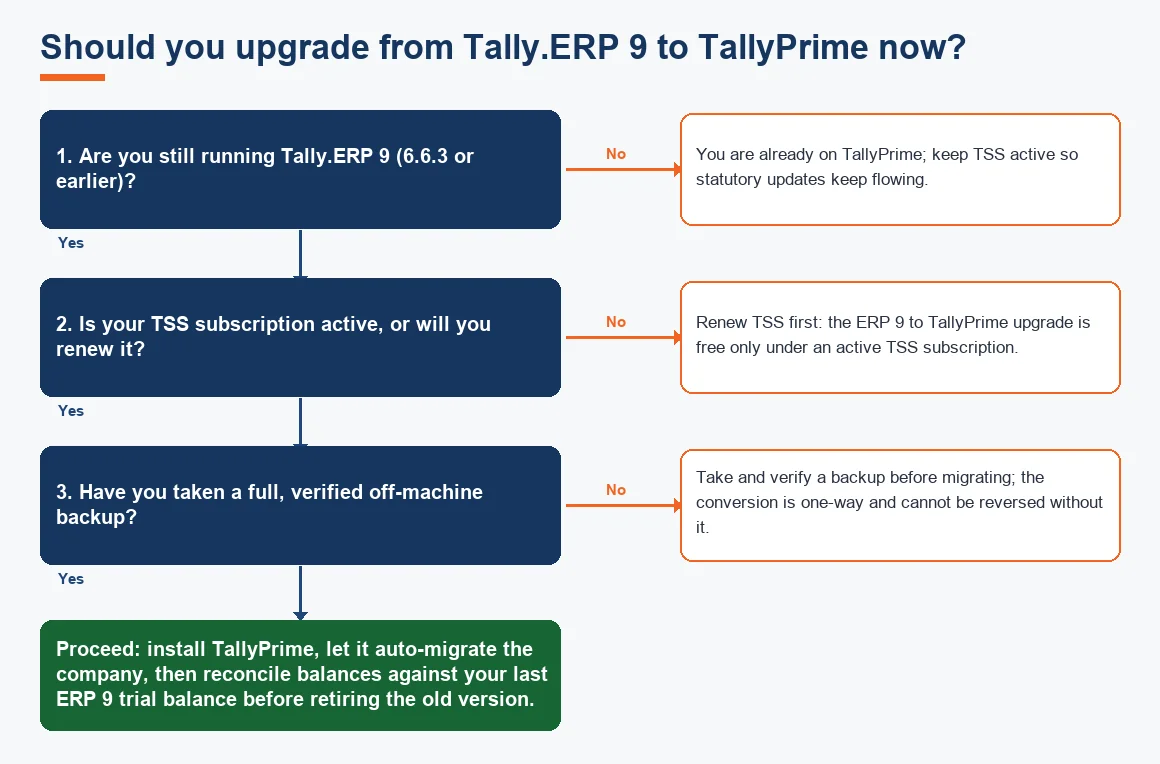
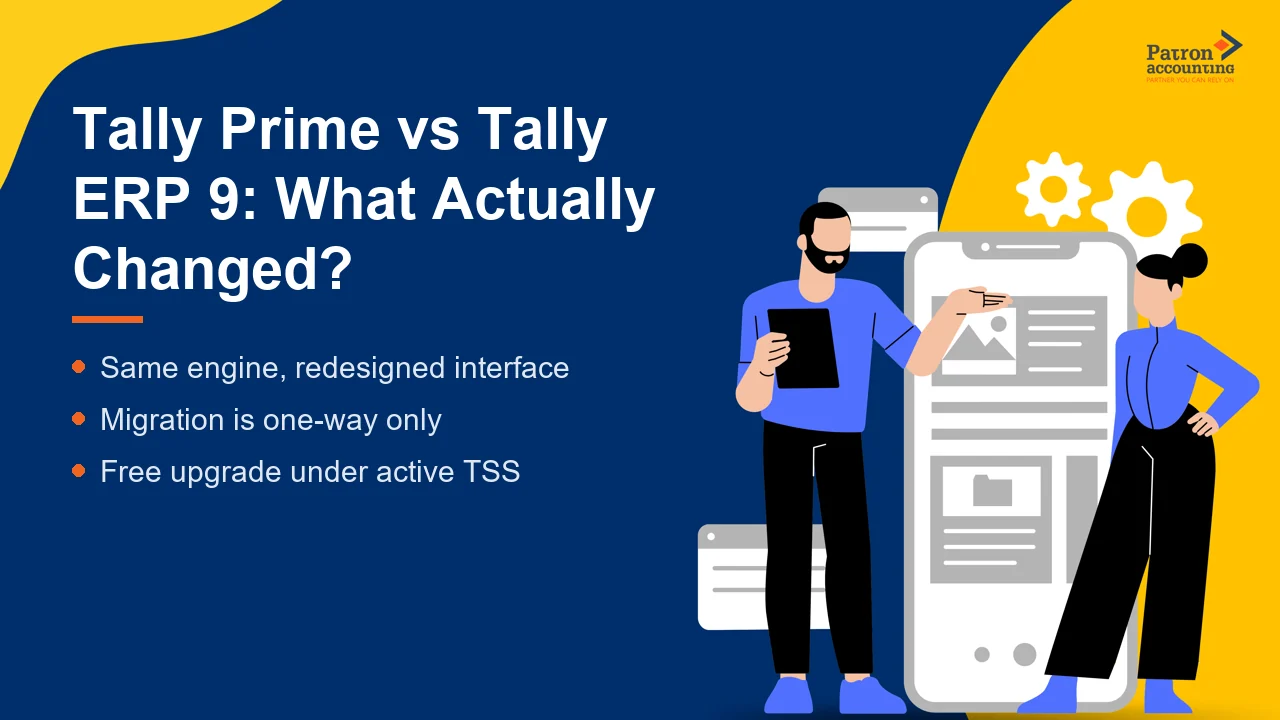
The short answer to Tally Prime vs ERP 9 is this: TallyPrime is the current generation of Tally, released in November 2020 to replace Tally.ERP 9. The underlying accounting engine is the same, so your existing books move across intact, but the interface has been rebuilt around a Go To search bar, multitasking across reports and simpler GST and e-invoice workflows. Tally.ERP 9 is no longer sold, its final release was 6.6.3, and statutory updates for it have stopped. This article explains what actually changed, whether the switch is worth doing now, and how the one-way migration works, so you can decide before your next close.
Difference between Tally Prime and ERP 9: what actually changed
Most of what people notice is the interface. Tally.ERP 9 was menu driven: you moved down nested lists to reach a report or voucher. TallyPrime keeps the same double-entry logic underneath but adds a Go To bar that jumps straight to any report, master or voucher by name, and it lets you keep several reports open at once. The masters, groups and ledgers you built over years are untouched, so a bookkeeper who knows ERP 9 is productive in TallyPrime within a day or two.
The bigger, quieter change is compliance. Tally.ERP 9 handles one GSTIN per company and has no built-in e-invoice connectivity. From release 3.0, TallyPrime manages multiple GSTINs in a single company, and it does GSTR-2B reconciliation inside the product (built in since release 2.1), which matters for input tax credit matching. Because ERP 9 no longer receives statutory updates, running it today means the software cannot keep pace with GST portal changes, and that gap only widens each quarter.
| Area | Tally.ERP 9 (final release 6.6.3) | TallyPrime (release 3.0 and later) |
|---|---|---|
| Released | 2009, no longer sold | November 2020, current product |
| Navigation | Menu driven, nested lists | Go To search, multitasking across reports |
| GSTIN per company | One | Multiple (from 3.0) |
| GSTR-2B reconciliation | Not built in | Inside the product |
| E-invoice / e-way bill | Add-on or manual | Connected workflow |
| Statutory updates | Stopped | Ongoing under active TSS |
| Data compatibility | Cannot open Prime data | Reads and converts ERP 9 data |
Are Tally 9 and ERP 9 the same?
Not quite. Tally 9 was an earlier release from around 2006; Tally.ERP 9 arrived in 2009 and added remote access, payroll and, later, GST. In everyday conversation people say "Tally 9" when they mean Tally.ERP 9, but if you are on a genuinely old Tally 9 build you have two generations to cross, not one. Either way the destination today is TallyPrime, because both older lines are out of active support. If you rely on features like remote Tally access, note that these are carried forward and improved in TallyPrime rather than lost.
Is Tally ERP 9 discontinued?
Tally.ERP 9 is not sold to new users and receives no further product or statutory updates; 6.6.3 was the last release. Existing perpetual licences keep working, so the software will still open and record vouchers. The practical problem is not that it stops running, but that it stops staying compliant: new GST return formats, e-invoice thresholds and portal changes are not delivered to it. For a business that files GST, that is the point at which continuing on ERP 9 becomes a liability rather than a saving. The current e-invoicing threshold applies to businesses with aggregate turnover above five crore rupees, and the mandate is administered through the official GST portal and notified by CBIC.
Can I convert Tally ERP 9 to Tally Prime?
Yes, and the process is built in. When you open an existing Tally.ERP 9 company in TallyPrime, the software offers to migrate it, takes a backup of the old data folder first, then converts the company into the newer structure. You do not re-enter anything. The steps below show the safe sequence; our companion guide on Tally data backup and security best practices covers the backup step in detail.
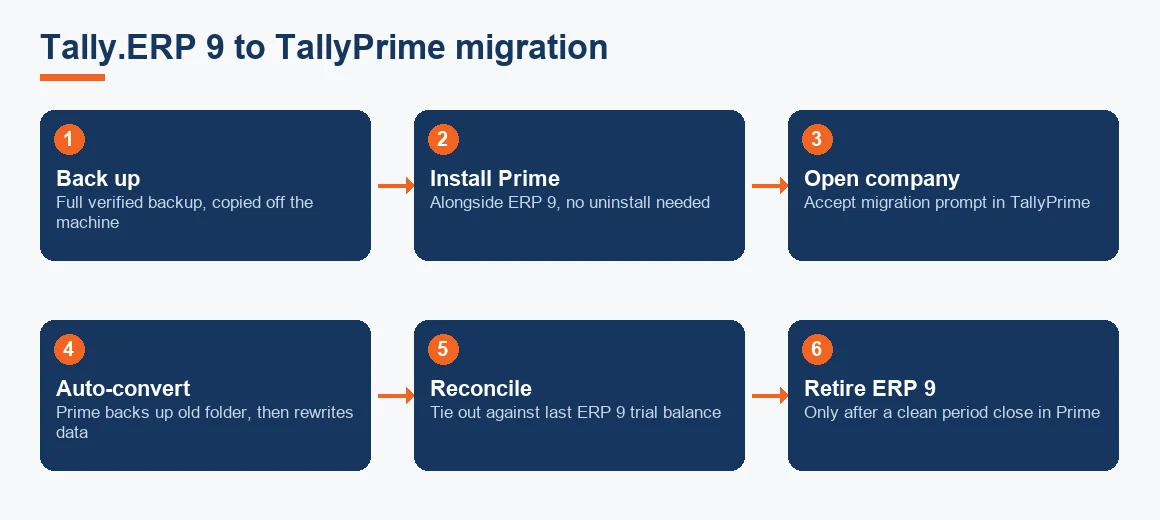
- Take a full, verified backup of every Tally.ERP 9 company, and copy it off the machine.
- Install TallyPrime alongside ERP 9; you do not have to uninstall the old version immediately.
- Open the company in TallyPrime and accept the migration prompt; it backs up the old folder automatically before converting.
- Reconcile the converted company against your last ERP 9 trial balance and key general ledger balances.
- Retire ERP 9 only once the numbers tie out and a full period has been closed cleanly in TallyPrime.
Is it possible to open Tally Prime data in Tally ERP 9?
No. Data cannot be opened downwards. TallyPrime rewrites the company into a newer data structure that Tally.ERP 9 simply cannot read, which is exactly why the migration tool backs up the old folder before converting. The only clean way back to ERP 9 is restoring that pre-migration backup. You can export vouchers as XML into a fresh ERP 9 company to recover transactions, but master settings and some configurations will not all survive the round trip. If you work across systems, understanding Tally XML export is worth the time, though for most businesses the honest answer is to commit to TallyPrime rather than plan a retreat.
Which is better, Tally ERP 9 or Tally Prime?
For any business filing GST in India today, TallyPrime is the better choice, because it is the only one of the two still receiving statutory updates. The comparison is less about features and more about compliance risk. ERP 9 will keep recording your double-entry bookkeeping accurately, but it cannot follow the GST portal forward. That said, if you run a niche add-on or a heavily customised TDL setup, test it in TallyPrime before you commit, because some older customisations need a developer to re-point them. Our guides on filing GST returns using TallyPrime and generating e-way bills and e-invoices in Tally show what the newer workflows actually look like, and the common Tally shortcuts and data entry tips ease the transition for your team.
What are the disadvantages of Tally Prime?
TallyPrime is not perfect, and it is fair to name the trade-offs. The recurring complaints are the licence cost with mandatory TSS renewal for statutory updates, slower multi-user performance over a LAN once data grows large, limited native cloud access, and reporting that often has to be exported to Excel for anything beyond the standard formats. Customisation still needs a TDL developer, and heavy manufacturing routing or multi-entity consolidation usually needs a second system. These are the reasons some businesses evaluate cloud alternatives such as Zoho Books accounting, Xero accounting services or Odoo accounting services at the same time as an upgrade, rather than treating the version choice in isolation. If a cloud move is on the table, our note on migration from Tally to Zoho compares the routes.
None of this changes the core recommendation. If you are already committed to Tally, TallyPrime is the version to be on. If you are open to rethinking the platform, weigh it against cloud options while your data is being touched anyway.
Which version of Tally is best: a worked cost example
Because the upgrade is free under active TSS, the real question is the three-year cost of ownership, not the upgrade fee. The table below models a single-user (Silver) licence already owned, comparing an active-TSS path against letting TSS lapse and later paying reactivation plus the compliance risk. All figures are indicative and Exl GST; check current pricing before you budget.
| Item (Silver, single user) | Stay current: renew TSS yearly | Let TSS lapse, reactivate in year 3 |
|---|---|---|
| Upgrade ERP 9 to TallyPrime | Free (active TSS) | Free once TSS active |
| TSS year 1 (indicative) | 4,500 | 0 |
| TSS year 2 (indicative) | 4,500 | 0 |
| TSS year 3 (indicative) | 4,500 | 4,500 renewal + 4,500 lapse reactivation |
| Three-year software spend | 13,500 | 9,000 |
| Statutory updates received | All three years | None until year 3 |
| E-invoice / GST compliance gap | Nil | Two years exposed |
The lapse path looks 4,500 rupees cheaper on paper, but it buys two years with no statutory updates, during which a single missed e-invoice mandate or GST format change can cost far more than the saving in penalties and rework. For most filing businesses the current path is the cheaper one once risk is priced in.
Key terms
- Tally Vault: the built-in password feature that encrypts a Tally company so data cannot be opened without the vault password.
- Tally XML Export: exporting vouchers and masters as XML, the practical route for moving transactions between Tally companies or versions.
- Remote Tally Access: connecting to a Tally company from another location, carried forward and improved in TallyPrime.
- GSTR-2B Input Tax Credit Matching: reconciling purchase records against the auto-drafted GSTR-2B to claim only eligible input tax credit, now handled inside TallyPrime.
Is Tally Prime an ERP?
In the strict sense, TallyPrime is business management and accounting software with strong inventory and statutory features, rather than a full enterprise resource planning suite with manufacturing routing, HR and CRM built in. The "ERP" in Tally.ERP 9 was always a name more than a category. For a small or mid-sized Indian business, TallyPrime does the accounting, GST, inventory and payroll work that matters day to day; if you need deep manufacturing or multi-entity consolidation, that is where a broader ERP or a second system comes in. Once your books are clean and current, keeping compliance on track is far more about process than product, which is where structured Tally Prime accounting services or broader accounting services earn their keep.
Key takeaways
- TallyPrime replaced Tally.ERP 9 in November 2020; ERP 9 is no longer sold and its last release was 6.6.3.
- The accounting engine is unchanged, so books migrate intact; the interface, GST and e-invoice workflows are what improved.
- Migration is one-way: always hold a verified off-machine backup before converting, because ERP 9 cannot open Prime data.
- The upgrade is free under active TSS; the true cost of staying on ERP 9 is a widening statutory and e-invoice compliance gap.
- If you are rethinking the platform entirely, weigh TallyPrime against cloud options before you migrate, not after.
Decision guide