In this guide
Bank reconciliation in Zoho Books is the process of matching every line on your bank statement against the payments and receipts you have already recorded, so that the cleared balance in the software agrees with the closing balance shown by the bank. It is a feature-level task rather than a one-off event: you connect a feed, let the software suggest matches, deal with the handful of lines that do not match, and only then mark the period reconciled. This explainer walks through how the tool behaves, where people go wrong, and a worked reconciliation you can follow line by line. For the underlying accounting concept, see our bank reconciliation glossary entry.
Can you do bank reconciliation in Zoho Books?
Yes. Reconciliation sits inside the Banking module and works on every plan, including the free plan available to Indian businesses below Rs 25 lakh turnover. The software keeps a running general ledger balance for each bank and cash account, and reconciliation is the control that proves that ledger balance is real. You select the account, enter the statement date and closing balance from your bank, and Zoho Books shows you the difference it still has to explain. When that difference reaches zero, the period is reconciled. The discipline behind this is the same whether you run Zoho, Xero, Odoo or Tally Prime; only the buttons differ.
Does Zoho Books connect to a bank account?
It does, in two ways. Most major Indian banks connect through a direct feed or an aggregator that pulls statement lines automatically, usually once a day. These are the automated bank feeds that remove manual typing. Where your bank is not supported, you download the statement and import it as a CSV, OFX or QIF file, taking care to map the date format (Indian statements are commonly DD/MM/YYYY, which Zoho must be told). Either way the link is strictly read only. Zoho Books can read what the bank has cleared; it cannot initiate a payment, so connecting a feed carries no risk of money moving on its own.
How to do bank reconciliation in Zoho Books step by step
The routine is short once the feed is in place. Follow it in the same order every month so nothing is skipped.
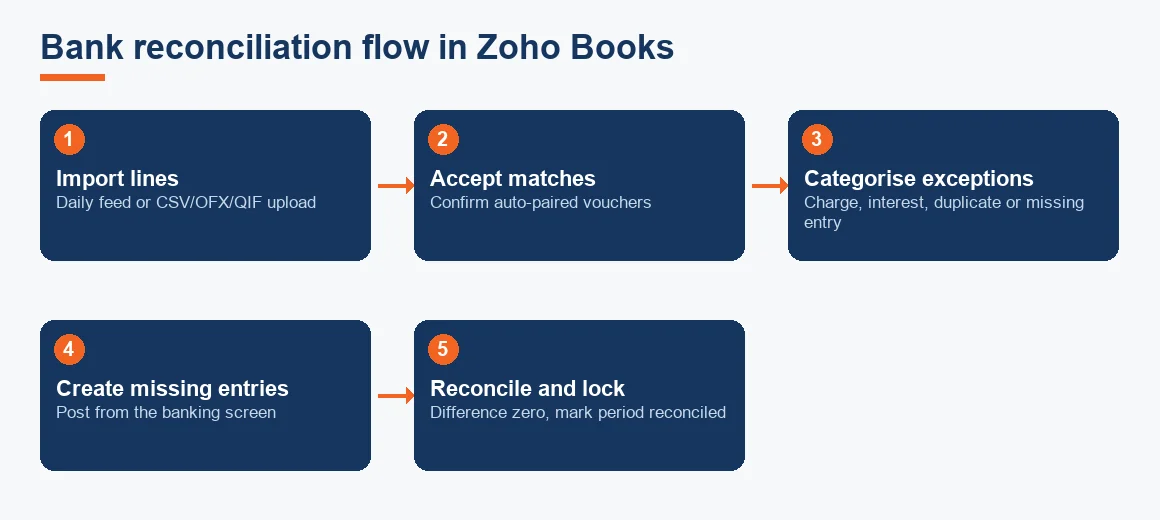
- Import the statement lines. Let the daily feed run, or upload the CSV, OFX or QIF file for the period.
- Accept the suggested matches. Zoho Books pairs each feed line with a recorded payment or receipt of the same amount and near date. Confirm the ones that are correct.
- Categorise the unmatched lines. A line with no partner is either a voucher you have not entered yet, a bank charge, interest, or a duplicate.
- Create the missing entries. Record the bank charge, the interest credit or the receipt directly from the banking screen so the line finds its match.
- Reconcile and lock. Enter the statement closing balance. When the cleared balance equals it and the difference is zero, mark the period reconciled.
This is exactly the workflow a bank and credit card reconciliation service follows on your behalf when the volume gets too large to handle in house.
Matching feeds and handling exceptions
Most lines match themselves. The value is in the exceptions. A receipt that reached the bank but was never invoiced, a vendor payment entered twice, a NEFT charge of a few rupees, a standing instruction nobody remembered: these are the lines that hold a month open. Use a bank clearing account only as a temporary holding place while you investigate, never as a permanent home for an unexplained figure. Genuine timing gaps, such as a cheque issued but not yet presented, are outstanding cheques and timing differences and are meant to sit unreconciled until the bank clears them.
Worked example: reconciling a month in Zoho Books
Assume the cleared balance in Zoho Books for a current account is Rs 8,45,000, while the bank statement closing balance is Rs 8,62,500. The reconciliation below shows how four routine items bridge the gap. All figures are illustrative.
| Particulars | Amount (INR) |
|---|---|
| Balance as per Zoho Books (cash book) | 8,45,000 |
| Add: Interest credited by bank, not yet recorded | 6,000 |
| Less: Bank charges debited by bank, not yet recorded | (1,500) |
| Adjusted book balance | 8,49,500 |
| Balance as per bank statement | 8,62,500 |
| Less: Cheque issued but not yet presented (outstanding) | (25,000) |
| Add: Deposit in transit, recorded in books not yet in bank | 12,000 |
| Adjusted bank balance | 8,49,500 |
Both columns settle at Rs 8,49,500, so the account reconciles. In practice you would first post the interest and the bank charge as fresh entries (they belong in the books), which turns the Rs 8,45,000 into Rs 8,49,500. The outstanding cheque and the deposit in transit need no entry: they are already in your ledger and will clear the bank on their own. Recording the two adjustments is a simple journal entry that the banking screen creates for you.
How do you unreconcile in Zoho Books?
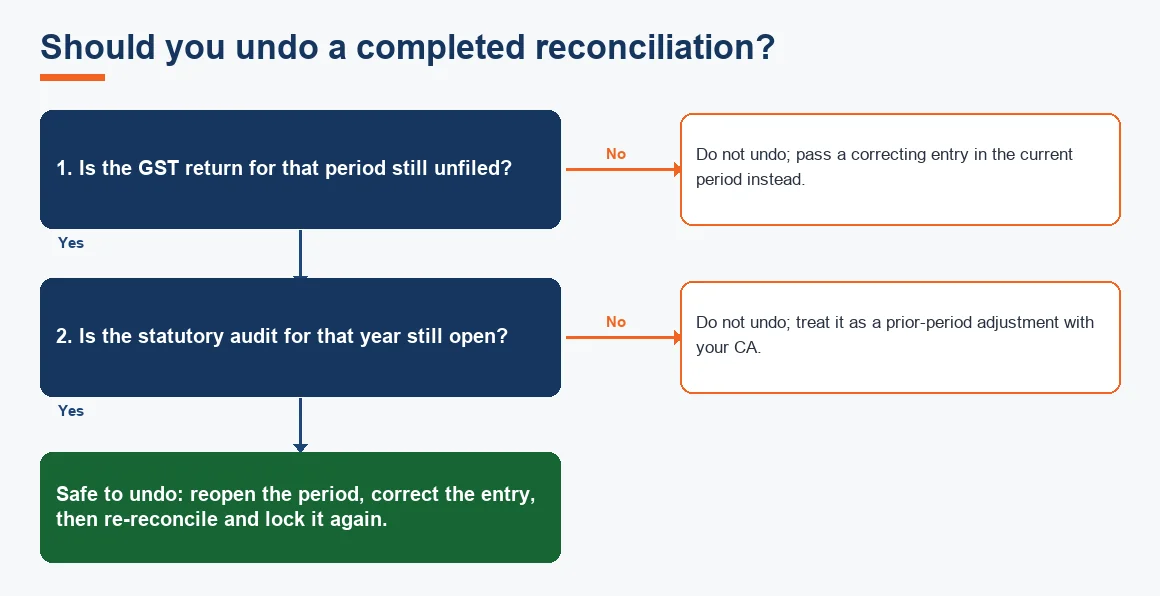
Open the Banking module, select the reconciled account and period, and choose to undo the reconciliation. The matched entries return to the unreconciled list and the period reopens. The audit trail stamps who reopened it and when, which matters if a query comes up later. Do this only before the GST return and the statutory audit for that period are finalised, because reopening a closed month changes comparative figures that may already sit in a filed return. If those are done, correct the position in the current period instead.
How to edit reconciled entries in Zoho Books
A reconciled entry is locked to protect the closed balance. To change it you unreconcile the period first, edit the voucher, then reconcile again. Never delete a reconciled receipt or payment outright, because it breaks the chain the auditor relies on. If the change is material and the audit is already signed, treat it as a prior-period adjustment with your CA rather than a silent edit. For heavier clean-ups across several months, an accounts reconciliation and audit review is the safer route.
How to record a returned cheque in Zoho Books
A cheque that bounces (returned unpaid) was probably recorded as a receipt when you banked it. When the bank reverses it, the feed shows a debit for the same amount. Do not delete the original receipt. Instead record the reversal so the customer's balance goes back up: mark the payment as bounced or pass an entry debiting the customer and crediting the bank, then account for any return charge the bank levied. The line then matches the feed and the customer once again shows as owing you the money. This keeps your general ledger honest and your receivables accurate.
How to export unreconciled transactions in Zoho Books
Before you close, it helps to see everything still open in one list. From the Banking module's reconciliation view you can filter to uncleared or unreconciled lines and export them to spreadsheet, or run the Account Transactions report filtered by reconciliation status. This export is the working paper you hand to your accountant, and it is what a reviewer checks against the bank statement. Keep it with the month, because under record-retention rules it forms part of the books.
Closing and keeping the record
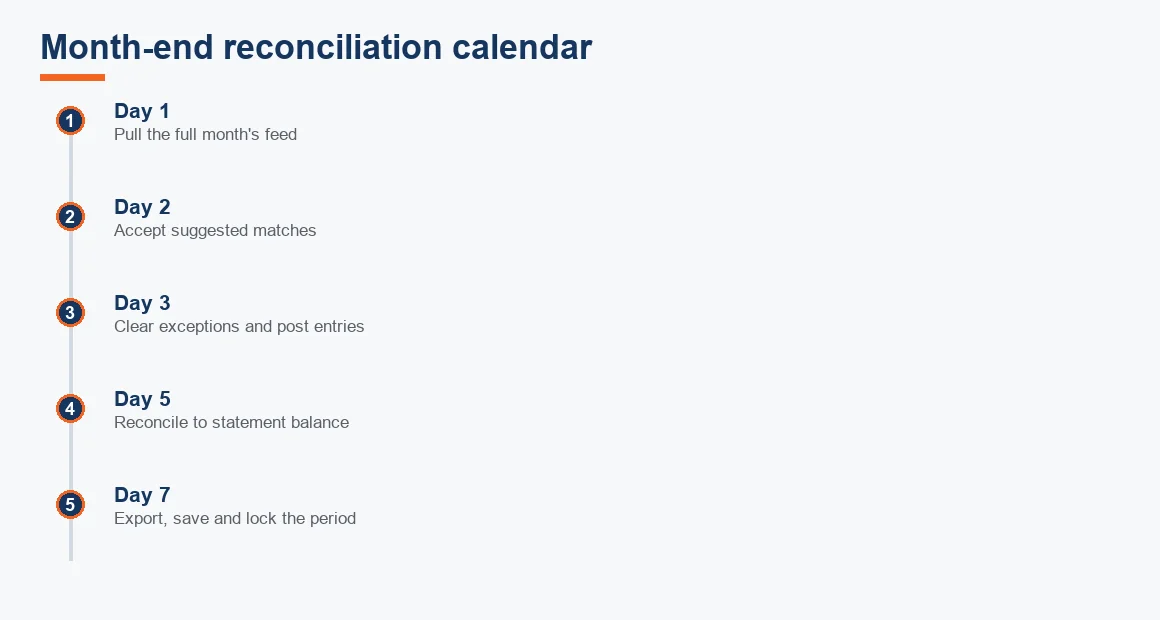
A reconciled month is only useful if it stays intact. Once the difference is zero and the period is locked, save the statement, the reconciliation report and the unreconciled export together. Under Section 128(5) of the Companies Act, 2013, books of account and the relevant vouchers must be preserved for eight financial years immediately preceding the current year, and bank statements and reconciliation working papers fall inside that requirement (see the Ministry of Corporate Affairs). Cloud storage is accepted, provided a daily backup sits on a server physically located in India, as clarified by the MCA's own account-maintenance rules. Because feeds are read only, the position is also consistent with the Reserve Bank of India account aggregator framework, under which data is shared for reading, not for moving money.
If Zoho is new to you, our guides on setting up GST in Zoho Books and filing GST returns from Zoho Books cover the next steps, while Zoho Books vs Tally and the pricing and plans explainer help you decide whether to stay on the free plan. For hands-off month-end work, the Zoho Books accounting service closes and reconciles the books for you.
Key terms
- Bank Reconciliation: matching recorded transactions to the bank statement until the two balances agree.
- Automated Bank Feeds: a daily read-only pull of statement lines from the bank into the software.
- Bank Clearing Account: a temporary ledger that holds a transaction while it moves between records.
- Outstanding Cheques / Timing Differences: entries recorded in the books that the bank has not yet cleared.
- Month-End Close Checklist: the ordered list of tasks that finalises a period's accounts.
Key takeaways
- Reconciliation in Zoho Books is done when the cleared balance equals the statement balance and the difference is zero.
- Connect a live feed or import CSV, OFX or QIF; the link is read only and cannot move money.
- Every unmatched line is a missing voucher, a duplicate or an unrecorded charge: fix the cause, do not force the match.
- Unreconcile only before the GST return and audit for the month are finalised; otherwise adjust in the current period.
- Preserve statements and working papers for eight financial years under Section 128(5) of the Companies Act.
Decision guide