In this guide
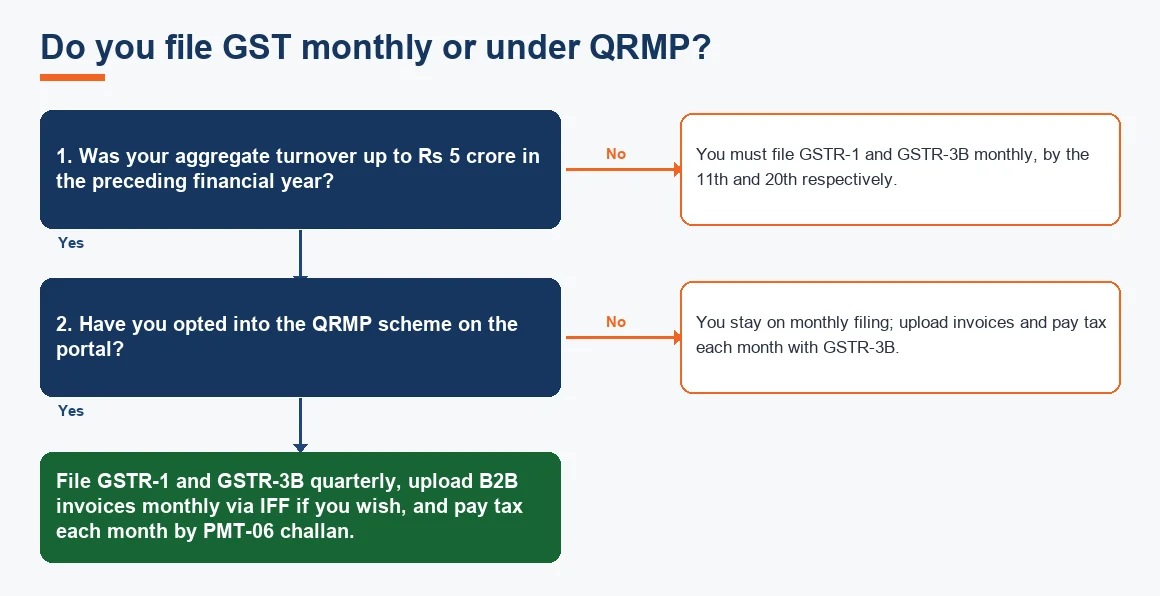
Yes, you can file GST returns from Zoho Books. The software reads your recorded sales and purchase invoices, builds the GSTR-1 detail and the GSTR-3B summary for the tax period, and then either produces a JSON file you upload on the GST portal or files straight from Zoho Books once your GSTIN is connected and validated with an OTP. What Zoho Books cannot do is fix careless bookkeeping: the returns are only as accurate as the invoices, tax rates and place-of-supply behind them, so a short reconciliation before you submit matters more than the button you press at the end. This guide walks through the whole cycle for an Indian business, from enabling GST to marking the return filed.
How do I enable GST in Zoho Books?
Before any return can be generated, the organisation has to be set up as GST registered. Under Settings, then Taxes, then GST Settings, switch on Is your business registered for GST?, enter the 15-digit GSTIN, choose the registration type (regular or composition) and set the reporting period and the date GST applies from. Zoho Books then reads the state code inside the GSTIN and uses it, against each customer's place of supply, to decide automatically whether a transaction attracts CGST and SGST or IGST. Getting this base configuration right is the single biggest determinant of clean returns, and we cover it in detail in our companion guide on setting up GST in Zoho Books. The link between your GSTIN and how each ledger is tagged is what practitioners call Zoho GSTIN mapping, and it is worth checking once before your first filing.
What is the difference between GSTR-1 and GSTR-3B?
These are two separate returns, and confusing them is the most common reason figures do not tie up. GSTR-1 is the detailed statement of your outward supplies, an invoice-by-invoice list of what you sold. GSTR-3B is a summary return where you declare total outward tax, claim input tax credit and actually pay the net tax in cash. You file both every period; one reports, the other pays.
| Point | GSTR-1 | GSTR-3B |
|---|---|---|
| What it contains | Invoice-level outward sales | Summary of tax and ITC |
| Tax paid here? | No, reporting only | Yes, net cash paid |
| Monthly due date | 11th of following month | 20th of following month |
| Feeds | Buyer's GSTR-2A / 2B | Your electronic cash and credit ledgers |
| Corrections | Amendment tables 9A / 9C | Adjusted in a later GSTR-3B |
According to the GST portal, both returns run on the same monthly rhythm for regular taxpayers, which is why Zoho Books prepares them together from a single set of books.
How to generate GSTR-1 in Zoho Books
Once your invoices for the period are recorded, generating GSTR-1 is a review exercise rather than data entry.
- Open GST Filing from the left menu and select the return period.
- Click into the GSTR-1 section. Zoho Books groups transactions into the portal's tables: B2B, B2C large, B2C small, exports, nil-rated and HSN summary.
- Review each table for missing GSTINs, wrong place of supply or invoices sitting in the wrong bucket.
- Fix any flagged transaction at source (edit the invoice), then refresh the return so the summary rebuilds.
- Export the GSTR-1 JSON for upload on the portal, or push it directly if your GSTIN is connected.
Who needs to file a GSTR-1, and when?
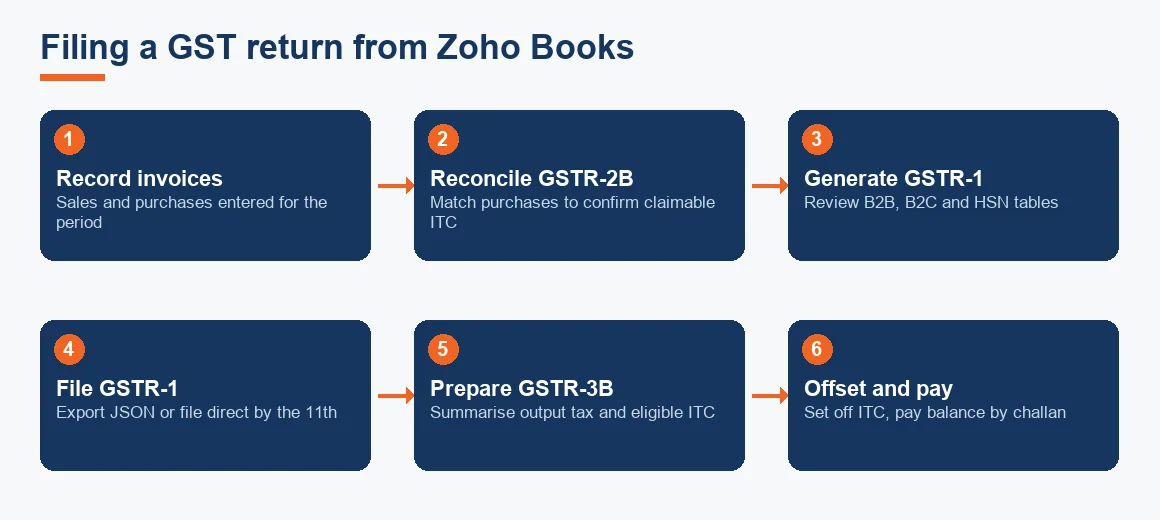
Every regular GST-registered taxpayer files GSTR-1, whether or not there were sales in the period; a nil GSTR-1 is still compulsory. Businesses with aggregate turnover up to Rs 5 crore in the preceding financial year may opt into the QRMP scheme and file GSTR-1 quarterly instead of monthly, uploading B2B invoices each month through the Invoice Furnishing Facility if they wish. Larger businesses file monthly by the 11th. Composition dealers do not file GSTR-1 at all; they use CMP-08 and GSTR-4. If your outward supplies are straightforward, the decision tree below sets out which cadence applies to you.
How to file GSTR-3B and mark it as filed in Zoho Books
GSTR-3B is where tax is actually paid, so it should only be prepared after your purchases and input tax credit are reconciled (the next section). The flow is:
- In GST Filing, open the GSTR-3B summary for the period.
- Check outward tax (from your sales) and the eligible ITC figure against your reconciled purchases.
- Log in to the GST portal, offset the liability against available credit, and pay any balance in cash by challan.
- Once the portal shows the return as filed with its ARN, return to Zoho Books and use Mark as Filed, entering the filing date and reference.
Marking the return as filed in Zoho Books does not file it with the government; it simply locks the period in your books so later edits cannot silently change a submitted figure. The actual filing and payment happen on the portal, or through the direct connection.
How to reconcile GSTR-2B before filing GSTR-3B
Input tax credit can be claimed only on purchase invoices that appear in your auto-drafted GSTR-2B, under section 16(2)(aa) of the CGST Act. That makes the GSTR-2B input tax credit matching step non-negotiable before you finalise GSTR-3B. Download the GSTR-2B JSON from the portal, import it into Zoho Books, and let it match against your recorded purchase bills. You get three lists: matched, mismatched and missing. Chase suppliers who have not filed (their invoice sits in your books but not in GSTR-2B), and hold that credit back until it appears. This purchase-side discipline mirrors the same careful matching you already do on the money side; if you have automated your bank reconciliation in Zoho Books, extend the same monthly habit to GST. Reconciliation of this kind is close cousin to a standard bank reconciliation: you are comparing two independent records and explaining every difference.
How to record GST paid, and add CGST and SGST, in Zoho Books
When you raise a GST invoice, Zoho Books automatically splits the tax into CGST and SGST for an in-state sale, or IGST for an inter-state sale, based on the place of supply against your state. You do not add these manually per invoice; you select the correct GST rate (or a tax group), and the software posts the halves to the right ledgers. The tax you pay on filing GSTR-3B is recorded as a payment against your GST liability, reducing the electronic cash ledger balance you topped up by challan. Behind the scenes each of these is an ordinary double-entry journal entry hitting your output tax, input tax and cash ledgers, viewable in the general ledger. If you would rather see the posting logic than trust the automation, our accounting calculators show the same entry-level detail for other statutory areas.
Key terms
- GSTR-2B Input Tax Credit Matching: comparing the portal's auto-drafted GSTR-2B against your purchase bills to decide how much ITC is actually claimable.
- Zoho GSTIN Mapping: the link between your registered GSTIN, state code and tax ledgers that drives automatic CGST/SGST/IGST splitting.
- Journal Entry: the double-entry record behind every tax posting Zoho Books makes.
- Bank Reconciliation: the same match-and-explain discipline, applied to your bank rather than GSTR-2B.
Worked example: offsetting ITC and paying net GST
This is the calculation GSTR-3B performs, shown for one month of a Maharashtra trader. Input tax credit set off order is IGST first, then CGST, then SGST. All figures are illustrative.
| Tax head | Output tax (Rs) | ITC from GSTR-2B (Rs) | Net payable in cash (Rs) |
|---|---|---|---|
| IGST | 72,000 | 50,000 | 22,000 |
| CGST | 90,000 | 30,000 | 60,000 |
| SGST | 90,000 | 30,000 | 60,000 |
| Total | 2,52,000 | 1,10,000 | 1,42,000 |
Output tax of Rs 2,52,000 less matched credit of Rs 1,10,000 leaves Rs 1,42,000 to pay in cash by challan before filing. Only the Rs 1,10,000 that appeared in GSTR-2B could be claimed; any supplier invoice missing from GSTR-2B would have raised the cash outflow until that supplier filed.
Do you file monthly or under QRMP?
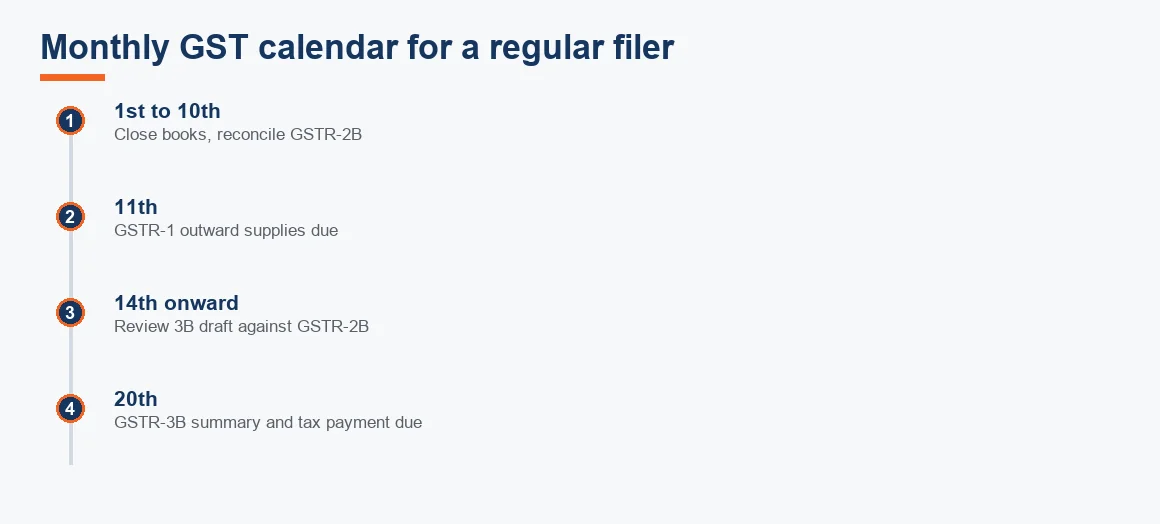
The cadence you follow changes your due dates and how you pay. Monthly filers pay as they file GSTR-3B; QRMP filers pay tax every month by PMT-06 challan but file the returns quarterly. The compliance calendar below shows the key dates for a monthly filer, and the decision tree sets out which route applies to you. QRMP GSTR-3B due dates differ by state: the 22nd for category X states such as Maharashtra and Gujarat, and the 24th for category Y states such as Delhi and Haryana.
How do I correct an invoice already filed in GSTR-1?
You do not edit a filed return. If an invoice reported in GSTR-1 was wrong, report it again with corrected details in a later GSTR-1 through the amendment tables (9A for B2B, 9C for credit and debit notes), quoting the original invoice number and date. Per the CBIC, amendments are permitted up to 30 November following the end of that financial year, or the date of filing the annual return, whichever is earlier. In Zoho Books you record the correction in the current period so the books and the amended return stay aligned.
Key takeaways
- Zoho Books generates GSTR-1 and the GSTR-3B summary from your books; you export JSON for the portal or file direct once the GSTIN is connected.
- GSTR-1 reports sales (due 11th); GSTR-3B summarises and pays tax (due 20th). They are separate returns.
- Always reconcile the downloaded GSTR-2B before GSTR-3B, because ITC is limited to invoices that appear there.
- QRMP lets businesses up to Rs 5 crore file quarterly while paying monthly by challan.
- Correct filed invoices by amendment in a later return, not by editing the original, and only up to the 30 November deadline.
Handled monthly, filing GST from Zoho Books becomes a short reconcile-and-submit routine rather than a scramble. If you would rather hand the recurring filing to a team that runs it inside the software each month, our Zoho Books accounting service does exactly that, and we support the same workflow for firms on Xero, Odoo and Tally Prime. If you are still choosing a platform, our comparisons of Zoho Books versus Tally and Zoho Books pricing and plans are the place to start.
Decision guide