In this guide
Zoho Books and Tally solve the same problem in two different ways. Zoho Books is cloud accounting reached through a browser or a phone and billed by subscription, while TallyPrime is desktop software that installs on an office machine and runs offline. For most Indian SMEs the decision comes down to three things: how your team works, how reliable your internet is, and whether you would rather pay a yearly subscription or a one-time licence. This guide compares the two on compliance, access, data control and cost so you can decide without the sales spin. If you have already made up your mind, our Zoho Books Accounting and Tally Prime Accounting Services pages cover setup and support.
Zoho Books vs Tally: the core difference
The headline distinction is cloud against desktop. Zoho Books stores your data on Zoho servers and you reach it through a browser or mobile app, so any authorised person can log in from anywhere with an internet connection and role-based access controls who sees what. TallyPrime installs locally and keeps the company data on that machine, going online only for e-invoicing, e-way bills and GST uploads. That single design choice drives almost every other difference: how you pay, how you back up, how many people can work at once, and what happens when the internet drops.
Both are mature products built for Indian compliance. Both generate GST invoices, push e-invoice IRNs, raise e-way bills and track TDS. So the comparison is rarely about whether one can do the job and almost always about which working style fits your office.
Difference between Zoho Books and Tally at a glance
The table below sets the two side by side on the points SME owners ask about most. Treat the pricing as indicative and Exl GST; published plans change from time to time.
| Point | Zoho Books (cloud) | TallyPrime (desktop) |
|---|---|---|
| Where data lives | Zoho servers, reached online | Your office machine, offline |
| Access | Browser and mobile, anywhere | Installed device, or a LAN, or via remote access |
| Pricing model | Annual subscription per organisation | One-time licence plus yearly TSS for updates |
| Multi-user | Included by plan, role-based | Gold licence for LAN multi-user |
| Works offline | No, needs internet | Yes, online only for uploads |
| Automatic backup | Handled by Zoho | Your responsibility |
| GST and e-invoicing | Built in | Built in |
Does Zoho Books have a general ledger and true double-entry?
Yes. Zoho Books runs on double-entry bookkeeping and maintains a full general ledger, so every transaction posts a debit and a credit and rolls up into a trial balance, profit and loss account and balance sheet. It is not a simplified billing app pretending to be accounting software. What Zoho Books is mainly used for is day-to-day bookkeeping: sales invoicing, purchases, expenses, bank feeds, GST returns and financial reports, with recurring invoices and payment reminders handling the routine.
Tally offers the same accounting depth and adds strong inventory and manufacturing features that heavy stock businesses lean on. For a service firm, agency or straightforward trader, Zoho Books covers the ground comfortably.
What are the disadvantages of Zoho Books?
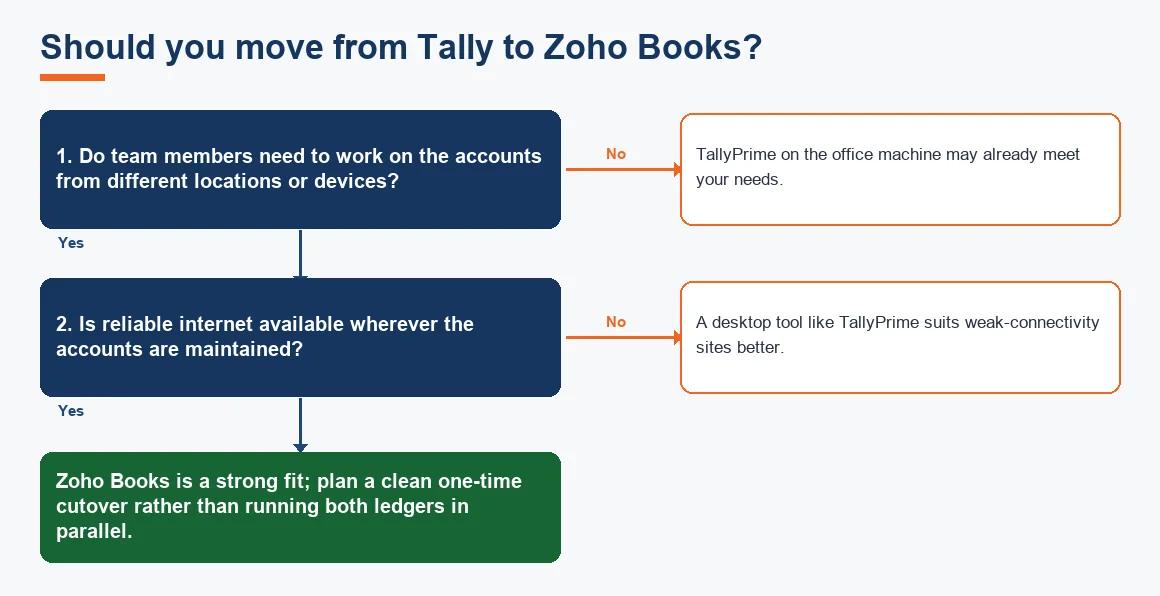
Being honest about the weak points matters more than a feature list. Zoho Books needs the internet, so a connectivity outage stops work in a way a desktop tool does not. Deep manufacturing, job-work and complex inventory scenarios are still Tally's home ground. Some accountants and staff simply know Tally's keyboard-driven screens cold and take time to adjust. And because pricing is a subscription, the spend never stops, whereas a Tally licence is bought once.
None of these is a deal-breaker for a typical SME, but they should shape the decision. A factory floor with weak signal is a poor fit for a cloud-only tool.
Is Tally still in demand, and when does it still win?
Tally is far from finished. It remains the default in large parts of Indian trade, and many accountants and auditors expect data in Tally format. It still wins where connectivity is unreliable, where deep inventory and manufacturing tracking are central, and where a team is fully trained and productive on it already. Security-conscious owners also value that the data sits on their own machine, protected by features such as Tally Vault password controls at company level.
The practical picture is that both tools have healthy demand. Zoho Books grows fastest among newer, service-led and multi-location businesses; Tally holds firm in stock-heavy trade and manufacturing. If you want cloud options beyond Zoho, compare Xero Accounting Services and Odoo Accounting Services as well.
Can Zoho replace Tally, and is Zoho Books compatible with Tally?
Zoho Books can replace Tally for most service and trading businesses, but the two are not compatible in the sense of a live sync. There is no continuous two-way link. Data moves one way by import: Tally masters and vouchers are exported to Excel or XML, reformatted into Zoho templates, and loaded as customers, vendors, items and opening balances. Zoho Books can also export back to Excel for a Tally import if you ever reverse course. Running both in parallel beyond a short cutover simply creates two versions of the same ledger, which is more risk than benefit.
The migration itself is a defined project, not a button. The flow below shows the usual order of work.
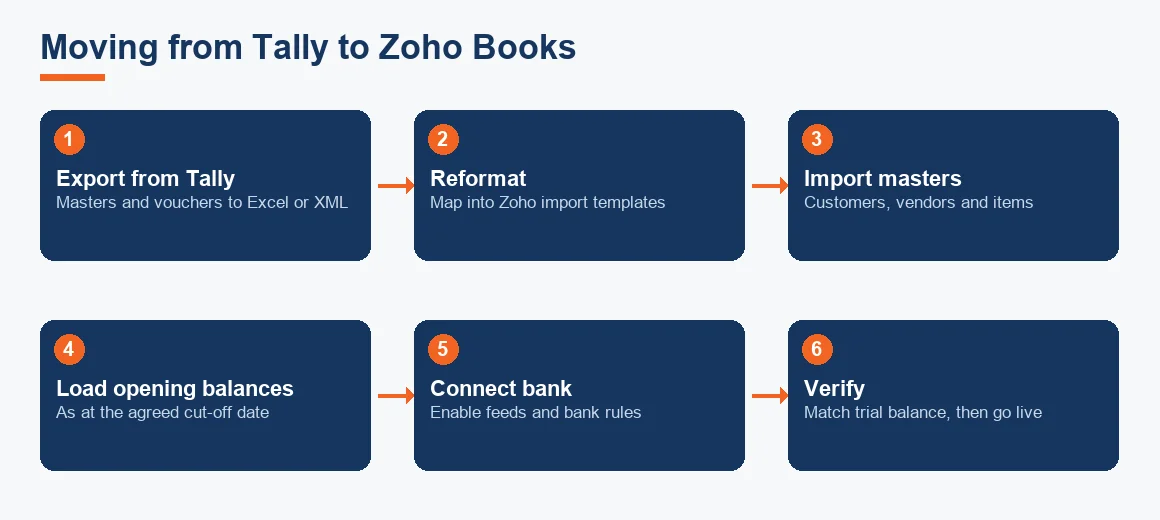
The step that trips people up is opening balances. Export your Tally data using a Tally XML export, agree a cut-off date, and load debtor and creditor balances as at that date so the new ledger opens clean. Once live, connect the bank for Zoho banking feeds and let bank rules and bank reconciliation handle the daily matching. We cover the mechanics in detail on our migration from Tally to Zoho guide, and there are step walkthroughs for setting up GST in Zoho Books, filing GST returns from Zoho Books and automating bank reconciliation in Zoho Books.
Worked example: three-year cost of ownership compared
Cost is where the two models diverge most, so it helps to see the whole picture rather than a monthly headline. The example below compares a small business needing a modest single-user setup: Zoho Books on an annual plan against a TallyPrime Silver licence with its yearly software services renewal. All figures are indicative and Exl GST, and actual plans vary; the point is the shape, not the exact rupee.
| Cost item | Zoho Books (annual plan) | TallyPrime Silver |
|---|---|---|
| Upfront licence | Nil | 18,000 |
| Year 1 | 8,999 (subscription) | Included with licence |
| Year 2 | 8,999 (subscription) | 4,500 (TSS renewal) |
| Year 3 | 8,999 (subscription) | 4,500 (TSS renewal) |
| Three-year total | 26,997 | 27,000 |
The totals land within three rupees of each other, which is the real lesson: over a three-year horizon the two are broadly comparable in cash terms. What differs is timing. Tally asks for a larger sum on day one and small renewals after; Zoho Books spreads an even amount across every year and bundles hosting, backups and updates into it. If cash flow at the start is tight, the subscription is easier to absorb. If you dislike recurring bills and have the funds upfront, the licence appeals. Neither is a runaway winner on price alone, so let working style decide. For a full plan-by-plan breakdown, see our Zoho Books pricing and plans explained. If you are weighing fixed-asset handling too, our depreciation calculator shows how each schedule builds up.
Which is better for your SME?
There is no single winner, only a fit. Zoho Books suits businesses that want anywhere access, several users, automatic backups and a predictable annual cost, particularly service firms, agencies and multi-location trades. Tally suits stock-heavy and manufacturing businesses, sites with weak connectivity, and teams already fast on it who value keeping data on their own machine. Many owners run a short parallel cutover during migration, then commit fully to one to avoid maintaining two ledgers.
Key terms
- General Ledger: the master record where every posted transaction accumulates by account.
- Double-Entry Bookkeeping: the method where each entry posts an equal debit and credit.
- Tally XML Export: the structured file format used to pull Tally masters and vouchers out for migration.
- Zoho Banking Feeds: the live link that pulls bank transactions into Zoho Books for matching.
- Bank Reconciliation: matching book entries against the bank statement to confirm both agree.
Key takeaways
- The core choice is cloud subscription (Zoho Books) versus desktop licence (TallyPrime), not compliance capability.
- Zoho Books keeps a full general ledger and true double-entry and can replace Tally for most service and trading firms.
- There is no live sync; migration is a one-way import of masters, vouchers and opening balances on an agreed cut-off date.
- Over three years the total cost is often close; cloud spreads it, desktop front-loads it.
- Tally still wins on deep inventory, weak connectivity and local data control; pick on working style, not features alone.
Both tools file the same statutory returns. E-invoicing is mandatory once your aggregate turnover crosses the notified threshold, as set out by CBIC, GST returns are filed on the GST portal, and companies must retain books for the period prescribed under the Companies Act, per the Ministry of Corporate Affairs. Choose the software that fits how you work; the compliance obligations stay the same either way.
Decision guide