In this guide
The main reasons businesses migrate from Tally to Zoho Books are practical rather than dramatic: they want books their whole team and their accountant can open from any device, automated bank feeds and GST filing instead of manual imports, and a live audit trail that stays on all year. Tally still runs well on the machine it is installed on, but a growing firm often outgrows a single-machine, licence-per-seat setup faster than it outgrows Tally's features. This is a reasons-and-awareness piece; if you are ready to plan the actual move, our service page on Migration: Tally to Zoho Books covers scope and support.
Why businesses migrate from Tally to Zoho Books: the short answer
Three shifts push most owners to look at Zoho Books. First, remote and hybrid work made a desktop-bound ledger awkward, because the person recording sales, the person approving payments and the CA reviewing the books are rarely on the same machine. Second, GST, e-invoicing and bank reconciliation have become monthly grind that owners want automated rather than keyed in by hand. Third, cloud software receives statutory updates centrally, so there is no version to reinstall each time a rate or return format changes. None of this means Tally is obsolete; it means the trade-offs have moved.
What are the advantages of Zoho over Tally?
The clearest gains are around access, automation and compliance built into the workflow rather than bolted on.
Access from anywhere
Zoho Books is browser based, so the same books open on a laptop at the office, a phone at a warehouse and the CA's screen during review, all showing the same live general ledger. Tally runs locally and needs remote-desktop tools or a LAN to be shared, which many small teams find fragile.
Automation and bank feeds
Bank feeds pull transactions in automatically and suggest matches, so bank reconciliation becomes a review task rather than a re-typing task. Recurring invoices, payment reminders and workflow approvals run on rules you set once.
GST and e-invoicing in the workflow
GST returns, e-invoice generation and e-way bills are handled inside the app against your mapped GSTINs, which reduces the export-and-upload steps. The Government's own filing systems on the GST portal remain the source of truth, so the value is in fewer manual hand-offs, not in bypassing any statutory step. The table below sets the two side by side.
| Dimension | TallyPrime | Zoho Books |
|---|---|---|
| Deployment | On-premise, per machine | Cloud, in the browser |
| Access | Single machine or LAN | Any device with a login |
| Bank reconciliation | Manual statement import | Automated bank feeds |
| GST and e-invoicing | Built in, desktop based | Built in, cloud based |
| Manufacturing and job work | Strong, multi-stage | Basic bills of material |
| Licensing | Perpetual plus annual TSS | Per-user subscription |
| Offline use | Works fully offline | Needs internet connection |
What are the disadvantages of Tally software that trigger the move?
Tally's limits are rarely about accounting logic; its double-entry bookkeeping engine is solid. The friction points owners cite are: the licence is tied to a machine, so remote access needs extra tooling; sharing books with an external accountant usually means posting a data file back and forth; and multi-user, multi-location working costs more seats. For distributed teams these are daily irritations rather than one-off ones, which is what eventually tips the decision.
Can we migrate data from Tally to Zoho Books?
Yes. Masters (ledgers, groups, items, contacts), opening balances and outstanding bills move across, and Zoho provides import routes for the exported files. The quality of the result depends almost entirely on how cleanly you map the chart of accounts before importing, so that each Tally ledger lands in the right Zoho account type and against the correct GSTIN. We keep the mechanics to their own guides: see How to Migrate From Tally to Zoho Books: A Step-by-Step Guide and the practical Tally to Zoho Books migration checklist. For a straight feature-and-price face-off, the Tally vs Zoho Books comparison is the better read.
The audit trail rule that quietly forces the decision
Since 1 April 2023, Rule 3(1) of the Companies (Accounts) Rules requires companies to use accounting software that records an edit log of every change with the date, and to keep that feature switched on through the year. The auditor comments on whether the audit trail was maintained under Rule 11(g) of the Companies (Audit and Auditors) Rules, 2014. The full text sits with the Ministry of Corporate Affairs. Zoho Books keeps this log on by default and it cannot be turned off, which auditors find easy to sign. Companies on older or improperly configured setups sometimes discover the move is simpler than retro-fitting compliance, and this rule is a common trigger.
How the migration decision usually plays out
A sensible move follows a steady sequence rather than a rushed weekend cut-over. The flow below is the pattern we see work most often.
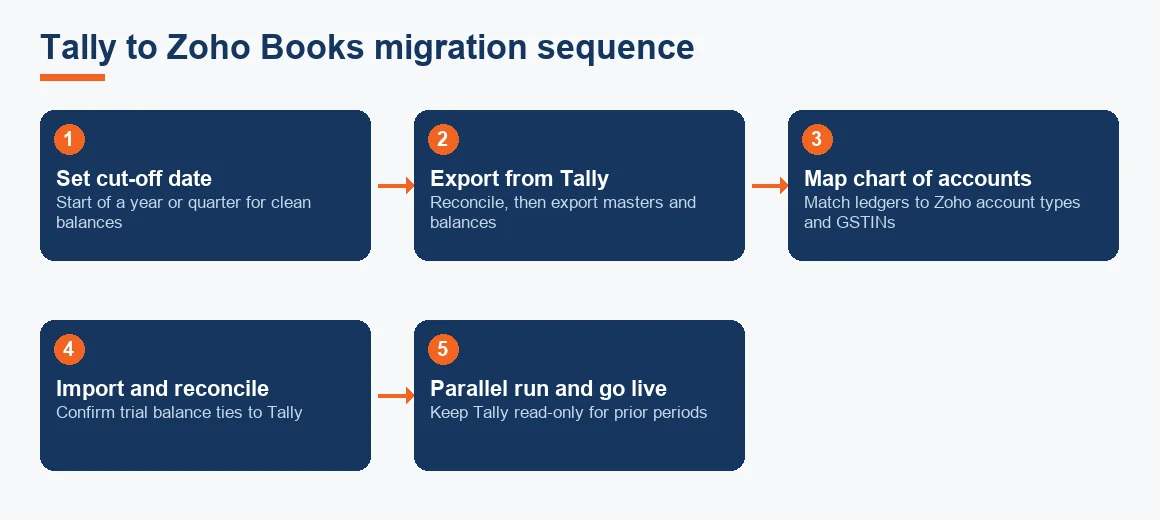
- Pick a cut-off date: usually the start of a financial year or a quarter, so opening balances are clean.
- Export and tidy in Tally: reconcile bank and party balances first, then export masters and balances.
- Map the chart of accounts: match each Tally ledger to a Zoho account type and GSTIN before importing anything.
- Import and reconcile: load masters and opening balances, then confirm the trial balance ties to Tally on the cut-off date.
- Run parallel, then go live: keep Tally read-only for the prior period and record fresh entries only in Zoho.
Keep the old Tally data accessible for the statutory retention period; do not delete it once you go live. If GST history matters to you, the note on preserving your GST history when moving from Tally to Zoho is worth a look, and fixed-asset registers can be re-checked against Schedule II lives with a depreciation calculator while you map.
Worked example: a three-year cost comparison
Cost is rarely the deciding factor, but owners still want the numbers. Below is an indicative three-year cost of ownership for a small trading firm, comparing a single-user TallyPrime Silver licence with a Zoho Books Standard subscription. All figures are indicative and Exl GST; check current pricing before you decide.
| Cost item | TallyPrime Silver (single user) | Zoho Books Standard |
|---|---|---|
| Year 1 | INR 22500 (perpetual licence) | INR 8988 (INR 749/month billed yearly) |
| Year 2 (renewal) | INR 4500 (TSS) | INR 8988 |
| Year 3 (renewal) | INR 4500 (TSS) | INR 8988 |
| Three-year total | INR 31500 | INR 26964 |
| Users included | 1 | 3 |
| Access | One machine | Any device |
On these indicative numbers the totals are close (about INR 31,500 against INR 26,964 over three years), but Zoho includes three users and anywhere access, while the single Tally seat needs extra tooling to share. That is the honest picture: price is a wash, and the decision turns on access, automation and who maintains the books. For an outsourced arrangement, our Accounting and Bookkeeping Services in India and the wider Accounting and Bookkeeping hub set out the options.
Key terms
- Tally XML Export: the structured file format Tally uses to push masters and vouchers out for import elsewhere.
- Zoho GSTIN Mapping: linking each ledger and contact to the correct GSTIN so GST returns compute correctly.
- Historical Data Cut-off Date: the date from which entries move to the new system, with everything before it kept as history.
- GST History Extraction: pulling past returns and reconciliations out of the old system before you retire it.
- Section 43B(h) MSME Clock: the income-tax rule tying deduction of MSME dues to timely payment, which cloud reminders help you track.
Which businesses should stay on Tally
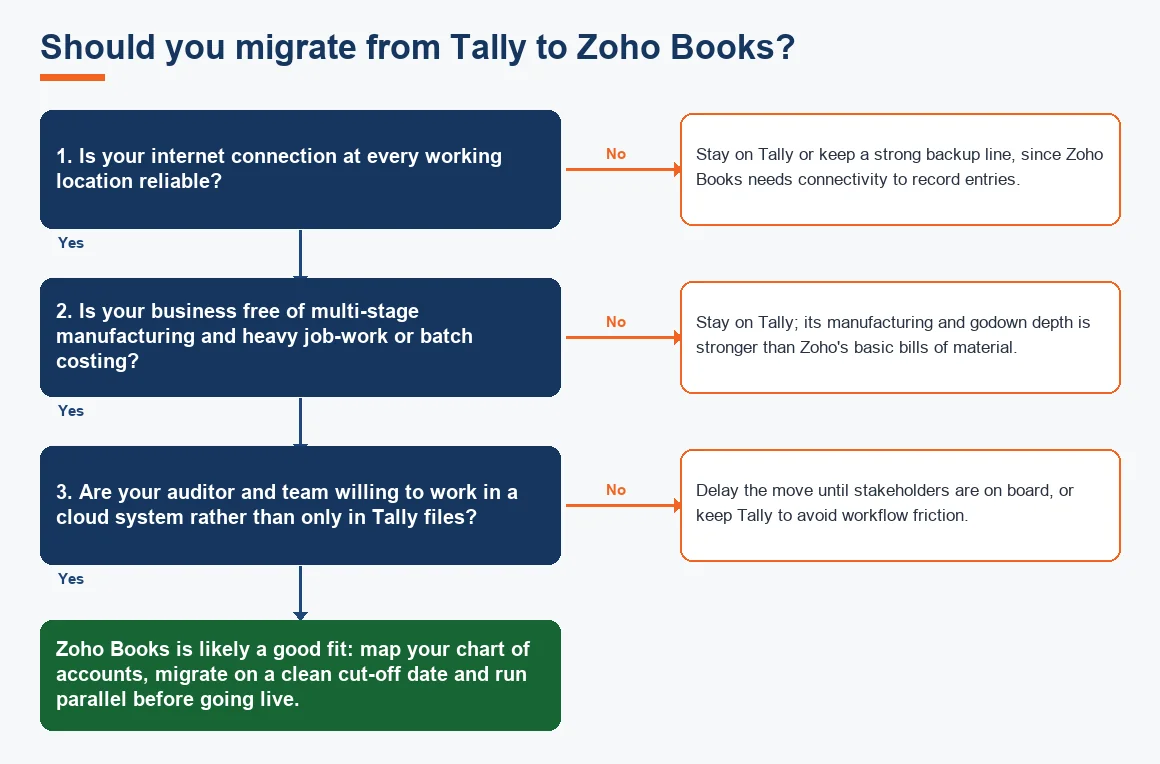
Migration is not for everyone. Manufacturers running multi-stage production and job work, distributors with large godown networks and batch costing, and firms whose auditor and consultants work only inside Tally files usually gain little. Units at locations with unreliable connectivity and companies with heavily customised TDL add-ons are also better staying put, because rebuilding those workflows costs more than any licence saving. If your needs sit closer to an ERP than to core accounting, the Migration: Tally to Odoo route may fit better than Zoho Books. There is no shame in staying; the right software is the one that matches how you actually operate.
Key takeaways
- Access and collaboration, not accounting features, are the usual reason businesses leave Tally for Zoho Books.
- Data migrates cleanly only when the chart of accounts is mapped before import; the trial balance must tie out on the cut-off date.
- The MCA audit-trail rule keeps an always-on edit log on the agenda, and Zoho Books meets it by default.
- Over three years the licence cost is roughly a wash, so decide on workflow fit, not price.
- Heavy manufacturing, large-godown inventory and poor-connectivity sites are the cases to keep on Tally.
Decision guide