In this guide
The tally to zoho migration steps follow a fixed order that keeps your balances intact: back up and clean your Tally data, export the masters to Excel, map them to the Zoho Books import templates, load the chart of accounts, then customers, suppliers and items, enter opening balances from the trial balance as at the go live date, and only after the two trial balances match to the rupee do you start recording live transactions. Do it in that sequence and nothing goes missing; do it out of order and references break. This guide walks through each stage the way we run it for clients, and points you to the deeper checklists where they exist. If you would rather hand the whole cut-over to a team, that sits with our Migration: Tally to Zoho Books service rather than this article.
Can you migrate data from Tally to Zoho Books?
Yes. There is no one-click bridge that reads a Tally company file straight into Zoho Books, so the move is a structured export and import rather than a live sync. You export your Tally masters and outstanding balances to Excel, reshape them into the columns Zoho expects, and upload them in the right order. Historical vouchers do not have to be re-keyed transaction by transaction: what you carry forward are the opening balances as at your chosen cut-off, and the detailed history stays readable in your archived Tally files. This keeps the migration light while still satisfying the record-keeping duties we cover further down.
The tally to zoho migration steps at a glance
Before the detail, here is the shape of the whole job. Each stage feeds the next, so resist the urge to import invoices before the parties and items they reference exist in Zoho.
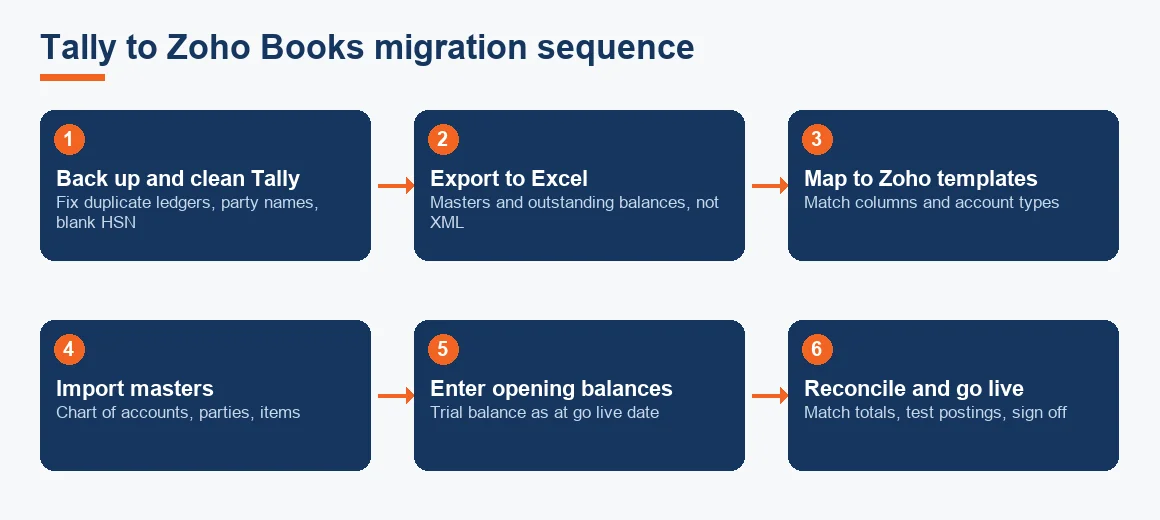
The two rules that save the most rework are simple: fix data quality in Tally first (duplicate ledgers, misspelt party names, blank HSN codes), and always import in dependency order so that a sales invoice can find the customer and item it points to. Our sister article, A Tally to Zoho Books Migration Checklist (Data & GST), lists every field to tick off if you want a line-by-line worksheet.
How to migrate Tally data: exporting and preparing the files
Start in Tally, not in Zoho. Take a full backup of the company data, then export each master group you need: ledgers grouped under the chart of accounts, sundry debtors and creditors with their outstanding bills, stock items with quantities and rates, and your GST registration details. Tally can export to Excel and to its own XML, but Zoho Books does not read Tally XML, so the practical path is to export to Excel and then remap the columns.
Which file format Zoho Books accepts
Zoho Books imports CSV, XLS and XLSX files against a downloadable template for each record type. So the working method is: download the Zoho template for chart of accounts, paste your cleaned Tally data into it, match every column (account name, type, GSTIN, opening balance), and upload. Repeat the same template-mapping for customers, vendors and items. A ledger mapping schema that pairs each Tally ledger to a Zoho account type and tax rate is the single most useful document you will build.
How to import Tally data into Zoho Books in the right order
Import order is not cosmetic; it decides whether your references resolve. Load the foundation records first, then the things that depend on them.
- Chart of accounts: every ledger head, mapped to a Zoho account type.
- Customers and suppliers: name, GSTIN, state (which drives place of supply), and contact details.
- Items: name, unit, selling and purchase rate, HSN or SAC code and tax rate.
- Opening balances: the trial balance as at the go live date.
- Open invoices and bills: unpaid documents entered one by one so ageing survives.
Bring outstanding debtors and creditors in invoice by invoice, not as a single lump, so that payment matching and ageing buckets keep working after go live. If you dump one net figure per party, you lose the ability to knock off individual invoices when the money arrives.
How opening balances are entered
Opening balances come from the Tally trial balance as at the go live date, entered under Settings and Opening Balances in Zoho Books. Every group total, from cash and bank to loans, capital, fixed assets and duties and taxes, is keyed in so that debits equal credits. Because Zoho Books runs on the same double-entry logic as Tally, the imported trial balance must balance before the software will treat the file as live-ready.
How inventory is moved from Tally to Zoho Books
Export the stock summary at the go live date with item name, unit, quantity, rate and HSN code, then import each line as an item with opening stock in Zoho Books. Value that opening stock at the lower of cost and net realisable value, as Accounting Standard 2 requires, so you are not carrying inflated inventory into the new ledger. Batch numbers, expiry dates, godown-wise balances and alternate units frequently need manual rework because the two systems structure those fields differently. If you run a warehouse or a pharmacy with heavy batch tracking, budget extra time here and reconcile stock value as a separate line in your sign-off.
Choosing the cut-over date
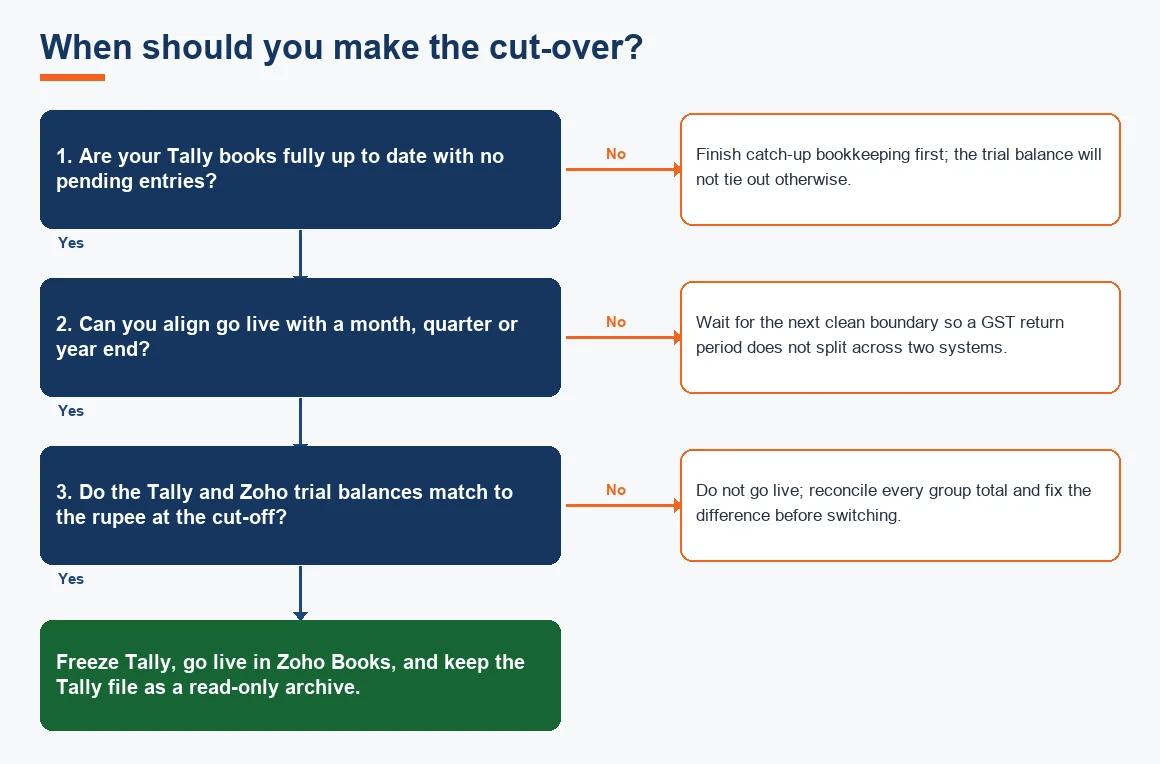
The cleanest cut-over is the first day of a month, and ideally the first day of a quarter or financial year. That way one GST return period sits entirely in Tally and the next sits entirely in Zoho, with no split month to reconcile twice. Running the two systems in parallel for a few weeks is sensible, but stop dual entry as soon as the reconciliation is signed off, or you double your bookkeeping and invite mismatches.
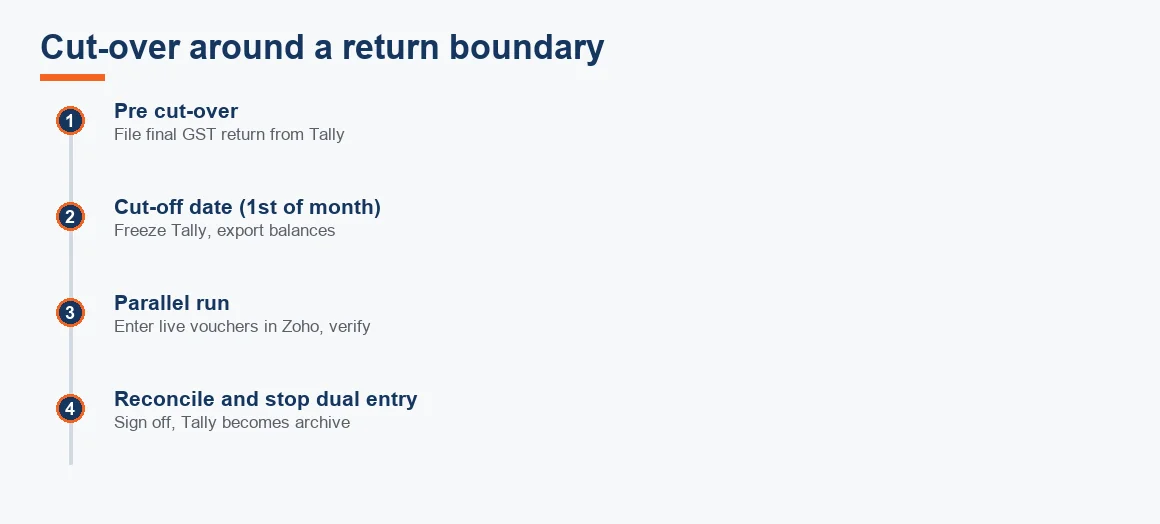
Aligning the switch with a return boundary also protects your GST trail. If you want that history handled carefully, our note on preserving your GST history when moving from Tally to Zoho covers what to archive before you file the final Tally-based return.
Worked example: reconciling the trial balance before go live
This is the check that decides whether the migration is done. You run a trial balance in both systems at the cut-off date and match every group total. The migration is only signed off when the difference column reads zero throughout. Figures below are illustrative for a small trading company migrating on 1 April.
| Ledger group | Tally (Rs) | Zoho opening (Rs) | Difference (Rs) |
|---|---|---|---|
| Cash and bank | 4,20,000 | 4,20,000 | 0 |
| Sundry debtors | 8,65,000 | 8,65,000 | 0 |
| Closing stock | 6,10,000 | 6,10,000 | 0 |
| Fixed assets (net) | 3,05,000 | 3,05,000 | 0 |
| Sundry creditors | 5,40,000 | 5,40,000 | 0 |
| Duties and taxes (GST) | 1,10,000 | 1,10,000 | 0 |
| Capital and reserves | 15,50,000 | 15,50,000 | 0 |
| Total (Dr = Cr) | 22,00,000 | 22,00,000 | 0 |
Debits (cash, debtors, stock, fixed assets) sum to Rs 22,00,000 and credits (creditors, GST payable, capital and reserves) sum to Rs 22,00,000, so the file balances. Once the group totals tie out, post one test sales invoice at 18% GST, one purchase bill and one payment, and confirm the tax, any TDS and the reports behave before you stop entering in Tally.
How to check the migration before going live
Treat go live as a decision, not a date. The comparison above is the evidence; the test postings are the proof that the engine works. Confirm that tax rates trigger correctly, that place of supply resolves from the customer's state, and that a receipt knocks off the right open invoice. Only when all of that passes do you announce the switch internally and freeze Tally for new entries. If your books are behind and the trial balance will not tie out because of gaps, that is a bookkeeping clean-up problem to fix before migrating, not something the import can paper over.
What happens to your old Tally data after migrating
Nothing gets deleted. Section 128(5) of the Companies Act, 2013 requires books of account and relevant vouchers to be kept in good order for eight financial years immediately preceding the current year, and the GST law adds its own retention period on top. So keep the Tally licence and data files readable, and archive backups together with PDF copies of the trial balance, ledgers, stock summary and filed GST returns for the whole retention window. Zoho Books becomes your live system of record; Tally becomes your read-only archive. The registrar's requirements are set out by the Ministry of Corporate Affairs, and the GST record-keeping rules by the CBIC, while the underlying returns remain available on the GST portal.
Key terms
- Trial Balance: the list of every ledger balance that must tie out debit to credit; the master check for a migration.
- Historical Data Cut-off Date: the fixed date at which balances are frozen in Tally and carried into Zoho.
- Ledger Mapping Schema: the document pairing each Tally ledger to a Zoho account type and tax rate.
- Outstanding Balances Migration: bringing unpaid invoices and bills across one by one so ageing survives.
- Tally XML Export: Tally's native export format, which Zoho cannot read directly and which must be converted to mapped Excel.
Where this fits with other software moves
Zoho is one destination among several. If you are weighing options, the reasons owners switch are set out in why businesses are migrating from Tally to Zoho Books, and a side-by-side is in Tally vs Zoho Books: a feature and pricing comparison. The same export-map-import discipline applies if you are heading elsewhere, such as our Migration: Tally to Odoo service. For the wider picture of how software choice sits inside day-to-day books, see the Accounting & Bookkeeping hub and our Accounting & Bookkeeping Services in India. When you carry fixed assets across, our depreciation calculator helps you re-check net block figures before you key the opening balance.
Key takeaways
- Migrate in dependency order: chart of accounts, then parties, then items, then opening balances, then open documents.
- Zoho Books reads CSV, XLS and XLSX; Tally XML must be converted to a mapped Excel template first.
- Opening balances come from the Tally trial balance at the cut-off date and must match to the rupee before any live entry.
- Pick a month, quarter or year-end cut-over so GST return periods do not split across two systems.
- Preserve Tally data for eight financial years under the Companies Act; Zoho becomes live, Tally becomes the archive.
Decision guide