In this guide
Moving GST data from Tally to Zoho Books is really two separate jobs. One is carrying the live position (opening balances, outstanding invoices, the input tax credit ledger) into the new books so day-to-day work continues. The other, quieter job is preserving the filed return history that the law still holds you to long after the old system is switched off. This guide is about that second job: what GST history to extract, where it lives, and how to make sure a departmental notice two years from now does not land you searching for a licence you have already cancelled.
Does Zoho Books handle GST, and what does it actually store?
Yes. Zoho Books is built for Indian GST: you map each place of business to its GSTIN, tag every contact and item with the correct HSN or SAC and tax rate, and the software prepares GSTR-1 and GSTR-3B summaries and pushes returns through the GST portal or a GSP. Adding GST details in Zoho is done under Settings, then Taxes and GST, where you enter the GSTIN, registration type and the date GST settings should take effect. From that effective date onward Zoho keeps its own return workpapers and a full audit trail of invoices and credit notes.
The catch is the word onward. Zoho holds what you file from the effective date. It does not automatically hold what Tally filed before the move. That earlier history has to be preserved deliberately, which is the whole point of a careful migration from Tally to Zoho Books. If you are still weighing the switch itself, the reasons sit in a separate piece on why businesses are migrating from Tally to Zoho Books.
How long must GST history be preserved?
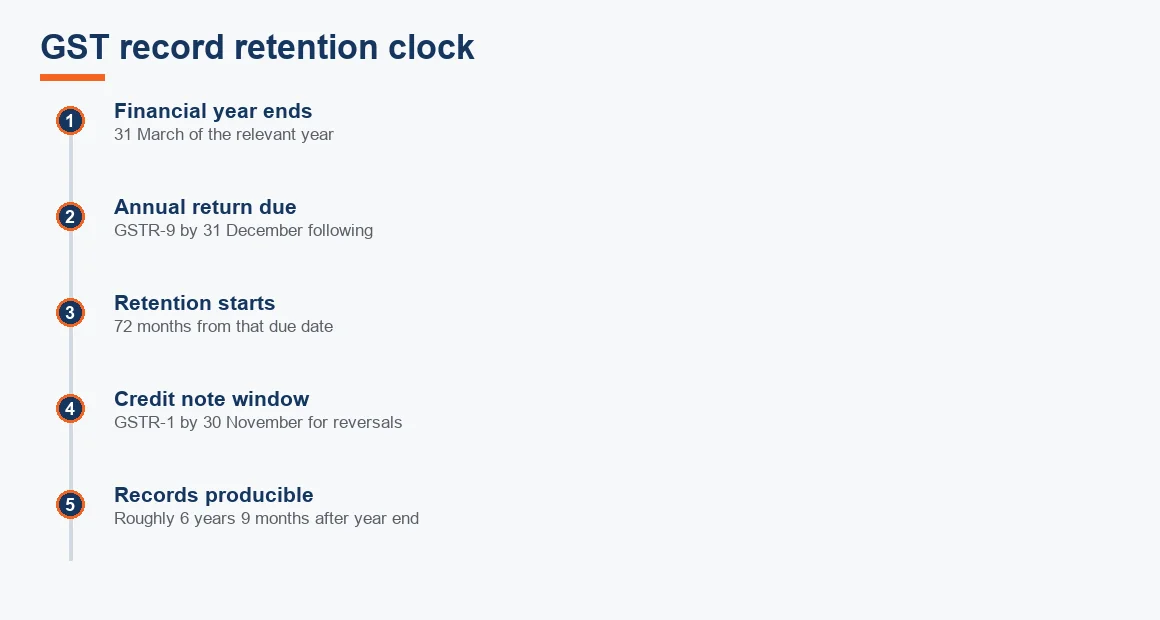
Section 36 of the CGST Act requires every registered person to keep books and records for seventy two months from the due date of furnishing the annual return for that year. Because the annual return (GSTR-9) is due by 31 December following the financial year, seventy two months works out to roughly six years and nine months after the year end. Where an appeal, revision or investigation is pending, records must be kept for one year after that proceeding concludes, whichever is later. The retention rule is set out in the law itself, and the return archive on the portal is described in the CBIC guidance at cbic-gst.gov.in.
So a migration in 2026 does not free you from the 2020-21 records. Those still have to be producible in 2027. That single fact should shape every decision below about what you export and what you keep alive.
What GST history to preserve before Tally goes dark
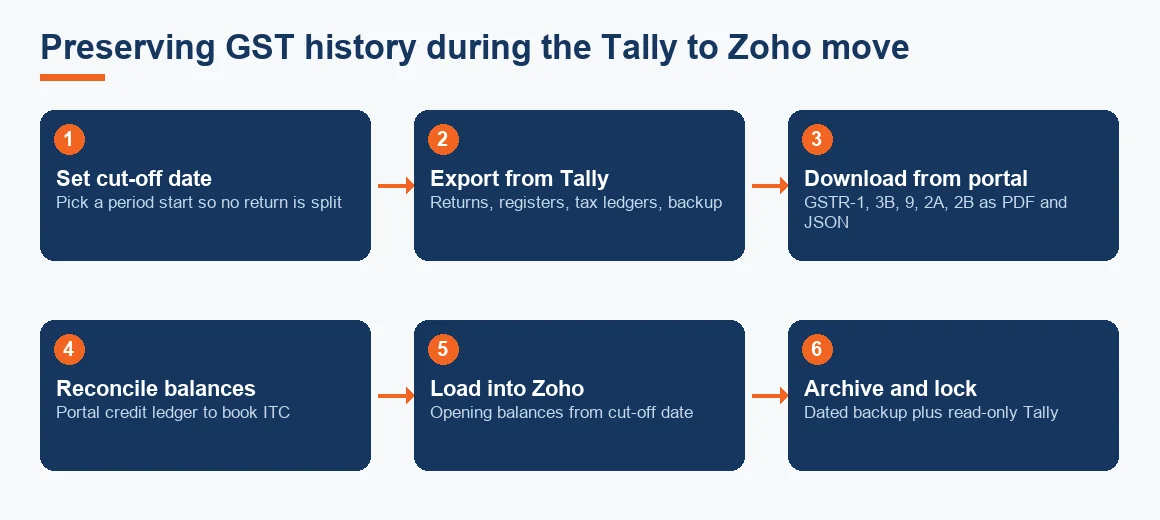
The safest approach is to treat go live as a hard cut-off and archive a complete pack for every open year. The table below maps what to preserve against where each item actually lives, so nothing depends on a single source surviving.
| What to preserve | Primary source | Backup source |
|---|---|---|
| Filed GSTR-1 (period-wise) | GST portal (PDF and JSON) | Tally GST returns export |
| Filed GSTR-3B (period-wise) | GST portal (PDF and JSON) | Tally GST returns export |
| GSTR-9 and 9C (annual) | GST portal | Signed working papers |
| GSTR-2A and 2B (ITC) | GST portal download | Reconciliation workbook |
| Sales and purchase registers | Tally day book export | Excel / PDF archive |
| e-invoice IRNs and e-way bills | IRP and e-way bill portals | Tally voucher references |
| ITC and tax ledgers at cut-off | Tally trial balance | Portal electronic ledgers |
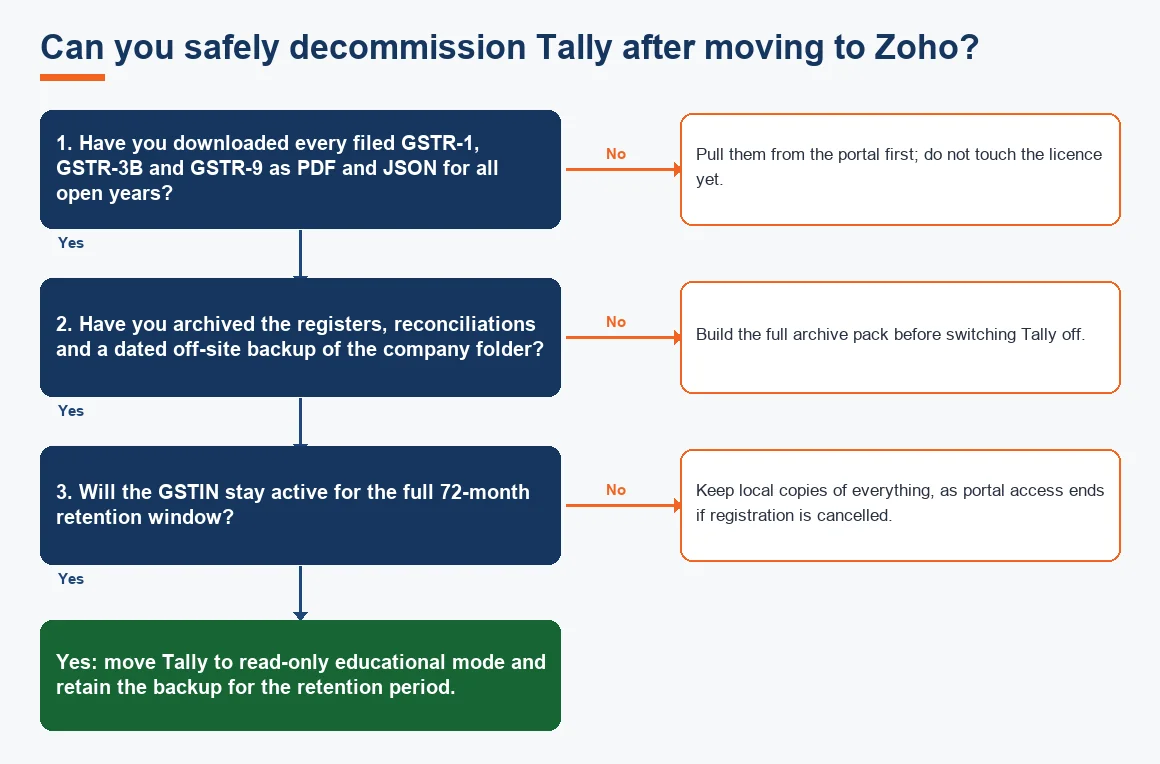
Filed returns stay on the GST portal under the returns dashboard and can be pulled as PDF or JSON for past periods regardless of which accounting software you now run, as confirmed on the GST portal. GSTR-2A and 2B for earlier periods remain available too. Even so, download and archive the year's returns and reconciliations at go live, because portal access depends on the GSTIN staying active. If registration is ever surrendered or cancelled, that convenient online history can disappear.
How to export GST data from Tally Prime
Getting GST details out of Tally is straightforward once you know where to look. Work through it methodically rather than exporting one report and assuming it is complete.
- Open the company in TallyPrime and go to Display More Reports, then Statutory Reports, then GST, then GSTR-1 and GSTR-3B. Set the period to each return month or quarter in turn.
- Use the export option (Alt+E) to save each return summary. Export to Excel for readability and, where offered, to JSON to preserve the machine-readable version.
- Pull the day book and the sales and purchase registers for the same periods, so you hold transaction-level detail behind each summary.
- Export the trial balance and the individual tax ledgers (CGST, SGST, IGST, cess and the ITC ledgers) as at the cut-off date. These feed your opening balances in Zoho.
- Take a full, dated backup of the company folder and store one copy off the office machine, for example on an external drive or secure cloud folder.
Exporting Tally data to the GST portal is a different task and usually not needed for old periods: those returns are already filed. The export above is for your archive and for building Zoho's opening figures, not for re-filing.
How to import GST data into Zoho Books and set the opening position
Zoho Books does not ingest a full Tally return history and does not need to. What it needs is a clean starting position as at your cut-off date. After adding the GST registration under Settings, import the master data (contacts with their GSTINs, items with HSN or SAC codes and tax rates) and then load opening balances: outstanding receivables and payables, the closing trial balance, and the tax ledger balances.
Set the migration date to the first day of a return period, ideally the start of a month or, cleaner still, the start of a quarter or financial year. That way no single GSTR-1 or GSTR-3B is split across two systems. For the mechanics of the master-data and balance import itself, the companion step-by-step migration guide and the data and GST migration checklist walk through each screen. Getting a GST report in Zoho afterwards is then simply Reports, then GST, then the return summary for the period, which will only ever cover periods on or after the effective date.
Reconciling GST after the move
Reconciliation is where migrations succeed or quietly fail. Two balances have to tie out at the cut-off date.
The input tax credit balance
Tie the electronic credit ledger balance shown on the GST portal at the changeover date to the input tax credit ledger in Tally. List every difference, resolve what you can, then carry the portal figure into Zoho Books as the opening ITC balance, because the portal is the position the department recognises. Credit claimed in the books but not yet appearing in GSTR-2B should be parked in a separate ledger until the supplier files, so your books never overstate available credit.
Ongoing GSTR-2B matching in Zoho
From go live, reconcile GST in Zoho Books by importing GSTR-2B each month and matching it to recorded purchases, exactly as you did in Tally. The GSTR-2B matching discipline does not change with the software, only the screen you do it on.
Handling credit notes against pre-migration invoices
A common worry is what happens when a customer returns goods sold under a Tally invoice after you have moved to Zoho. Raise the credit note in Zoho Books quoting the original Tally invoice number and date, and load that original invoice as a historical document or an opening receivable so the credit can be applied against it. The credit note still has to be reported in GSTR-1 by 30 November following the end of that financial year for the output tax to be reduced, a deadline set out in Section 34 and summarised on the GST portal. Miss that window and the tax on the return cannot be recovered.
Worked example: reconciling the electronic credit ledger at changeover
Assume a firm migrates on 1 October 2026 with the following closing ITC picture. The goal is to agree the portal balance and set the correct opening figure in Zoho Books. Figures are illustrative.
| Particulars | Tally ITC ledger (INR) | Portal credit ledger (INR) |
|---|---|---|
| ITC as per books at 30 Sep 2026 | 4,85,000 | - |
| Electronic credit ledger on portal | - | 4,60,000 |
| Less: credit booked, supplier not yet filed (parked) | (25,000) | - |
| Adjusted book ITC | 4,60,000 | 4,60,000 |
| Opening ITC to carry into Zoho | 4,60,000 (portal figure) | |
The INR 25,000 gap was not an error. It was credit recorded in the books before the supplier filed, so it had not yet reached GSTR-2B or the credit ledger. Carry INR 4,60,000 into Zoho as the opening balance and hold the INR 25,000 in a separate provisional ITC ledger, releasing it in the month GSTR-2B finally reflects it. This keeps the recognised credit exactly equal to the government's record.
Retention, read-only access and a dated backup
Once the archive is built and balances reconciled, decide what happens to Tally. You do not need a live paid licence to satisfy retention. TallyPrime in educational mode opens existing company data for viewing without a paid licence, which is usually enough to answer a departmental query or pull a sample voucher during an audit. Keep that read-only access, plus a dated backup of the company folder stored off the office machine, for the full seventy two-month window. For teams that also run inventory or a second product, the parallel route to migration from Tally to Odoo follows the same preserve-then-reconcile logic.
Key terms
- GST History Extraction: pulling filed returns and registers out of the old system before it is switched off.
- Historical Data Cut-off Date: the dividing line after which the new software owns the records and before which the old system holds them.
- GSTR-2B Input Tax Credit Matching: monthly reconciliation of recorded purchases against the auto-drafted GSTR-2B statement.
- Outstanding Balances Migration: carrying open receivables, payables and ledger balances into the new books as opening figures.
- Tally XML Export: the structured export format used to move Tally master and voucher data out for archiving or import.
None of this is a reason to delay the switch. The migration itself is well trodden, and comparing the two products in the Tally versus Zoho Books feature and pricing comparison shows why so many firms make the move. The point is simply that GST history is a compliance asset, not a byproduct, and preserving it costs an afternoon now against a scramble later. If you would rather hand the whole exercise to a team, the Tally to Zoho migration service and the broader accounting and bookkeeping hub cover it end to end, and the wider accounting and bookkeeping services in India page sets out ongoing GST support. Opening fixed-asset balances that carry across can be sanity-checked with the depreciation calculator before you lock the trial balance.
Key takeaways
- Preserve GST history deliberately: Zoho holds only what you file from the effective date, not Tally's earlier returns.
- Section 36 fixes retention at 72 months from the annual return due date, so a 2026 migration does not release older years.
- Archive filed GSTR-1, GSTR-3B, GSTR-9, GSTR-2A and 2B at go live, because portal access depends on an active GSTIN.
- Carry the portal electronic credit ledger figure, not the book figure, into Zoho as opening ITC, and park unmatched credit separately.
- Report credit notes against old invoices in GSTR-1 by 30 November following the financial year, and keep Tally in read-only mode with an off-site backup.
Decision guide