In this guide
A Tally to Zoho checklist is a stage-by-stage list of what to reconcile and clean before the switch, what to map and import during it, and what to match after it, so the opening balances in Zoho Books agree exactly with the last audited figures in Tally. Treat migration as an accounting close, not a file copy: the goal is that the trial balance on your last Tally day equals the opening trial balance on your first Zoho Books day, to the rupee. This explainer walks through that checklist. When you are ready to have it done for you, the commercial work sits on the Migration: Tally to Zoho Books service page.
Can we migrate data from Tally to Zoho Books?
Yes, but selectively. Zoho Books imports masters and balances, not the full voucher-by-voucher history behind them. Your chart of accounts, customer and vendor contacts, item list and opening balances move across through CSV or Excel templates. What does not carry cleanly are cost centres, godown-wise stock with batch and expiry detail, price lists tied to stock groups, memorandum vouchers and Tally's edit log. These are either recreated inside Zoho Books using tags, warehouses and price lists, or left in a read-only Tally company that you keep for reference. The table below sets out the split so you can plan realistically before you start.
| Data in Tally | Carries to Zoho Books? | How it is handled |
|---|---|---|
| Ledgers / chart of accounts | Yes | Mapped to Zoho accounts via a mapping sheet |
| Customer and vendor masters | Yes | Imported as Contacts with GSTIN and state |
| Item / stock list | Yes | Imported as Items with HSN and rate |
| Opening balances (TB as at cut-off) | Yes | Entered as opening balances against each account |
| Outstanding invoices and bills | Yes | Imported as open invoices and bills for ageing |
| Cost centres | No | Recreated as tags or reporting fields |
| Godown batch and expiry stock | No | Recreated as warehouses; batch tracking re-set |
| Filed GST and TDS return history | No | Kept in read-only Tally plus PDF exports |
How to prepare Tally data for a Zoho migration
Most migration pain is data hygiene left undone. Before you export anything, tidy the Tally company so the imported general ledger is clean. Merge duplicate ledgers (the same vendor entered twice under two spellings), settle or write off stale suspense entries, and confirm every customer and vendor has a correct GSTIN and state, because Zoho uses the place of supply from the contact record. Run a trial balance and a stock summary as at your intended cut-off date and export both to PDF: these are your parity targets. Pull a Tally XML export or the daybook so nothing is lost if an import needs rebuilding. This clean-up sits alongside the fuller walkthrough in How to Migrate From Tally to Zoho Books.
The Tally to Zoho migration steps checklist
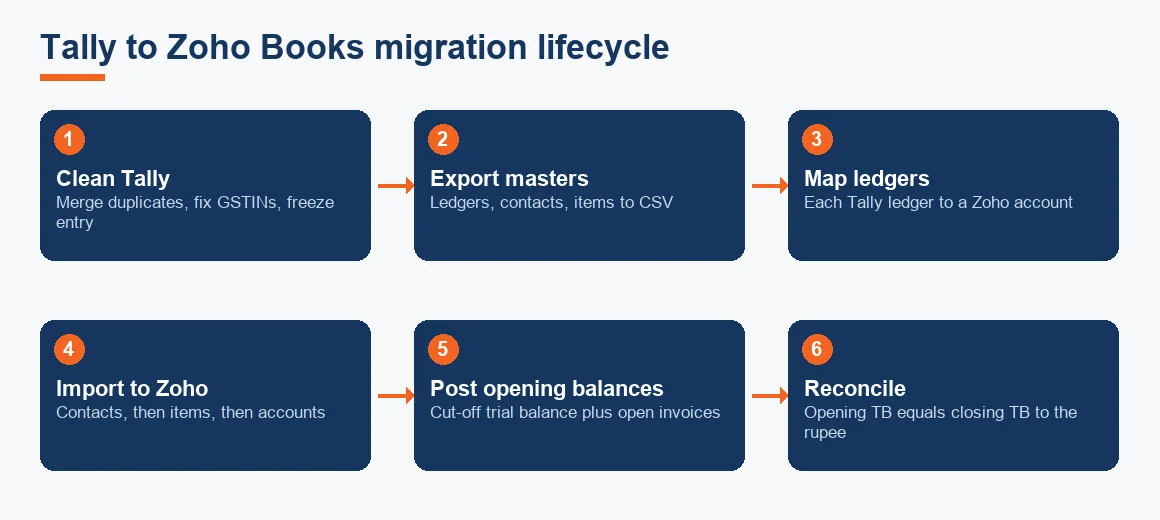
Work through these in order. Each step has a clear finish line, so you always know whether it is done.
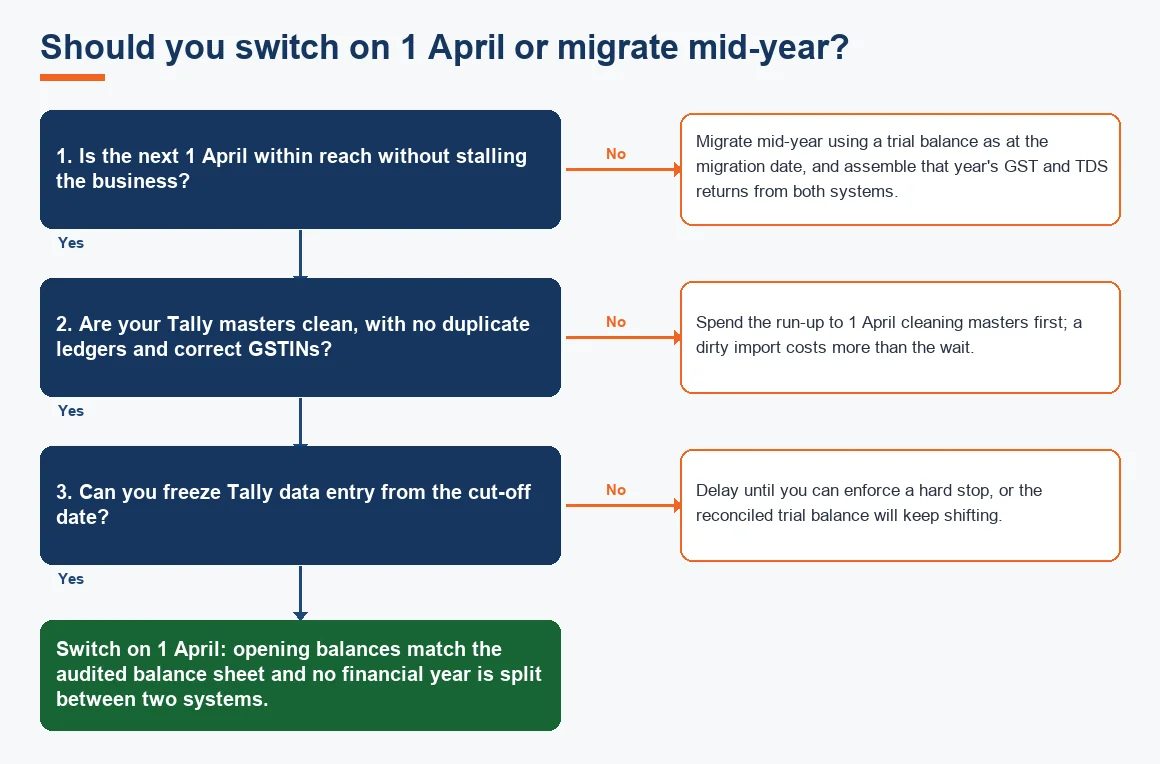
- Fix the cut-off date. Choose 1 April where you can, so opening balances match the audited balance sheet.
- Clean and freeze Tally. Merge duplicates, correct GSTINs, then stop data entry from the cut-off.
- Export masters. Chart of accounts, contacts and items to CSV or the Zoho import templates.
- Build the ledger mapping sheet. Map each Tally ledger to a Zoho account and account type before importing anything.
- Import masters into Zoho Books. Contacts first, then items, then the chart of accounts.
- Enter opening balances. Post the cut-off trial balance as opening balances, and import open invoices and bills for ageing.
- Reconcile the trial balance. Zoho's opening TB must equal the Tally closing TB to the rupee.
- Set up GST, bank feeds and users. Confirm GSTIN mapping, connect banks and set roles before going live.
How to import items and CSV data into Zoho Books
Zoho Books imports through the Import option inside each module: Items, Contacts, Chart of Accounts, Invoices and so on. Download the sample CSV for the module, paste your Tally data into the matching columns, then map each spreadsheet column to a Zoho field during upload. For items, the columns that matter are name, HSN or SAC code, selling and purchase rate, and the linked income and expense account. Keep the file in UTF-8 CSV so rupee symbols and vernacular names do not corrupt. Import a five-row test file first, check it landed correctly, then run the full file. Expense entries after go-live are posted directly in Zoho Books under Purchases or Expenses rather than imported. There is no live two-way sync between Tally and Zoho: migration is a one-time cut-over, and a Zoho-to-Tally Prime reverse conversion is a fresh export, not an undo button.
What to reconcile after the switch: GST and TDS
After go-live, three reconciliations decide whether the migration was clean. First, the trial balance parity described above. Second, GST: returns already filed from Tally, such as GSTR-1 and GSTR-3B, remain valid and are never refiled, so Zoho Books simply reports from the migration date onward and the two systems together cover the year. Confirm your GSTIN is correctly mapped in Zoho and that the first fresh GSTR-2B input tax credit matching run reconciles. Third, TDS: check opening TDS payable and any carried-forward challans. Preserving the older records matters here, which is exactly what Preserving Your GST History When Moving From Tally to Zoho covers. Zoho is a GST Suvidha Provider and can generate the IRN and QR code with the GST portal directly, so e-invoicing continues once turnover thresholds apply under the rules published by CBIC.
Worked example: trial balance parity check
This is the single test that proves the migration balanced. Take the Tally closing trial balance as at 31 March and the Zoho opening trial balance as at 1 April, and place them side by side. Every line must agree. The illustrative figures below are indicative only.
| Account | Tally closing (INR) | Zoho opening (INR) | Difference (INR) |
|---|---|---|---|
| Capital account | 50,00,000 | 50,00,000 | 0 |
| Fixed assets (net) | 32,50,000 | 32,50,000 | 0 |
| Sundry debtors | 18,40,000 | 18,40,000 | 0 |
| Sundry creditors | 12,90,000 | 12,90,000 | 0 |
| GST input credit | 2,10,000 | 2,10,000 | 0 |
| Bank and cash | 9,80,000 | 9,80,000 | 0 |
| Stock in hand | 15,60,000 | 15,60,000 | 0 |
| Net difference | 0 |
A zero net difference with every line at zero is a clean migration. A zero net difference where individual lines are non-zero and merely offset each other is a red flag: two mapping errors have cancelled out, and you must find them before going live.

How long to keep the old Tally data
Do not delete the Tally company after migrating. Retain it for at least eight financial years, matching the books preservation period in section 128(5) of the Companies Act 2013, published by the MCA, and 72 months from the annual return due date under the GST record rules. Zoho Books holds the migrated balances and everything posted after cut-over, not the transaction history behind the opening figures, so keep the Tally backup file plus PDF exports of ledgers, trial balances and filed returns. If your accountant later needs to defend a figure to an assessing officer, that read-only Tally company is the evidence. General preservation guidance for audited books is set out by the ICAI.
Key terms
- Trial Balance: the list of all ledger balances that must total to zero and is the parity target for migration.
- Ledger Mapping Schema: the sheet that pairs each Tally ledger with a Zoho account and account type before import.
- Historical Data Cut-off Date: the date on which Tally stops and Zoho Books opening balances begin.
- Tally XML Export: the structured export from Tally used to move masters and rebuild imports if needed.
- Outstanding Balances Migration: carrying open invoices and bills across so debtor and creditor ageing continues uninterrupted.
Which migration path fits you
Zoho Books is one destination; some businesses moving off Tally choose an ERP instead, which is a different project covered under Migration: Tally to Odoo. If you are still deciding, weigh the reasons in Why Businesses Are Migrating From Tally to Zoho Books against the feature and cost view in Tally vs Zoho Books: A Feature and Pricing Comparison. Whichever you pick, the clean-up and reconciliation discipline is the same, and it is the same discipline our wider Accounting and Bookkeeping HUB and Accounting and Bookkeeping Services in India teams apply on every close. If fixed assets carry across, a quick pass through our Depreciation Calculator confirms the net block ties to Schedule II before you post the opening entry.
Key takeaways
- Migration is an accounting close: the last Tally trial balance must equal the first Zoho Books opening trial balance to the rupee.
- Masters and opening balances import; cost centres, batch and expiry stock, and filed return histories do not, and are recreated or kept in a read-only Tally company.
- Switch on 1 April where possible, so opening balances match the audited balance sheet and no year is split.
- Map ledgers before importing balances, or offsetting errors will hide in a trial balance that still totals to zero.
- Keep the Tally data for at least eight financial years under section 128(5); returns already filed are never redone.
Decision guide