In this guide
The honest answer to tally vs odoo is that they are not really the same kind of product. TallyPrime is a mature, perpetual-licence desktop package built around fast Indian accounting, inventory and GST compliance. Odoo is a browser-based ERP charged per user per month, where accounting is one module sitting beside manufacturing, sales, CRM, projects and a website in a single database. So the question is rarely which is the better accounting engine; it is whether your business needs a tight accounting tool or a connected ERP, and whether that difference is worth the cost and effort of moving.
Tally vs Odoo: the short answer
If you run a trading or services business under roughly 50 crore turnover with a small accounts team and ordinary GST filing, TallyPrime does the job at a lower long-run cost, and most of your CAs and auditors already know it inside out. Choose Odoo when accounting has to be joined to operations that Tally cannot model well: shop-floor manufacturing, project profitability, a live e-commerce site, or a sales pipeline you want feeding straight into invoicing. The decision is about the shape of your operations, not about which product posts a journal entry more elegantly. Both do double-entry correctly.
What is the difference between Tally and Odoo?
The core differences sit in four places: what the software is for, how it is licensed, where it runs, and who maintains it.
Tally is an accounting-first application. It is installed on a Windows machine or a small local network, bought once as a perpetual licence, and kept current through an optional annual Tally Software Services renewal. Odoo is an ERP platform accessed through a browser, billed on subscription per user per month, and it expects someone to configure modules and manage periodic version upgrades. In Tally the accounting logic is fixed and dependable; in Odoo the double-entry engine is standard but a great deal of behaviour, from tax rules through fiscal positions to approval workflows, is configured rather than pre-set. That flexibility is Odoo's strength and, as the next section explains, also its risk.
Why do businesses consider Odoo better than Tally?
Odoo tends to win when a business has outgrown standalone accounting. Being browser-based, any number of licensed users work concurrently from any location without a hosted-server workaround, which suits branch offices and remote teams. It carries native inventory depth that Tally does not attempt: bills of material, work orders, routing and quality checks, so factory movement posts to the ledgers as it happens through proper BOM costing. And because sales, purchase, CRM, projects and the website share one database, you avoid the reconciliations and re-keying that pile up when separate tools are stitched together. For a company that genuinely needs those modules, that single source of truth is the real prize, not the accounting screen itself.
What are the disadvantages of Odoo?
Odoo's flexibility is double-edged. Because so much is configured, a poor implementation produces a slow, confusing system that is worse than the Tally it replaced. It needs an internal owner or a reliable partner to manage configuration, and version upgrades every year or two can break customisations if they were not built cleanly. Costs also creep: the headline per-user price grows once you add paid apps, hosting and implementation time. And Indian statutory reporting that Tally handles out of the box, such as GST return formats and TDS behaviour, often needs the India localisation app configured properly before it matches what your auditor expects. None of this makes Odoo a poor choice; it makes it a project that has to be resourced, not a switch you flip.
Tally vs Odoo compared feature by feature
The table below sets out the practical differences a decision-maker actually weighs. Treat any price as indicative and Exl GST.
| Factor | TallyPrime | Odoo |
|---|---|---|
| Product type | Accounting-first desktop package | Full ERP, accounting is one module |
| Licensing | Perpetual, one-time; optional annual TSS | Per user, per month subscription |
| Access | Desktop or local network; remote via TSS or hosting | Browser, any location, concurrent users |
| Manufacturing | Godowns, batches, manufacturing journals | BOM, work orders, routing, shop-floor |
| Indian GST and TDS | Built in and mature | Via India localisation, needs setup |
| Customisation | Limited; stable by design | Extensive; needs an owner |
| Ecosystem of accountants | Very wide in India | Narrower, ERP-partner led |
Is Odoo a good accounting software, and is it better than Zoho?
Odoo is a capable accounting system on its own terms; its ledger, reconciliation and reporting are sound. But if all you need is clean cloud accounting, GST filing and bank feeds for a services or trading firm, a focused product such as Zoho Books is usually simpler to run than a full ERP you only use a slice of. The comparison that matters is fit, not a ranking: Odoo makes sense when you will use its operations modules, and a lighter tool makes sense when you will not. If your shortlist is really about leaving Tally for the cloud, the sibling route Tally to Zoho Books is a better place to weigh that lighter option, since it stays focused on accounting rather than a full ERP.
Is Tally outdated, and can you integrate Odoo with Tally?
Tally is not outdated for what it is built to do. It remains fast, reliable and compliant, and the talk of it being replaced by AI overstates the case; the compliance work it automates still has to be filed by a human under statute. What has changed is expectation: teams now want browser access, connected operations and dashboards that a desktop ledger was never designed to provide. You can integrate Odoo with Tally through Tally's XML export and third-party connectors, and some businesses run both in parallel during a transition. That is sensible as a bridge, but running two systems permanently doubles the maintenance and the reconciliation, so it should be a phase, not a destination.
How a Tally to Odoo migration actually works
A migration is a defined project with a cut-off date, not an export button. The sequence below is the one that keeps your opening balances tying to the last audited figures. The mechanics of each step, and the pitfalls, are covered in depth in our guides on migrating data from Tally to Odoo, the migration checklist and common pitfalls, and mapping Tally ledgers to an Odoo chart of accounts.
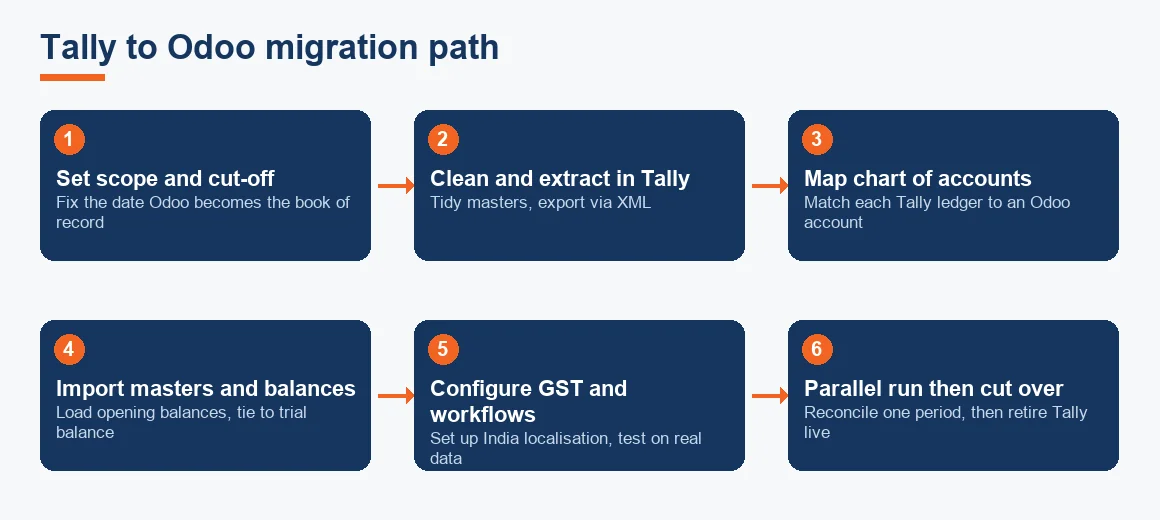
- Decide the scope and cut-off: fix the date from which Odoo becomes the book of record, usually a financial year or quarter start, so nothing is posted in two places.
- Clean and extract in Tally: tidy duplicate ledgers, close stale parties, then export masters and balances, typically through XML export.
- Map the chart of accounts: align each Tally ledger to an Odoo account using a documented ledger mapping schema; this is where most of the real thinking sits.
- Import masters and open balances: load parties, items, the chart of accounts and closing balances as opening balances, then check the trial balance agrees to the last audited figures.
- Configure GST, tax and workflows: set up India localisation, tax rules and approvals, and test them on your own transactions.
- Run in parallel, then cut over: post one period in both systems, reconcile, and only then retire Tally as the live book while keeping it archived for history.
Historical detail that does not migrate is best archived: keep the Tally company file and a set of exported statements so you can answer any assessment or audit query on prior years without keeping the old system live. The general ledger that matters going forward is the one in Odoo from the cut-off date.
Worked example: three-year cost of ownership
Cost is where the licensing difference becomes real. The worked figures below compare a five-user setup on TallyPrime Gold against five Odoo users on a standard plan over three years. All amounts are indicative, Exl GST, and rounded for illustration; your actual quote will vary with apps, hosting and implementation.
| Cost component | TallyPrime Gold (5 users) | Odoo (5 users, standard) |
|---|---|---|
| Upfront licence | 67,500 one-time | Nil |
| Annual (TSS or subscription) | 13,500 per year | 1,700 per user x 5 x 12 = 102,000 per year |
| Year 1 outflow | 81,000 | 102,000 |
| Three-year total | 108,000 | 306,000 |
The arithmetic is straightforward: Tally is 67,500 once plus 13,500 for each of three years, so 108,000; Odoo is 102,000 each year, so 306,000. On cash alone Tally is far cheaper over three years. But the Odoo figure is not buying the same thing: it includes upgrades, browser access for all five users, and the CRM, project and inventory modules. Read the gap as the price of that breadth, and judge it against how much of the breadth you will actually use. If the answer is very little, the ERP premium is hard to justify on accounting grounds alone.
Do both satisfy the Companies Act audit trail rule?
For a company, this is not optional. The proviso to Rule 3(1) of the Companies (Accounts) Rules requires accounting software to record an audit trail of every change with dates, and the auditor reports on it under Rule 11(g) of the Companies (Audit and Auditors) Rules 2014. Both TallyPrime and Odoo can meet this, but only if the edit log is switched on and never disabled during the year; a log that was turned off for a month defeats the purpose and your auditor must report it. Confirm the setting on day one of using either system. The requirement, and the MCA notifications behind it, are set out on the Ministry of Corporate Affairs site, and the GST return formats your software must produce are published on the CBIC GST portal and the main GST portal.
So should you migrate, and where to get help
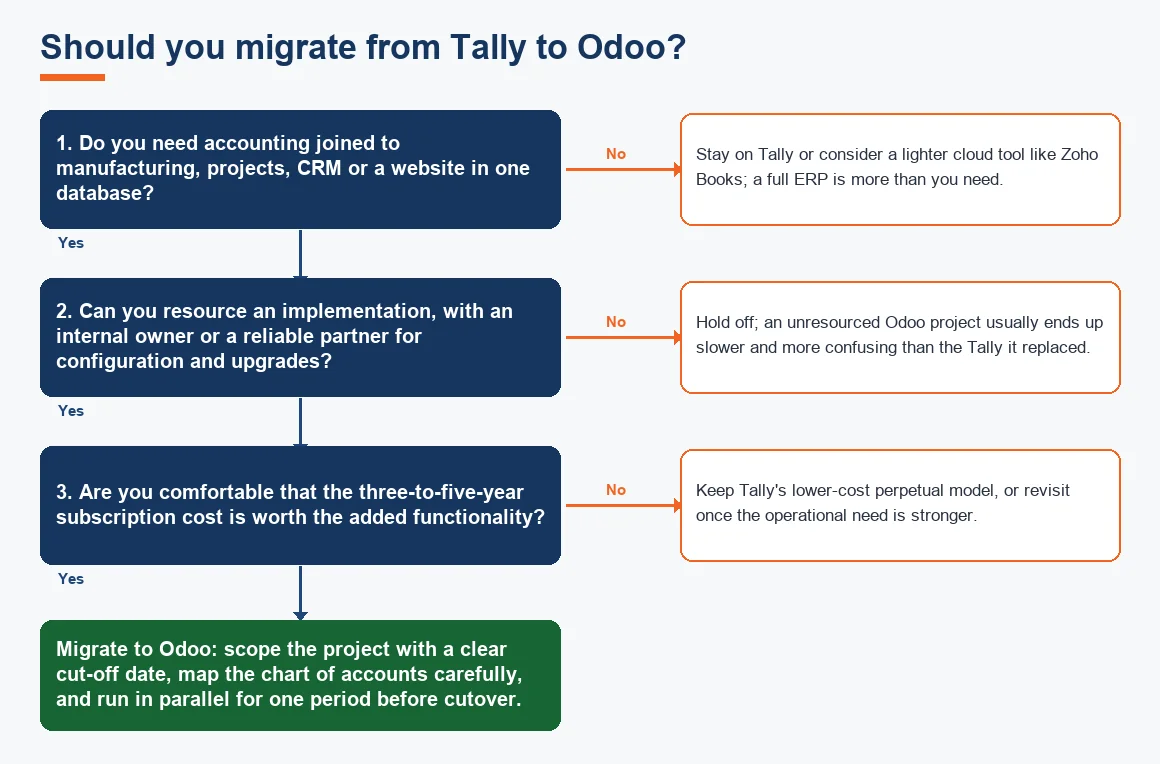
Stay on Tally if it meets your compliance and reporting needs and you have no real use for operations modules; the cost and disruption of moving would buy you little. Move to Odoo when connected operations, browser access and a single database genuinely change how you work, and you can resource the implementation. If your fixed-asset register is part of the move, our depreciation calculator helps you rebuild Schedule II blocks cleanly on the new system, and the AS vs Ind AS matrix is handy if the switch is prompting a wider reporting review. When you are ready to act on a decision to switch, the commercial service pages, Tally to Odoo migration and the broader accounting and bookkeeping hub or accounting and bookkeeping services in India, set out how a managed move is scoped and run.
Key terms
- Odoo Double-Entry Engine: the core ledger logic in Odoo that posts every transaction as balanced debits and credits.
- Odoo Fiscal Positions: Odoo's rules that automatically map taxes and accounts by customer or supplier type.
- Tally XML Export: the structured file format used to extract masters and vouchers out of Tally for import elsewhere.
- Ledger Mapping Schema: the documented match between each Tally ledger and its target Odoo account.
- Bill of Materials (BOM) Costing: costing a finished good from the value of its components and operations, native to Odoo manufacturing.
Key takeaways
- Tally is an accounting tool, Odoo is an ERP; pick by the shape of your operations, not by the accounting screen.
- Perpetual licensing makes Tally cheaper over three to five years; Odoo's subscription buys upgrades and far wider functionality.
- Odoo rewards businesses that will use its manufacturing, project or website modules and can resource an implementation.
- Migration is a scoped project with a cut-off date; masters and open balances move cleanly, deep history is archived not copied.
- Whichever you use, keep the Companies Act audit trail switched on all year, or your auditor must report it.
Decision guide