In this guide
Migrating from Tally to Odoo means moving your masters, your closing balances and, where the case demands it, your transaction history into Odoo without losing a rupee or the audit trail behind it. The tally to odoo migration steps follow a fixed order: extract the data from Tally, clean and map it, configure Odoo, import the masters, load the balances, run both systems side by side for a month, and only then cut over. This explainer walks through each step in the order you will actually do them, and flags where an Indian business tends to trip up. If you are still deciding whether the move is worth it, our note on Tally versus Odoo weighs that up separately; here we assume the decision is made and the question is how.
What migrating from Tally to Odoo actually involves
Tally stores your books in its own proprietary company file. Odoo runs on a PostgreSQL database and treats accounting as one module inside a wider ERP, so the migration is not a file copy; it is a controlled re-entry of your data into a different structure. Three things travel across: master records (the reference data), balances (what each account and item is worth on the cut-over date) and, optionally, historic transactions. Odoo keeps the same double-entry logic Tally uses, so a debit stays a debit; what changes is how the two packages label and group the same entries.
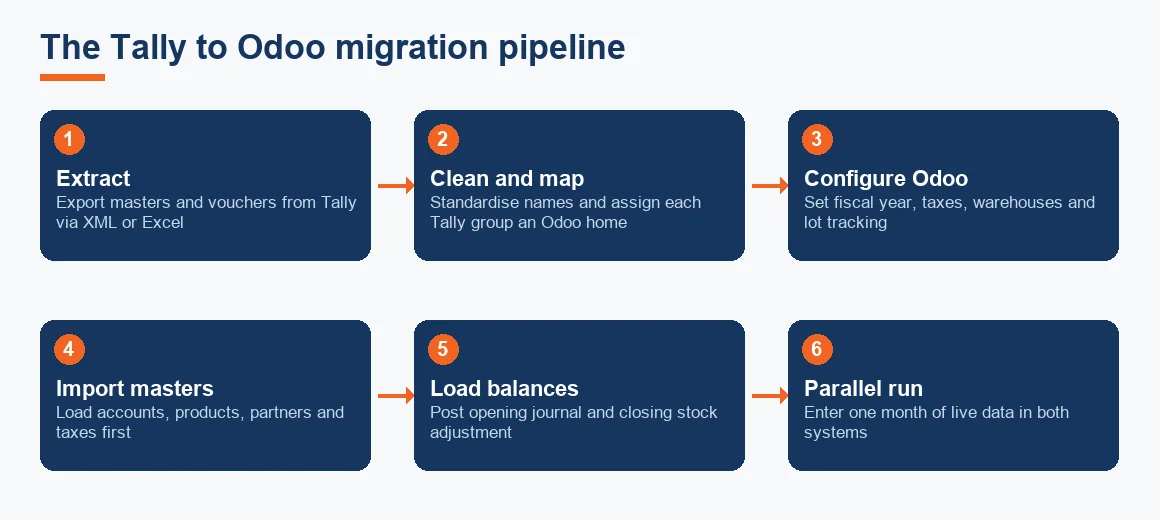
The word migration also carries a second, unrelated meaning inside Tally itself. When you open an older company in Tally Prime, it runs a version migration that rewrites the file to the newer format. That is housekeeping within Tally and has nothing to do with moving to Odoo, so keep the two ideas apart before you begin. The cleanest way to picture the real exercise is as a one-way pipeline rather than a sync: you freeze the source, move it, prove it matches, and switch off the old system. The diagram below shows that pipeline end to end.
Who needs a Tally to Odoo migration
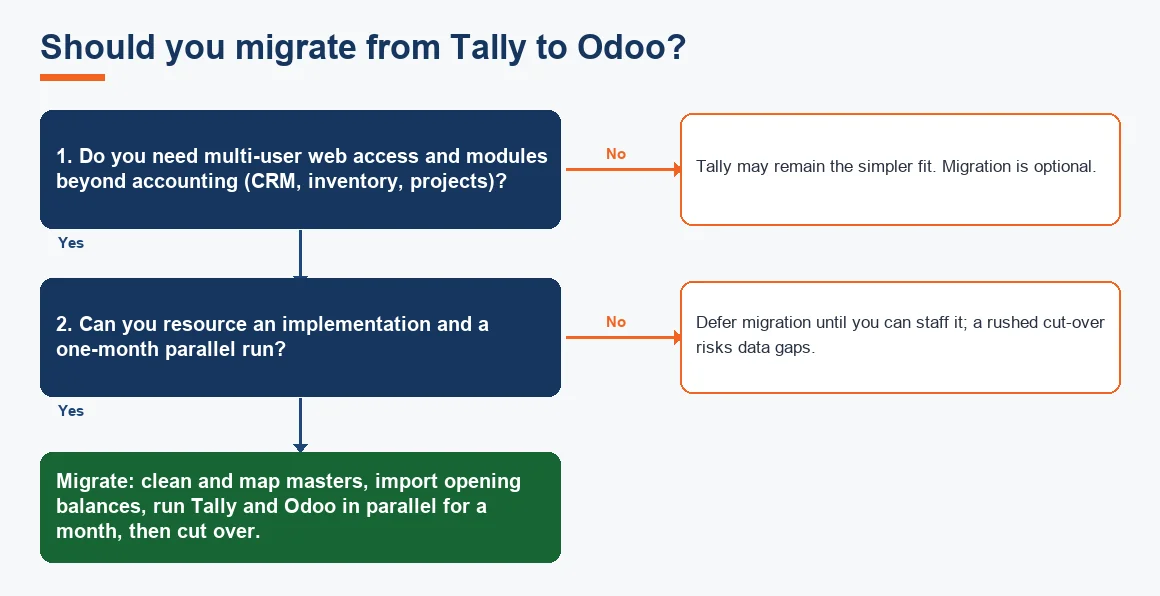
Not every Tally user should move. The businesses that genuinely benefit tend to share a pattern. They have outgrown standalone accounting and want inventory, manufacturing, sales and accounts in one connected place. They run multiple warehouses or need lot and serial tracking that Tally handles awkwardly. Or they have a distributed team that wants browser access rather than a Tally licence on each machine. If that is you, the migration pays for itself; if you simply want cleaner books in the tool you already own, it may not.
Group companies are a special case. If you are consolidating several entities, the move is also a chance to standardise the chart of accounts across all of them, which is far harder to retrofit later. For that, read our guidance on mapping Tally ledgers to an Odoo chart of accounts before you export anything, because the mapping decisions you make once will govern every entity.
The tally to odoo migration steps, in order
Here is the sequence. Treat it as a checklist and do not skip ahead; each step assumes the one before it is signed off.
- Extract from Tally. Export masters and transactions using Tally's XML or Excel export. XML preserves structure best; Excel is easier to edit. Pull ledgers, groups, stock items, units, customers, suppliers, GST details and the day book for the period you intend to carry.
- Clean and map. Standardise names, remove duplicate ledgers, and decide the Odoo home for every Tally group. This is the step that decides whether the migration is smooth or painful.
- Configure Odoo. Set the fiscal year, taxes, GST fiscal positions, warehouses and the chart of accounts. Switch on multi-location and lot tracking here if you use them, because they cannot be added cleanly after stock is loaded.
- Import masters. Load the reference data first: accounts, products, partners, taxes. Nothing transactional moves until masters import without error.
- Load balances. Post opening balances as a journal entry, and load closing stock as an inventory adjustment at the Tally closing value.
- Run in parallel. Enter live transactions in both Tally and Odoo for one month.
- Reconcile and cut over. Compare the two systems, and once they agree, stop entering data in Tally.
The heavy lifting sits in steps two and three. Odoo does not have a one-to-one equivalent for every Tally concept, so a straight import will fail unless you have already decided where each element lands.
What moves cleanly and what needs mapping
Masters move across with little friction. The structural features that make Tally distinctive, cost centres, godowns and bill-wise references, do not exist under the same names in Odoo and must be mapped to Odoo's own constructs first.
| Tally element | Odoo equivalent | Migration note |
|---|---|---|
| Ledgers and groups | Chart of accounts | Move cleanly; align the group hierarchy to Odoo account types. |
| Stock items and units | Products and units of measure | Move cleanly; set the costing method before import. |
| Customers and suppliers | Contacts (partners) | Move cleanly with GSTIN and address details. |
| Cost centres | Analytic accounts | Manual mapping; Odoo tags entries rather than routing them. |
| Godowns | Warehouses and internal locations | Enable multi-location first; load closing stock as an adjustment. |
| Stock batches | Lot or serial numbers | Enable lot tracking first; carry opening quantity and value per lot only. |
| Bill-wise references | Open invoices and bills | Load as outstanding documents so ageing rebuilds correctly. |
A worked example: mapping one Tally company into Odoo
To see how the rules above play out, take a small trading business closing its books on 31 March. The table maps six of its Tally masters to the Odoo destination, with the figure that should land in Odoo once the import is done. Every GST figure uses the current rates, the closing values are the ones you post as the opening journal and the inventory adjustment, and the party balance is loaded as an open invoice so the ageing rebuilds. As a rough guide, a migration of this size is priced from ₹25,000 (indicative, Exl GST), with the real quote turning on how many lots and how much history you carry. Record every stock move through inventory voucher mapping so quantities and values stay tied to the ledger.
| Tally master or field | Example in Tally | Odoo destination | Value or GST after migration |
|---|---|---|---|
| Sales ledger (Sales @18%) | Taxable sales ₹1,00,000 | Chart of accounts: sales income, 18% fiscal position | CGST ₹9,000 + SGST ₹9,000 = ₹18,000; invoice ₹1,18,000 |
| Stock item (14-inch laptop) | 25 units at ₹40,000 cost | Product (storable), weighted-average cost | Inventory adjustment 25 × ₹40,000 = ₹10,00,000 |
| Purchase ledger, inter-state | Purchase ₹80,000 @18% IGST | Chart of accounts: purchases, IGST 18% position | IGST ₹14,400; bill total ₹94,400 |
| Sundry debtor (ABC Traders) | Closing balance ₹2,36,000 | Contact (partner) with GSTIN, receivable | Open invoice ₹2,36,000 (₹2,00,000 taxable + ₹36,000 GST at 18%) |
| Godown (Pune store) | Closing stock ₹10,00,000 | Warehouse and internal location | Loaded as one inventory adjustment at ₹10,00,000 |
| Fixed asset (plant), WDV | Written-down value ₹5,40,000 | Chart of accounts: fixed asset, plus asset register | Opening journal carries ₹5,40,000 at cost less accumulated depreciation |
Opening balances or the full history?
This is the decision that most changes the size of the job. For the large majority of businesses, opening balances as at 1 April are enough. You carry the closing figures across, leave the earlier years fully readable in Tally for audit and assessment, and start fresh in Odoo. That keeps the import small, fast and easy to reconcile.
Full transaction history is worth the effort only in specific cases: where you need item-level analytics across prior years, or where a pending assessment or litigation means you must be able to drill into old vouchers inside the live system. If neither applies, do not carry years of day book across just because you can; every extra year is more to clean and more that can break. Whichever route you take, the closing trial balance, the stock summary and the GST ledgers must tie exactly between the two systems.
Setting the cut-over date and running in parallel
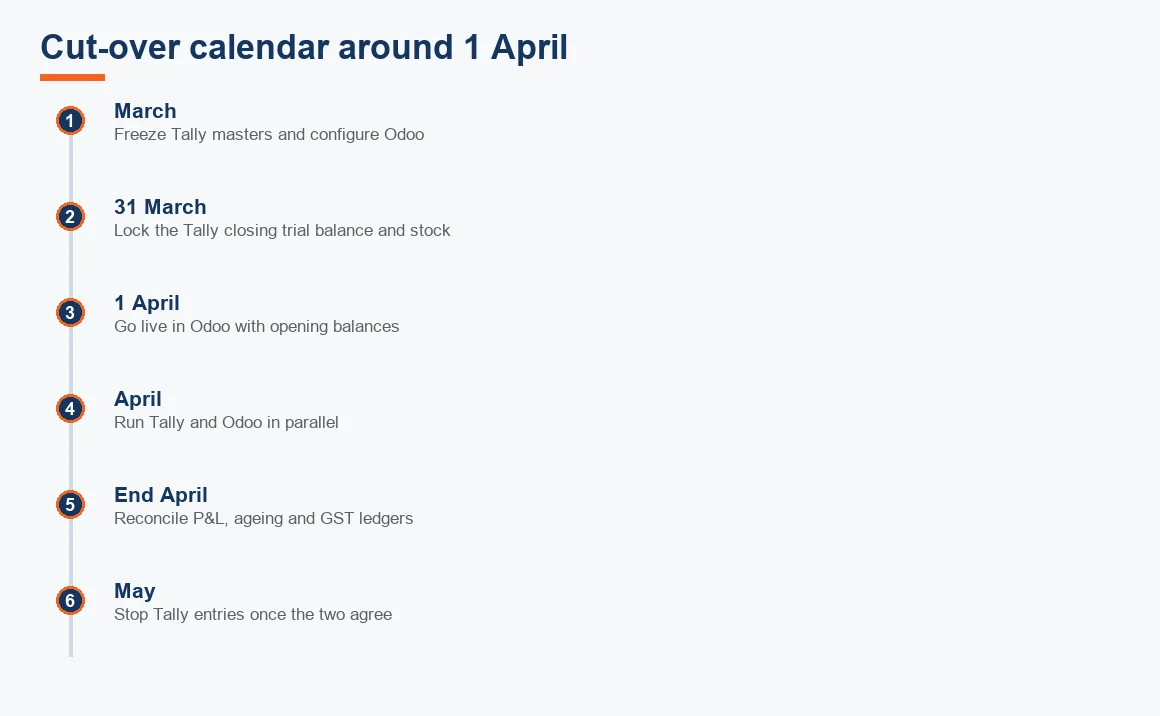
Set the cut-over at 1 April so that a complete financial year sits inside one system and your annual audit is not split across two packages. A mid-year switch forces the auditor to stitch two sets of books together for one year, which nobody enjoys and which invites error.
Do not switch off Tally on day one. Run both systems in parallel for a full month: enter every live transaction in Tally and in Odoo, then at the end of the month compare the profit and loss, the receivables ageing and the tax ledgers. Only when the two agree do you stop entering data in Tally. The month of overlap is your safety net; it catches mapping errors while you still have a working fallback. The migration checklist and common pitfalls lists the exact reports to compare during that window.
Keep the audit trail intact
A new accounting system in India is not free to run without an edit log. Rule 3(1) of the Companies (Accounts) Rules 2014 requires every company to use accounting software with an audit trail that records each change and cannot be switched off, and the Ministry of Corporate Affairs has made this mandatory for all companies. The statutory auditor reports separately on the feature under Rule 11(g) of the Companies (Audit and Auditors) Rules 2014, a duty that sits outside CARO. Enable Odoo's log from the very first day of use, not after go-live, because entries posted before the log is on are not covered.
This matters during migration specifically because the opening journal and the inventory adjustment are large, one-off entries. If they are posted before logging is enabled, an auditor can reasonably ask how they can be relied upon. Turn the log on, then post them, and keep the sealed Tally backup so the trail stays continuous across the change of system. The GST side deserves the same care: your input and output tax ledgers must reconcile to what you have already filed on the GST portal, so that the return figures in Odoo pick up exactly where Tally left off.
How to check the migration is correct
Proving the move is where discipline pays off. Reconcile in this order, and treat any mismatch as a stop sign rather than a rounding quirk:
- Trial balance. The closing trial balance in Tally and the opening trial balance in Odoo must match to the rupee. Every general ledger account should agree line by line.
- Stock summary. Total quantity and value per item, and per lot where you track lots, must equal the Tally closing stock.
- Party balances. Receivables and payables ageing should rebuild to the same buckets, which only happens if you loaded open invoices rather than a net figure.
- GST ledgers. Input and output tax balances must match your last filed returns.
- Fixed assets. Carry the written-down value per asset; our depreciation calculator helps you confirm the opening WDV before you load it.
If the trial balance ties but the profit and loss looks odd during the parallel month, the fault is almost always a mapping error in step two, not the import itself. That is why the parallel run exists at all, and why the same reconciliation discipline applies whether you land on Odoo or a lighter cloud ledger, as in a Tally to Zoho Books migration.
Key terms
- Tally XML Export: Tally's structured export format that preserves master and voucher relationships during extraction.
- Ledger Mapping Schema: the plan that assigns each Tally ledger and group to an Odoo chart-of-accounts line.
- Odoo Fiscal Positions: Odoo's rule set that applies the correct GST treatment to each transaction.
- ERP Open Balances: the opening figures posted into the new system on the cut-over date.
- Trial Balance: the list of every ledger balance used to prove the two systems agree.
When to hand it over
A migration you do once is a migration you will not have practised. If the books are complex, if inventory runs into thousands of lots, or if a busy filing season leaves no room for a month of parallel entry, it is usually cheaper to have it done properly than to redo it. Patron's Migration: Tally to Odoo service handles the extraction, mapping and reconciliation end to end, with a CA signing off each checkpoint. Either way, the informational ground rules on this page still apply, and you can see how software migration sits within the wider accounting and bookkeeping process.
Key takeaways
- Odoo runs on a PostgreSQL database, so migration is a controlled re-entry, not a file copy.
- Masters move cleanly; cost centres, godowns and batches must be mapped to Odoo's analytic accounts, warehouses and lots first.
- Opening balances at 1 April suit most businesses; carry full history only for analytics or live litigation.
- Set the cut-over at 1 April and run both systems in parallel for one month before switching off Tally.
- Enable Odoo's audit trail from day one to satisfy Rule 3(1) of the Companies (Accounts) Rules 2014.
- Sign off only when the trial balance, stock summary, party ageing and GST ledgers all tie exactly.
Decision guide