In this guide
A Tally to Odoo checklist is the ordered set of tasks that takes your books from a fixed cut-off date in Tally to a first clean month-end close in Odoo: clean the masters, export and map the data, load opening balances and open items, then reconcile before you retire Tally. The number that decides most of it is the cut-off date, because everything before it moves as balances and everything after it is entered fresh. This explainer walks through what applies, what does not, and where migrations quietly go wrong. If you want the migration handled for you rather than run in-house, that sits with our Migration: Tally to Odoo service; this article stays on the how-to.
What is a Tally to Odoo migration checklist?
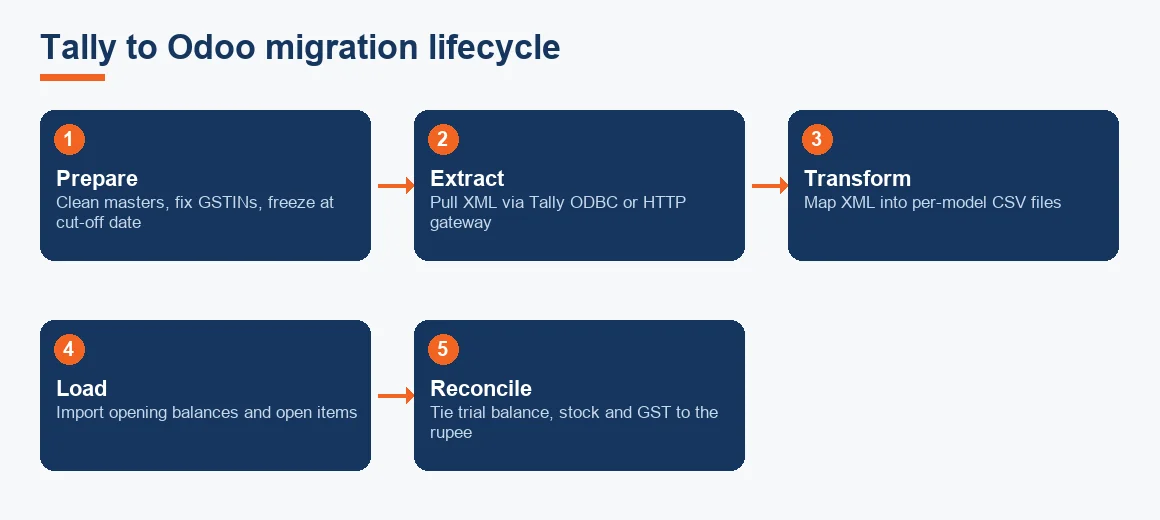
It is a sequence, not a data dump. A good checklist treats migration as five stages: prepare and clean the source, export and transform, map to Odoo models, load opening balances and open transactions, then reconcile and run in parallel. Each stage has a gate you should not cross until the previous one balances. Odoo runs a strict double-entry engine and validates fields such as tax codes, partner state and account type that Tally left loose, so most of the effort is in the preparation, not the button that imports.
What data should you migrate from Tally to Odoo?
Migrate masters and balances, not history. In practice that means five model files: partners (customers and vendors), the chart of accounts, products and stock items, opening balances, and open invoices and bills as on the cut-off date. Closed and settled transactions from prior years stay in Tally as your archive. Trying to replay years of individual vouchers into Odoo is the single biggest cause of a migration that never finishes. If you do need mapping detail, the ledger-by-ledger work is covered in mapping Tally ledgers to an Odoo chart of accounts, so we will not repeat it here.
What to leave behind
Leave settled invoices, reconciled bank lines and fully depreciated fixed assets in the archive. Carry the closing written-down value of live fixed assets as an opening balance and set up the asset afresh in Odoo; if you need to re-derive the block, our depreciation calculator handles Schedule II working. The step-by-step data migration guide covers the export mechanics in more depth.
How to prepare Tally data before Odoo migration?
Cleaning the source is where a migration is won. Work through this in Tally before you export anything:
- Merge duplicate ledgers and remove any master untouched for two years, since a company carrying 1,200 ledgers typically holds 15% to 20% dead accounts.
- Correct GSTINs that are the wrong length or format, and add the state code to every party master, because Odoo derives the fiscal position from state and will reject blanks.
- Clear negative stock. Tally permits it; Odoo blocks it, so a minus quantity stops the whole product import.
- Freeze the books up to the cut-off date so no back-dated entry moves your opening figures after you have exported them.
- Print and save the closing trial balance, stock summary and GST returns as on the cut-off date. These are the targets you reconcile against later.
What are the steps of data migration and its four types?
The steps are: prepare, extract, transform, load, and reconcile. The four broad types of data migration are storage migration, database migration, application migration and business-process migration; a Tally to Odoo move is mainly an application and database migration, since you are changing both the accounting engine and the underlying data store. Tally exports masters and vouchers as XML, while Odoo imports CSV or XLSX, so the practical transform step turns Tally's XML export into column-mapped CSV files, one per Odoo model. Bulk extraction uses the Tally ODBC interface or its HTTP XML gateway rather than re-keying screen by screen.
How are GST and TDS balances carried across?
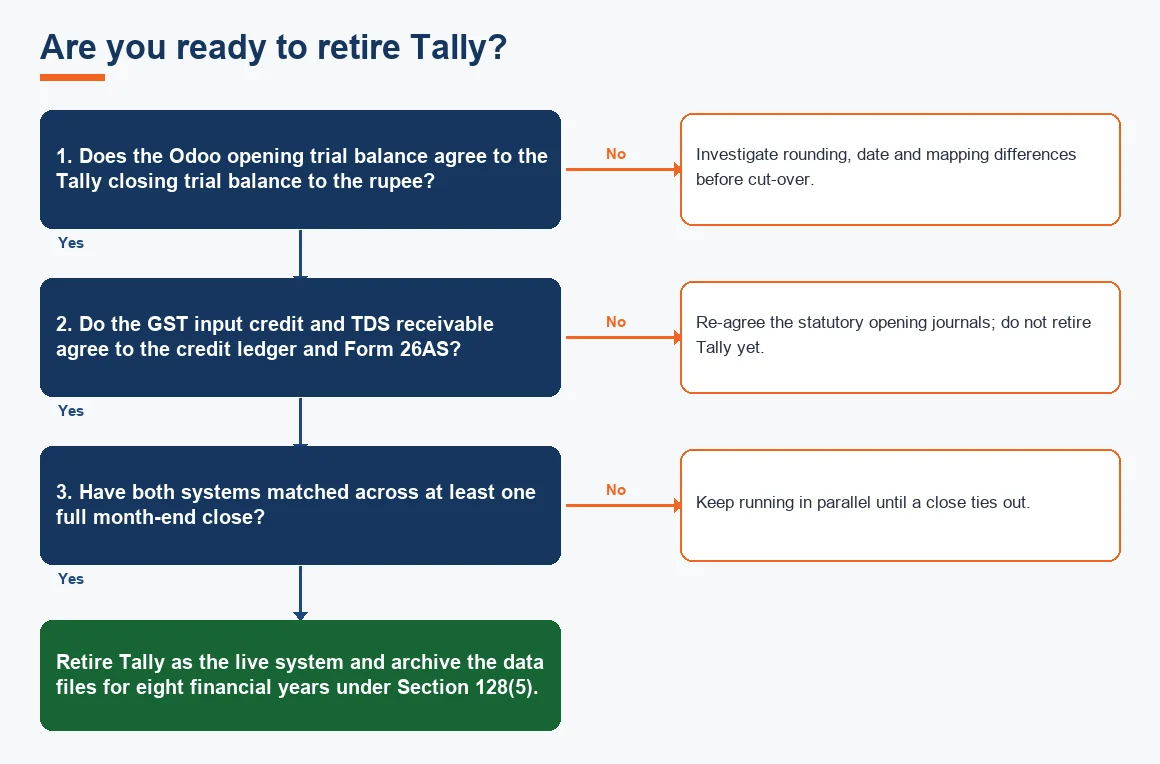
Carry unadjusted statutory balances as opening journal entries, never as re-imported invoices. Input tax credit not yet claimed sits in a GST input receivable ledger, agreed to the electronic credit ledger on the GST portal as on the cut-off date. TDS deducted by your customers sits in a TDS receivable ledger by assessment year, agreed to Form 26AS. Keep the two reconciliations as working papers, because a mismatch here surfaces months later when you file and the credit is not where Odoo expects it. For the tax logic itself, HSN and rate mapping should follow the schedules published by CBIC, and GSTR-2B matching continues as normal once you are live.
What are the common pitfalls when migrating from Tally to Odoo?
Five failures recur across almost every Tally to Odoo import. Date format mismatches, where Tally's day-first dates load as month-first and shift the period. Opening stock imported under the wrong valuation method, so a FIFO business ends up on weighted average. GST tax codes mapped to the wrong fiscal position, producing IGST where CGST plus SGST was due. Negative stock that Tally allowed but Odoo refuses. And rounding differences of a few paise on each invoice that accumulate into a visible gap on the trial balance. Reconciling the trial balance and stock summary the moment the import finishes catches all five while they are still cheap to fix. If you are still deciding whether the move is worth it at all, that comparison lives in Tally vs Odoo: should you migrate.
How to verify data after a Tally to Odoo migration?
Verification is a set of tie-outs, each with a defined source of truth. Do not sign off the cut-over until every line below agrees to the rupee.
| What you check | Odoo report | Agree it to | Acceptable difference |
|---|---|---|---|
| Opening trial balance | Trial Balance as on cut-off | Tally closing trial balance | Nil |
| Debtors and creditors | Aged Receivable / Payable | Tally outstanding statement | Nil |
| Stock valuation | Inventory Valuation | Tally stock summary | Method difference only, documented |
| GST input credit | GST input ledger balance | Electronic credit ledger | Nil |
| TDS receivable | TDS receivable ledger | Form 26AS | Nil |
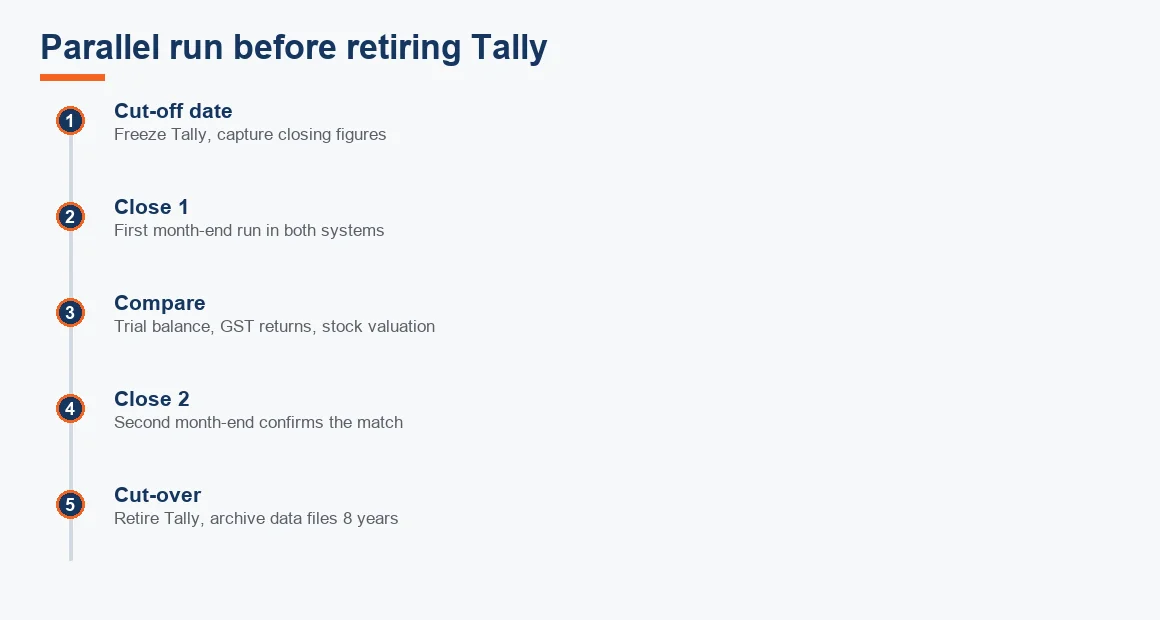
Run both systems side by side through this table for one to two full month-end closes. Once the closes match, retire Tally as your live system but keep the data files.
Worked example: reconciling the opening trial balance
Suppose a trading company sets 31 March as its cut-off and imports opening balances into Odoo. After the load, the accountant places the Odoo trial balance next to the Tally closing figures. All amounts are in INR and are indicative.
| Ledger | Tally closing (cut-off) | Odoo after import | Difference | Cause |
|---|---|---|---|---|
| Sundry Debtors | 42,50,000 | 42,50,000 | 0 | Matches |
| Sundry Creditors | 28,30,000 | 28,29,600 | 400 | Per-invoice rounding |
| Stock-in-hand | 18,75,000 | 18,60,000 | 15,000 | FIFO vs weighted average |
| GST Input Credit | 3,20,000 | 3,20,000 | 0 | Matches |
| Bank | 9,80,000 | 9,80,000 | 0 | Matches |
The total gap is 15,400: a 400 rounding difference on creditors and a 15,000 stock difference. The rounding is corrected with a single adjusting journal entry to a rounding-off ledger. The stock gap is not an error but a valuation-method mismatch: the import defaulted to weighted average when the business runs FIFO, so the fix is to reset the product valuation method and re-import stock, after which the line ties to nil. The debtors, GST and bank lines already agree, so no action is needed there.
Key terms
- Historical Data Cut-off Date: the fixed date that splits migrated balances from freshly entered transactions.
- Trial Balance: the list of ledger balances used as the master tie-out for the migration.
- Tally XML Export: the native XML format Tally emits, transformed into CSV for Odoo import.
- Odoo Fiscal Positions: the rule set that maps a party's state to the correct GST treatment.
- ERP Open Balances: the opening receivables, payables and stock loaded as at the cut-off date.
Key takeaways
- Set one cut-off date on a filed return period and drive the whole checklist from it.
- Clean masters, GSTINs and negative stock in Tally before you export, not after.
- Move masters and balances only; keep settled history in the Tally archive.
- Carry GST and TDS as opening journals agreed to the credit ledger and Form 26AS.
- Reconcile the trial balance, stock and GST to the rupee across one to two closes, then retire Tally but keep the files for eight financial years.
For the broader move to a supported cloud stack, the same discipline applies to a Tally to Zoho Books migration, and both sit under our accounting and bookkeeping hub. If you would rather a team ran the reconciliation and parallel close for you, that is what our accounting and bookkeeping services in India cover. Record retention after cut-over follows Section 128(5) of the Companies Act; the current text is on the MCA site.
Decision guide