In this guide
Mapping Tally ledgers to an Odoo chart of accounts means matching each Tally ledger to an Odoo account and, more importantly, matching every Tally group to the correct Odoo account type so the balance sheet and profit and loss statement rebuild correctly. The single rule that saves the most rework is this: you map at group level, not ledger level. Get the group-to-type mapping right and the individual ledgers fall into place. This explainer walks through how Odoo organises accounts, how its structure differs from Tally, the exact group mapping, a step-by-step import, how to carry opening balances, and one worked example. If you are still deciding whether to switch platforms at all, read Tally vs Odoo: Should You Migrate Your Accounting? first; the commercial project itself sits with Migration: Tally to Odoo.
What is the difference between Tally ledgers and Odoo accounts?
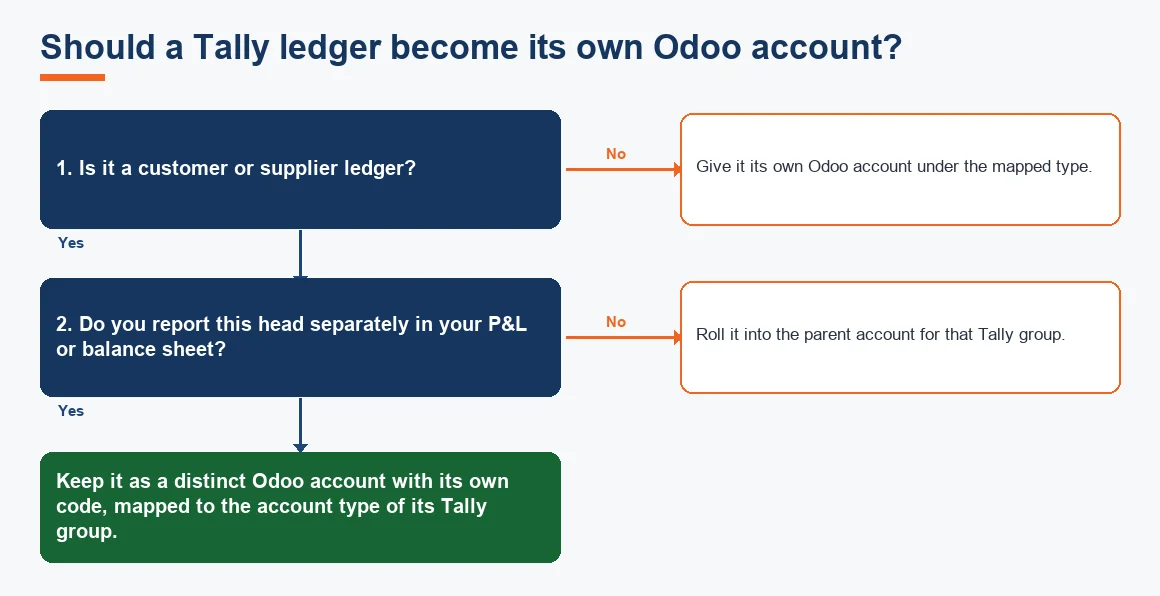
In Tally, a ledger is the individual account every voucher posts to: one customer, one bank account, one expense head. Each ledger must sit under one of Tally's 28 predefined groups, and the group, not the ledger, decides whether the balance lands in the balance sheet or the profit and loss account. Tally ships two ledgers by default (Cash and Profit & Loss A/c) and 15 primary groups plus 13 sub-groups that cannot be deleted.
Odoo works differently. It does not have Tally's fixed group tree. Instead every account carries an account type (Receivable, Payable, Bank and Cash, Income, Expenses and so on), and that type drives the reports, the automated entries and where the balance appears. There is no separate customer or supplier ledger for each party either: a single Receivable account holds all customer balances, and Odoo splits them per partner behind the scenes. Both tools run on double-entry bookkeeping, so the underlying logic is the same; it is the organising layer that changes. Understanding the Odoo double-entry engine is what makes the mapping obvious rather than mechanical.
How does Odoo structure its chart of accounts?
Odoo's chart of accounts is a flat list of accounts, each with a unique code, a name and an account type. When you install the Indian accounting localisation, Odoo pre-loads an India chart with GST-ready tax accounts, so you rarely start from an empty screen. The account types that matter for a Tally migration are:
- Receivable and Payable: trade debtors and creditors; these must exist for invoicing to work.
- Bank and Cash: every bank account and cash box.
- Current Assets, Non-current Assets, Prepayments, Fixed Assets: asset-side heads.
- Current Liabilities, Non-current Liabilities, Equity, Current Year Earnings: liability and capital heads.
- Income, Other Income, Expenses, Cost of Revenue, Depreciation: profit and loss heads.
The general ledger in Odoo is simply the sum of postings to these accounts, reported by type. Because reports are driven by type, an account placed under the wrong type is the single most common reason a migrated balance sheet does not tie out.
How to match Tally groups to Odoo account types
This is the heart of the job. Work down Tally's group list and assign each group one Odoo account type. Every ledger under that group inherits the mapping. The comparison below covers the groups most businesses actually use.
| Tally group | Odoo account type | Note |
|---|---|---|
| Sundry Debtors | Receivable | One Odoo account; parties tracked per contact. |
| Sundry Creditors | Payable | One Odoo account; parties tracked per contact. |
| Bank Accounts | Bank and Cash | Create one account per bank. |
| Cash-in-Hand | Bank and Cash | Petty cash and cash box. |
| Sales Accounts | Income | Split by revenue stream if you report that way. |
| Purchase Accounts | Expenses or Cost of Revenue | Use Cost of Revenue if you track gross margin. |
| Direct / Indirect Expenses | Expenses | Keep the existing heads for continuity. |
| Direct / Indirect Incomes | Other Income | Interest, scrap sales, discounts received. |
| Fixed Assets | Fixed Assets | Depreciation posts to a Depreciation account. |
| Capital Account | Equity | Proprietor capital, partner capital, share capital. |
| Loans (Liability) | Non-current / Current Liabilities | Split by tenure. |
| Duties & Taxes | Current Liabilities / Current Assets | Split into CGST, SGST, IGST, cess. |
| Current Assets / Liabilities | Current Assets / Current Liabilities | Advances, deposits, provisions. |
How to import a chart of accounts into Odoo step by step
With the group mapping decided, the import itself is mechanical. A clean ledger mapping schema in a spreadsheet is what keeps the run repeatable.
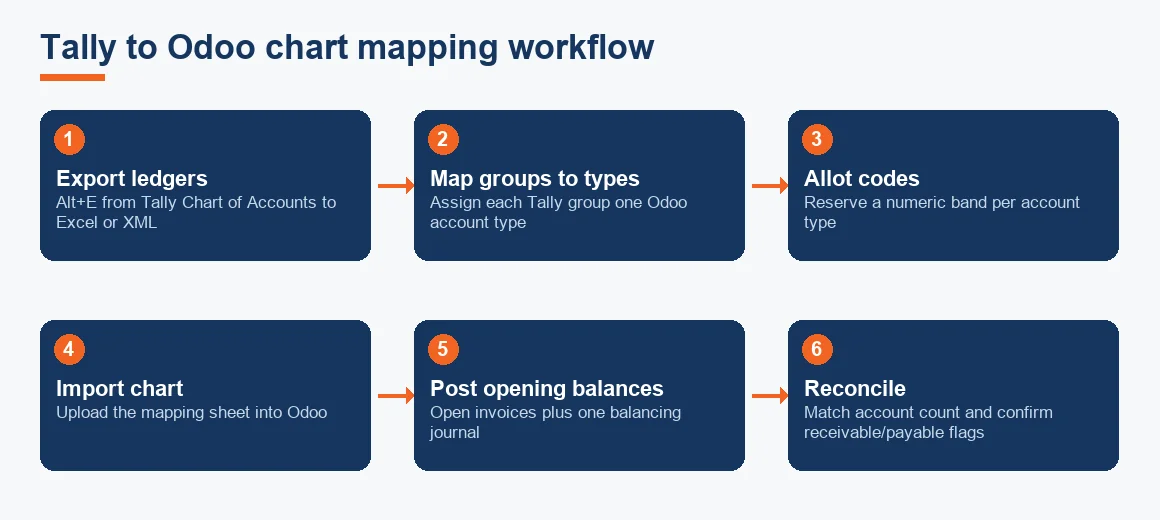
- Export from Tally. From Gateway of Tally, open Chart of Accounts, Ledgers, press Alt plus E and export to Excel; take the Trial Balance in ledger-wise view for balances. A Tally XML export is the cleaner route when the list runs to several hundred ledgers.
- Build the mapping sheet. One row per Tally ledger, with columns for its Tally group, target Odoo account name, Odoo account type and a unique Odoo code.
- Allot code ranges. Reserve a numeric band per type (for example 1xxxxx assets, 2xxxxx liabilities, 4xxxxx income, 6xxxxx expenses) so codes never clash.
- Import in Odoo. Go to Accounting, Configuration, Chart of Accounts, then Favourites, Import records, and upload the sheet mapped to Code, Name and Account Type.
- Reconcile the count. Compare the Odoo account count against the Tally ledger list and confirm receivable and payable accounts are flagged correctly.
The mechanics of moving vouchers and masters, as opposed to the mapping design, are covered in How to Migrate Data From Tally to Odoo, and the full pre-flight list sits in A Tally to Odoo Migration Checklist and Common Pitfalls.
How to handle opening balances when mapping Tally to Odoo
Opening balances are not part of the chart import; they come in as one journal entry after the accounts exist. Decide a trial balance cut-off date, usually the last day of a completed month or the financial year end, and take the closing figures as of that date. Post a single journal entry that debits every account with a debit balance and credits every account with a credit balance, using a temporary Opening Balance account to hold any difference to zero. These are treated as ERP open balances, so verify the entry balances before you post live transactions.
Worked example: mapping a small trading firm's trial balance
Take a proprietor running a trading business who exports a trial balance as at 31 March. The table shows each Tally ledger, its group, the Odoo account and type it maps to, an allotted code, and the balance carried across. Debits and credits both total 14,14,000, so the opening journal ties out.
| Tally ledger | Tally group | Odoo account (type) | Code | Debit (INR) | Credit (INR) |
|---|---|---|---|---|---|
| Cash | Cash-in-Hand | Cash (Bank and Cash) | 101000 | 50,000 | - |
| HDFC Current A/c | Bank Accounts | HDFC Bank (Bank and Cash) | 102000 | 3,20,000 | - |
| Ramesh Traders | Sundry Debtors | Trade Receivables (Receivable) | 121000 | 1,80,000 | - |
| Furniture & Fixtures | Fixed Assets | Furniture (Fixed Assets) | 151000 | 90,000 | - |
| Input CGST + SGST | Duties & Taxes | Input GST (Current Assets) | 131000 | 54,000 | - |
| Purchases | Purchase Accounts | Purchases (Cost of Revenue) | 610000 | 6,00,000 | - |
| Office Rent | Indirect Expenses | Rent (Expenses) | 620000 | 1,20,000 | - |
| Proprietor's Capital | Capital Account | Owner Capital (Equity) | 301000 | - | 4,00,000 |
| Delta Supplies | Sundry Creditors | Trade Payables (Payable) | 211000 | - | 2,10,000 |
| Output CGST + SGST | Duties & Taxes | Output GST (Current Liabilities) | 231000 | - | 54,000 |
| Sales | Sales Accounts | Sales (Income) | 410000 | - | 7,50,000 |
| Total | 14,14,000 | 14,14,000 |
Notice the two Duties & Taxes ledgers split across a Current Asset (input) and a Current Liability (output) account, and the fixed-asset head carries its own code so depreciation can post separately later; you can size that depreciation with the Depreciation Calculator. The proprietor's capital maps to Equity, keeping the balance sheet in the Schedule III shape that the Ministry of Corporate Affairs prescribes for statutory accounts.
Key terms
- General Ledger: the complete record of all account postings, reported by type in Odoo.
- Ledger Mapping Schema: the spreadsheet that links each source ledger to a target account, type and code.
- Odoo Double-Entry Engine: the posting logic that reads account type to build the financial reports.
- Tally XML Export: the structured export format used to move masters and vouchers out of Tally.
- ERP Open Balances: the carried-forward balances posted as the opening journal in the new system.
How ledgers are organised in Odoo accounting: a quick recap
Where Tally forces every ledger under a fixed group, Odoo lets the account type do that work, which is why the mapping is a group-to-type exercise rather than a ledger-to-ledger copy. Keep the party accounts collapsed, split the tax accounts, reserve code ranges, and post opening balances as invoices and a single journal. For a like-for-like sense of how a different cloud tool handles the same job, Migration: Tally to Zoho Books follows a comparable pattern. Both this technique and the underlying reporting standards are part of the wider Accounting & Bookkeeping HUB, and ongoing books support sits with Accounting & Bookkeeping Services in India.
Key takeaways
- Map Tally groups to Odoo account types first; individual ledgers inherit the mapping.
- Collapse all debtors into one Receivable account and all creditors into one Payable account.
- Split Duties & Taxes into separate CGST, SGST, IGST and cess accounts, input and output.
- Reserve a numeric code range per account type before importing.
- Carry opening balances as open invoices plus one balancing journal, not ledger by ledger.
Decision guide