In this guide
The honest answer to Odoo vs Zoho is that they solve different problems: Odoo is a full ERP that runs manufacturing, inventory, projects and accounting in one database, while Zoho Books is a focused accounting ledger built for clean books, GST returns and receivables. For most Indian small businesses that only need tidy accounts and compliance, Zoho Books wins on cost and speed; for a business that also needs to run a factory floor or several companies in one system, Odoo earns its extra weight. This guide compares the two on fit, on cost and on their real disadvantages so you can decide without a sales pitch.
Odoo vs Zoho Books: the short answer
Both tools keep proper double-entry bookkeeping and post to a structured general ledger, so neither is wrong for accounting. The split is about scope. Zoho Books is a single, opinionated accounting product: invoicing, bills, banking, GST and reporting, with the rest of the Zoho suite bolted on when you need it. Odoo is a platform of interlocking apps where accounting is one module sitting beside sales, purchase, inventory, manufacturing and human resources. If your question is really "which keeps my books and files GST with the least fuss", Zoho Books is the shorter road. If it is "which runs my whole operation on one login", that is Odoo's argument.
What is Odoo best for?
Odoo is best for businesses whose accounting cannot be separated from operations. A manufacturer that needs a bill of materials, production orders and work in progress valuation in the same database as the ledger is Odoo's natural customer. So is a group that wants parent-subsidiary consolidation, or a company that wants its e-commerce store, warehouse and accounts to talk to each other without middleware. Odoo also localises well for Indian GST through its fiscal-position engine, and the Community edition being open source appeals to teams that want to own and extend the code. For the deeper pros and cons, our explainer on whether Odoo is good accounting software goes further.
Is Odoo for small business, and is it good for India?
Odoo can work for a small business, but it rewards those with a process to systematise rather than a simple ledger to keep. For India it handles GST, e-invoicing and TDS once configured, and setting that up correctly is a project in itself; our walkthrough on GST setup in Odoo shows what that involves. The honest caveat is that a two-person consultancy will feel Odoo as overhead, while a fifty-person plant will feel it as relief.
What is Zoho Books best for?
Zoho Books is best for service firms, traders, agencies and small manufacturers who want compliant accounting without running an ERP. GST is native: it maps invoices through GSTIN mapping, prepares GSTR-1 and GSTR-3B summaries and helps with GSTR-2B input tax credit matching so you claim only what reconciles. Bank feeds, automated payment reminders, project time tracking and a clean mobile app cover the daily needs of most SMEs. It reaches the rest of the Zoho ecosystem, from CRM to Inventory, when you outgrow the base plan, which keeps the first step small. If you want a done-for-you setup, that is a job for a Zoho Books accounting team rather than a blog.
Odoo vs Zoho Books compared
The table below summarises where each tool leads. Treat prices as indicative and Exl GST, since both vendors revise India plans periodically; always confirm the current rate card before you commit.
| Factor | Zoho Books | Odoo |
|---|---|---|
| Core nature | Focused accounting ledger | Full ERP suite, accounting is one module |
| Pricing model | Per organisation, users bundled per plan | Per user per month (Enterprise) |
| GST and e-invoicing | Native, quick to switch on | Supported via fiscal positions, needs setup |
| Manufacturing / BOM | No true BOM or work in progress | Manufacturing orders, BOM, routings, WIP |
| Multi-company consolidation | Limited | Strong, built in |
| Customisation | Moderate, within the suite | Deep, open-source Community edition |
| Setup effort | Days, largely self-serve | Weeks, usually partner-led |
| Best suited to | Service firms, traders, small SMEs | Manufacturers, multi-entity groups |
What are the disadvantages of Odoo?
Odoo's main disadvantage is total cost of ownership. Odoo Enterprise is charged per user per month, so a ten-seat team pays ten times the unit price, and that is before partner implementation and hosting. Odoo Community is free to download but ships without the Enterprise accounting, localisation and support layers, so most Indian businesses end up on Enterprise anyway. Configuration is a genuine project: fiscal positions, tax accounts and reports need setting up correctly, and upgrades between major versions can break custom modules. Our note on the disadvantages of Odoo accounting covers these trade-offs in detail. In short, Odoo's power is also its cost.
What are the disadvantages of Zoho Books?
Zoho Books' disadvantage is the ceiling on complexity. It tracks stock and composite items but has no true bill of materials, no work in progress and no production costing, so a real manufacturer needs Zoho Inventory plus workarounds or a different tool. Heavy customisation and multi-company consolidation are weaker than a full ERP offers. Some businesses also dislike being drawn deeper into a single vendor's ecosystem as they grow. None of this makes Zoho Books a poor product; it makes it a specialist that you can outgrow in one specific direction, which is scale of operations rather than scale of turnover.
How to choose between Odoo and Zoho Books
Work through the decision in order rather than by preference. The flow below sets out the questions that matter, from operational need down to budget.
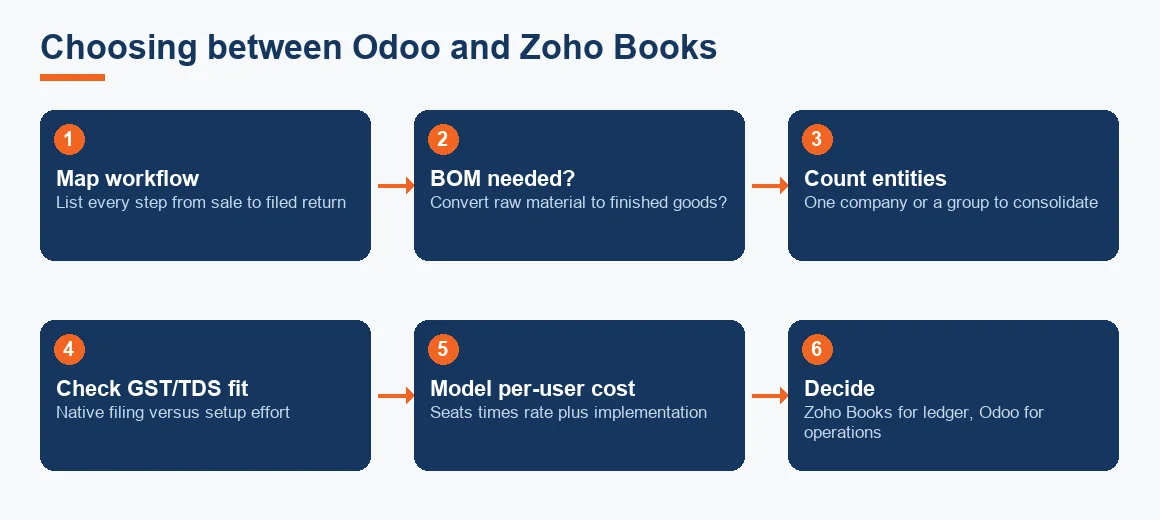
- Map your workflow. Write down what happens between a sale and a filed return. If manufacturing, assembly or multi-warehouse movement appears, note it.
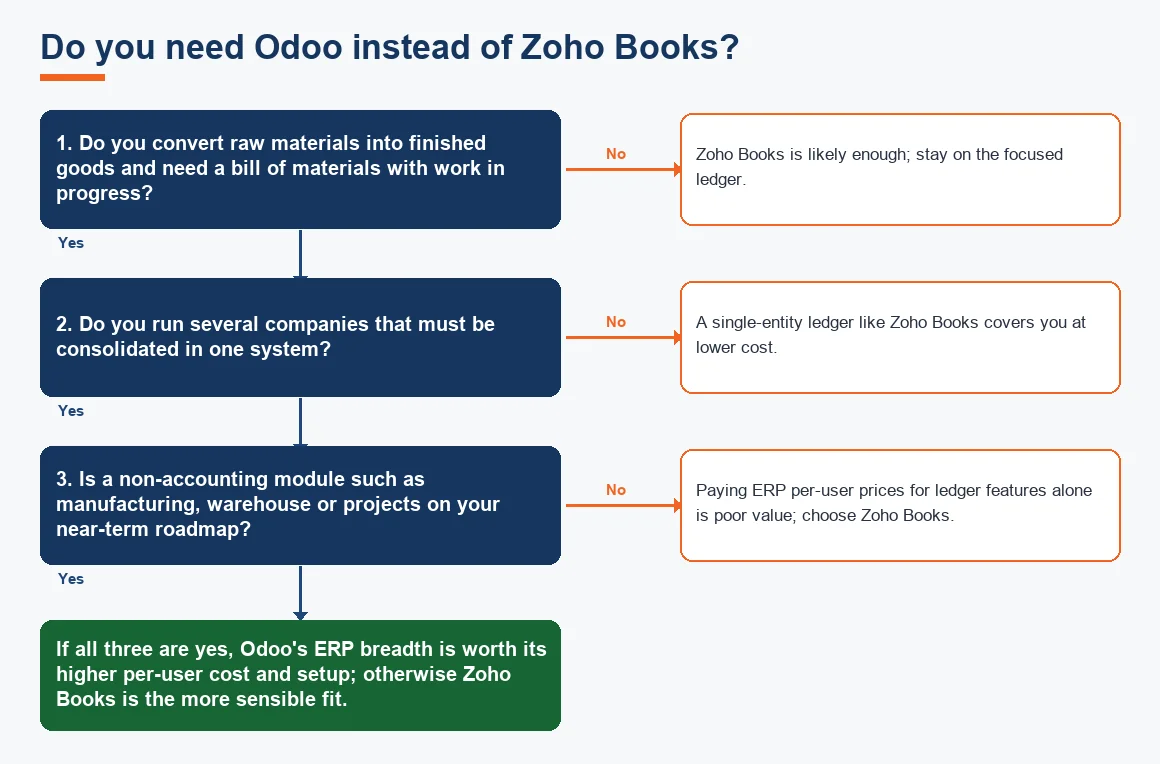
- Test the BOM question. If you convert raw materials into finished goods and must cost that, Odoo is on the shortlist and Zoho Books alone is not.
- Count your entities. One company points to Zoho Books; several companies needing consolidation point to Odoo.
- Check GST and TDS fit. Both handle Indian tax, but Zoho Books needs less setup. Confirm e-invoicing thresholds against the GST portal before you rely on either.
- Model the cost per user. Multiply Odoo's per-user rate by your real seat count and add implementation, then compare with a bundled Zoho Books plan.
If you also run other books elsewhere, comparing all four mainstream options against Xero accounting and TallyPrime accounting is worth an afternoon before you sign anything.
Worked example: ten-user cost comparison
Cost is where the two diverge most sharply for a growing team. The worksheet below compares a ten-user finance setup over one year. Figures are indicative and Exl GST, and assume Odoo Enterprise Standard at a per-user rate with a one-time implementation, against a Zoho Books plan that bundles five users with the rest added on.
| Line item | Zoho Books | Odoo Enterprise |
|---|---|---|
| Base plan (per month) | ₹1,799 (5 users bundled) | Nil base, per-user only |
| Per-user seats | 5 extra × ₹250 = ₹1,250 | 10 × ₹1,499 = ₹14,990 |
| Monthly subscription | ₹3,049 | ₹14,990 |
| Annual subscription (×12) | ₹36,588 | ₹1,79,880 |
| One-time implementation | Nil (self-serve) | ₹75,000 (indicative) |
| Year-one total | ₹36,588 | ₹2,54,880 |
On these indicative numbers Zoho Books costs roughly one-seventh of Odoo in year one for the same ten seats. That gap is the price of Odoo's extra breadth, and it is only worth paying when a manufacturing or multi-entity workflow needs it. If your books are simply an accounting job, the cheaper tool is also the right one. Fixed-asset workings such as depreciation sit in both systems, and you can sanity-check a schedule against our depreciation calculator regardless of which you pick.
Key terms
- Double-Entry Bookkeeping: the debit-and-credit method both tools use to keep the books balanced.
- Bill of Materials (BOM) Costing: the recipe of components and cost that turns raw material into a finished good, native to Odoo, absent in Zoho Books.
- Odoo Fiscal Positions: Odoo's rule engine that swaps tax accounts by customer type and place of supply for correct GST.
- Zoho GSTIN Mapping: how Zoho Books ties each contact and invoice to a GSTIN so returns compile correctly.
Key takeaways
- Zoho Books is the lower-cost, faster-to-run choice for businesses that only need compliant accounting and GST.
- Odoo earns its higher cost when manufacturing, work in progress or multi-company consolidation is genuinely needed.
- Odoo's disadvantage is per-user cost and setup effort; Zoho Books' disadvantage is that it stops short of true ERP scale.
- Decide by workflow first and price second, and model per-user cost against your future headcount, not today's.
Whichever way the decision falls, the software is only as good as the setup and the monthly discipline behind it. If you would rather hand the configuration, GST mapping and monthly close to specialists, our Odoo Accounting Services team can take that on, and the same is true on the Zoho side. Keep TDS positions such as Section 194Q current against the Income Tax Department and GST rules against CBIC, because no tool relieves you of the underlying compliance.
Decision guide