In this guide
An honest Odoo accounting review has to start with what Odoo actually is. Odoo is a full ERP suite, and accounting is one module inside it, so the software is genuinely good when your books need to connect to inventory, manufacturing, sales and projects, and only average when you want a plain ledger and nothing more. The rest of this guide sets out where Odoo fits an Indian business, where it needs configuration work, and who should think twice before adopting it.
Does Odoo actually do accounting?
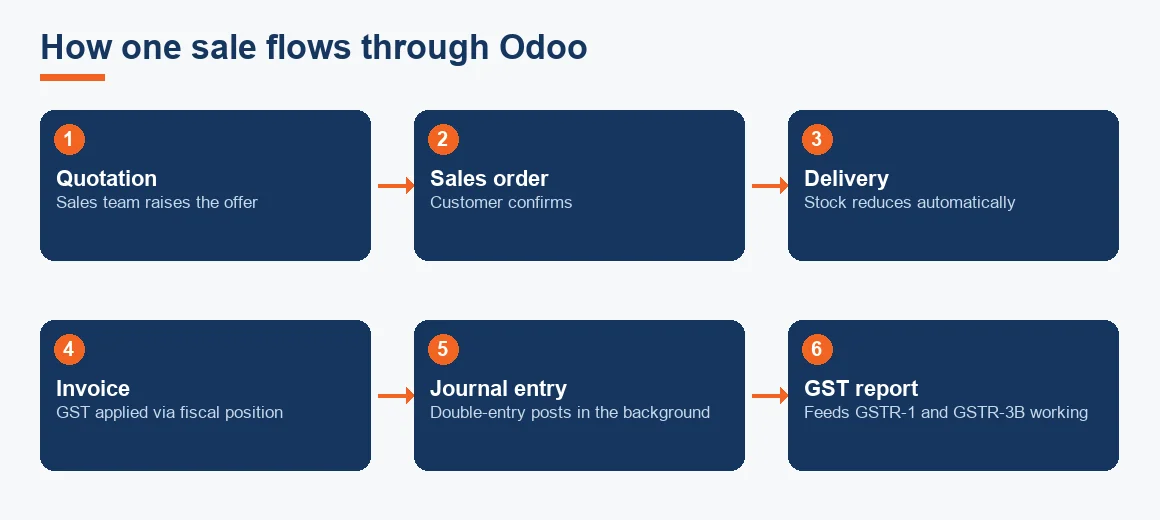
Yes. Underneath the ERP menus, Odoo runs a proper double-entry engine, so every invoice, payment and stock move posts a balanced journal in the background. It is not a spreadsheet with an invoice template bolted on. You get a full general ledger, a chart of accounts, bank reconciliation, ageing reports and a trial balance that ties back to the source documents. If you have only ever seen Odoo as a CRM or a website builder, the accounting side is more complete than most people expect.
The point that separates Odoo from a dedicated accounting product is integration. When a sale is confirmed, the same record drives the delivery, the invoice, the stock reduction and the accounting entry. That is the real reason businesses choose it, and also the reason a simple business may find it heavier than it needs.
Is Odoo good accounting software for Indian businesses?
For India specifically, the answer depends entirely on the localisation. Out of the box, Odoo is built for a global audience, so the Indian fiscal features live in a separate localisation package that must be installed and switched on. Once that package is configured, Odoo handles GST tax groups, HSN codes, GSTR-1 and GSTR-3B working, e-way bills and IRN generation for e-invoicing. Left unconfigured, it will happily let you raise invoices that do not carry the right tax treatment, which is where most complaints about Odoo in India actually come from.
This is a configuration gap, not a capability gap. Registered businesses file returns on the GST portal, and e-invoicing is mandatory for taxpayers above the aggregate turnover threshold notified by CBIC (five crore rupees from 1 August 2023). Odoo can produce the IRN and the QR-coded invoice, but you must confirm that your installed version supports the current e-invoice schema before going live, because that schema is revised from time to time. The same applies to TDS ledgers under the rules of the Income Tax Department, which need to be mapped rather than assumed.
Odoo accounting features worth knowing
The features that genuinely stand out are the ones tied to Odoo being an ERP rather than a ledger:
- Fiscal positions that switch tax treatment automatically by customer or location, useful for handling intra-state versus inter-state GST and export invoices. This is driven by Odoo fiscal positions, which map the right tax to the right transaction without manual selection.
- Inventory-linked costing, where stock valuation and cost of goods sold update as goods move, and manufacturing costs roll up through bill of materials costing.
- Bank reconciliation with rules that learn from repeated entries, so recurring transactions match with fewer clicks over time.
- Analytic accounting for project and cost-centre profitability, which is stronger than what most small-business tools offer.
- Input tax credit workflows that can be reconciled against purchase records, supporting GSTR-2B input tax credit matching when the data is captured cleanly.
None of this is unique to Odoo on its own, but having it in one connected system, rather than stitched across four apps, is the practical advantage.
Odoo accounting pros and cons at a glance
The honest trade-offs matter more than a feature list. Here is how the strengths line up against the limitations that Indian businesses report most often.
| Strength | Limitation for Indian businesses |
|---|---|
| Accounting sits inside inventory, manufacturing, sales and CRM in one database | Overkill for a simple trading or services business with plain books |
| Highly customisable workflows, approvals and reports | Customisation usually needs a partner, and effort drives the real cost |
| Indian localisation covers GST, e-invoice, e-way bill and TDS | Localisation must be installed and configured; nothing works at default |
| Scales from one company to multi-company and multi-currency | Fewer Indian accountants know Odoo than know Tally, so support is thinner |
| Community edition is open source and free to self-host | Enterprise features, hosting and support carry a recurring licence cost |
If you want a deeper look at the downsides alone, our companion piece on the disadvantages of Odoo accounting covers them in detail, and we will not repeat that ground here.
Who needs Odoo, and who does not
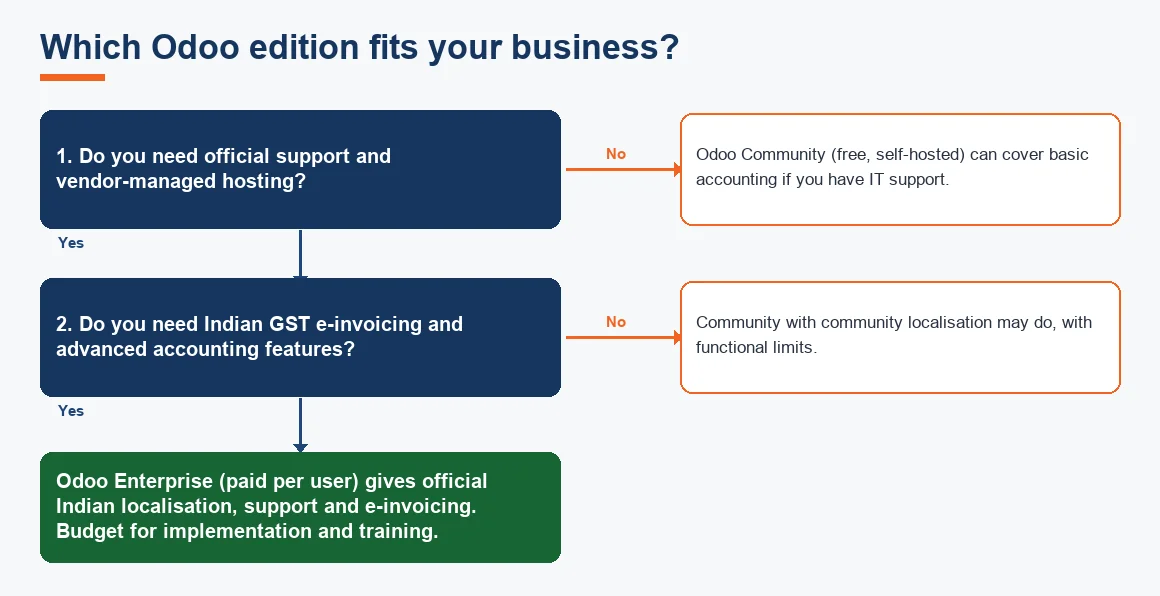
The clearest way to decide is by business shape rather than size. Odoo suits a business where accounting cannot be separated from operations: a manufacturer tracking work orders and material costs, a multi-warehouse distributor, a group running several legal entities, or a services firm that bills against projects and needs profitability by job. In those cases the connected data is worth the setup effort.
Odoo is usually the wrong choice for a small trading firm with a handful of GST invoices a month, a professional running simple books, or any owner who wants to file returns quickly without a partner in the loop. For those profiles, a focused tool such as Zoho Books, Xero or Tally Prime is faster to adopt and easier to staff. If you are weighing Odoo directly against the most common Indian SME alternative, our comparison of Odoo vs Zoho Books works through that specific decision.
Is Odoo 100% free?
Not entirely, and this is where expectations often go wrong. Odoo comes in two editions. The Community edition is genuinely open source and free to download and self-host, but you provide the server, the updates and the technical support yourself. The Enterprise edition, and the hosted Odoo Online and Odoo.sh options, are paid on a per-user, per-app subscription. Odoo also promotes a plan where a single app is free for unlimited users online, but the moment you need a second app the paid tier applies, and accounting rarely lives alone.
For most Indian businesses the licence is not the expensive part; implementation is. Chart of accounts mapping, GST configuration, e-invoice credentials, data migration and staff training are where the budget goes, so a review that judges Odoo purely on licence price misses the real number.
What Odoo actually costs an Indian SME each month
Because the licence is only one part of the picture, it helps to see the running cost as a single monthly figure. The estimate below models a five-user Indian SME on the Standard Odoo Online plan, folding the one-off implementation into a monthly amount so you can compare it like for like against a plain subscription tool. All prices are indicative, Exl GST, and will move with your user count, chosen plan and the partner you engage.
| Cost component | Basis (indicative, Exl GST) | Indicative monthly |
|---|---|---|
| Odoo user licences | 5 users at about ₹600 to ₹780 per user per month, Standard plan on annual billing | ₹3,000 to ₹3,900 |
| Indian localisation and e-invoice add-on | The fiscal localisation itself is free; e-invoice and e-way bill generation via IAP credits or a third-party connector | ₹500 to ₹1,500 |
| Implementation amortised | One-off setup of about ₹75,000 spread over 24 months | about ₹3,100 |
| Indicative monthly total | Sum of the above, before GST | ₹6,600 to ₹8,500 |
The figures are indicative only and exclude GST. A single-user, self-hosted Community setup can run at close to zero licence cost, while a heavily customised, multi-company rollout will sit well above this band, so treat the table as a starting point rather than a quote.
How safe and reliable is Odoo?
On the hosted editions, Odoo runs on managed infrastructure with regular backups and role-based access rights, which is adequate for most SMEs. On a self-hosted Community setup, security is entirely your responsibility, including backups, patching and access control, so it is only as safe as the person maintaining the server. Whichever route you take, set up user roles and approval rights properly, because the same integration that makes Odoo powerful also means a careless permission can let one user touch stock, sales and accounts at once.
What Odoo needs before you go live in India
If you decide Odoo fits, treat the rollout as a sequence rather than a switch you flip. A realistic go-live runs through the steps below, and skipping any of them is where implementations fail.
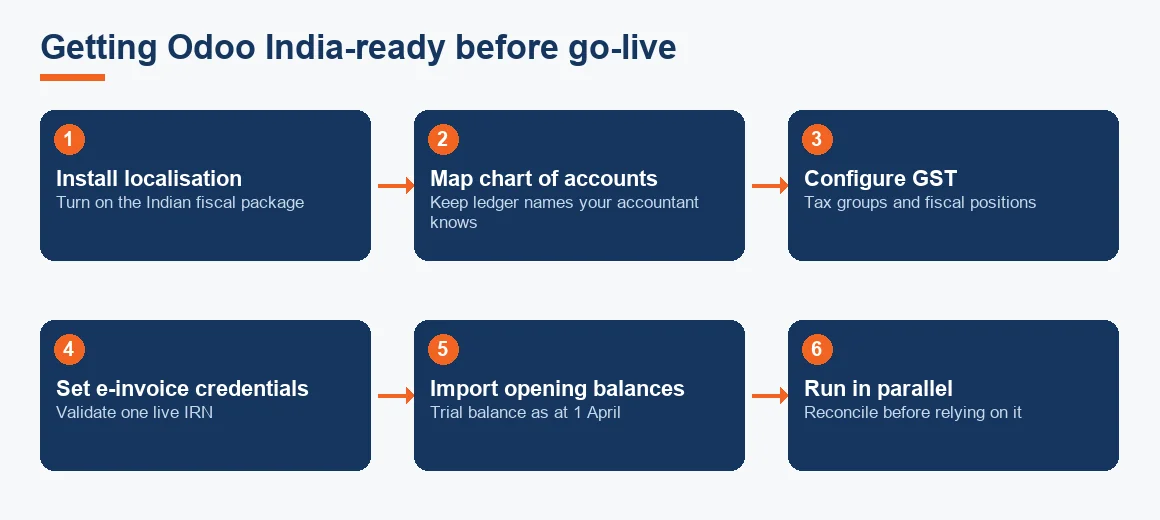
- Install the Indian fiscal localisation so GST, e-invoice and e-way bill features become available.
- Map your chart of accounts to Odoo's structure, keeping ledger names your accountant will recognise.
- Configure GST tax groups and fiscal positions for intra-state, inter-state and export scenarios.
- Set up e-invoice and e-way bill credentials and validate one live IRN before relying on it.
- Import masters and opening balances from your old system, usually from the trial balance as at 1 April.
- Run in parallel for a short period so you can reconcile Odoo output against your previous books before you rely on it alone.
Coming from Tally is a common starting point. Migration is done through CSV or Excel import of masters and balances rather than a direct connector, and transaction-level history is usually left behind in a read-only Tally file for earlier years. If you would rather not manage the fiscal setup yourself, this is exactly the work covered by professional Odoo Accounting Services, and setting up GST correctly is walked through step by step in our guide on GST setup in Odoo.
Key terms
- Double-Entry Bookkeeping: the method where every transaction posts equal debits and credits; Odoo's engine is built on it.
- Odoo Fiscal Positions: rules that switch the applicable tax automatically by customer or location.
- Bill of Materials (BOM) Costing: the roll-up of component and labour costs into a finished-goods cost in manufacturing.
- GSTR-2B Input Tax Credit Matching: reconciling purchase records against the auto-drafted GSTR-2B to claim eligible credit.
Key takeaways
- Odoo is good accounting software when books must connect to inventory, manufacturing, sales or projects, and average when you only need a plain ledger.
- Indian GST, e-invoice and TDS features exist, but the localisation must be installed and configured before anything works.
- The licence is rarely the main cost; implementation, mapping and training are where the budget goes.
- Simple trading and services businesses are usually better served by Zoho Books, Xero or Tally Prime.
- Test one full GST cycle in a demo database and run in parallel before you rely on Odoo alone.
In short, Odoo is a strong accounting choice for process-heavy Indian businesses that are willing to invest in a proper setup, and a poor fit for anyone wanting a quick, self-contained ledger. If that describes a more complex operation than a single accounting tool can hold, our broader accounting services team can help you decide whether Odoo, or a lighter alternative, is the right home for your books.
Decision guide