In this guide
The main disadvantages of Odoo accounting for an Indian business are cost and complexity that do not show up in the sticker price: the software is free to download but usually needs a paid implementation partner, Indian GST and TDS formats are not ready made the way they are in Tally or Zoho Books, customisations break at each yearly version upgrade, and the cloud editions stop working when the internet does. None of this makes Odoo a bad product. It is a full ERP, and used for what it is built for it is powerful. The trouble starts when a small services firm buys it purely as accounting software and discovers the running cost only after go live. This is a critical, honest review of where Odoo accounting falls short for Indian users, and who should look elsewhere. If you want the commercial help side of this, our Odoo Accounting Services page covers implementation and support separately.
What are the disadvantages of Odoo accounting?
Grouped simply, the drawbacks fall into five buckets that most Indian teams meet in this order.
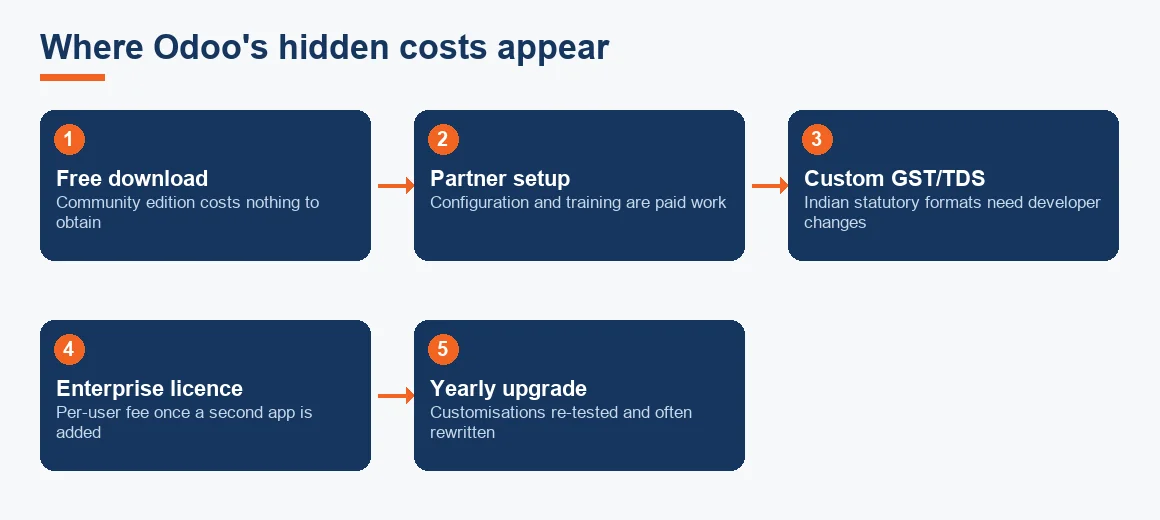
- Hidden running cost: the free Community edition needs a partner to configure, and Enterprise adds a per user licence on top.
- Weak out-of-the-box Indian localisation: GST returns, TDS, e-invoicing and e-way bills often need extra modules or developer work.
- Maintenance and developer dependency: Python modules and XML views give flexibility but mean changes need technical skill.
- Upgrade churn: a new major version every year, with customisations re-tested each time.
- Cloud-only editions: no offline working unless you self host.
These are the same categories of limitation you weigh for any package, so read this alongside Is Odoo Good Accounting Software? Pros and Cons for Indian Businesses, which sets out where Odoo genuinely wins before you decide.
Is Odoo 100% free? The cost that appears after go live
No, Odoo is not 100% free in any practical sense for a business. The confusion comes from two things being true at once. Odoo Community is genuinely open source and free to download, and Odoo Enterprise gives one app free for unlimited users on the Odoo Online plan. But accounting on the free Community edition still needs to be installed, configured and connected to your chart of accounts, and the moment you add a second app the free tier ends and the per user Enterprise licence applies to everyone.
The larger cost is people, not licences. Setting up a working Odoo double-entry engine with the correct Odoo fiscal positions for interstate and intrastate GST is partner work. For a small firm the implementation fee, custom Indian modules and a support retainer routinely run to several lakh rupees in year one, which the worked example below sets out in full.
Odoo accounting limitations Indian users hit first
The problems Indian teams notice earliest are localisation gaps. Tally and Zoho Books ship Indian statutory formats ready made, so a GSTR-1 or a TDS certificate comes out of the box. Odoo's Indian localisation module exists and has improved, but bespoke needs still surface quickly: a GST report laid out the way your consultant wants it, a TDS section field that is not there by default, an e-invoice IRN flow tuned to your invoicing, or reconciling purchases against GSTR-2B input tax credit matching. Each of these is a change to a Python module or an XML view, which means a developer or partner, not a settings toggle.
TDS is a common early snag. Applying Section 194Q TDS on goods at 0.1% on purchases above the fifty lakh threshold, or lining it up against the seller's TCS, is the kind of India-specific logic that ready-made packages handle in a dropdown and Odoo often handles through configuration or code. For the statutory detail itself, the Income Tax Department and the CBIC GST portal remain the authorities to confirm rates and thresholds against.
The maintenance burden and developer dependency
Odoo's greatest strength, that almost anything can be customised, is also its heaviest running cost. Because customisation lives in Python and XML, the useful things a growing business asks for (an approval workflow, a custom cost centre report, a tweaked invoice layout) all need technical hands. Smaller businesses feel this as a standing dependency: a developer or implementation partner effectively on call. A firm that has run Tally on a desktop for years, editing nothing, gets a shock at how much Odoo expects to be actively maintained.
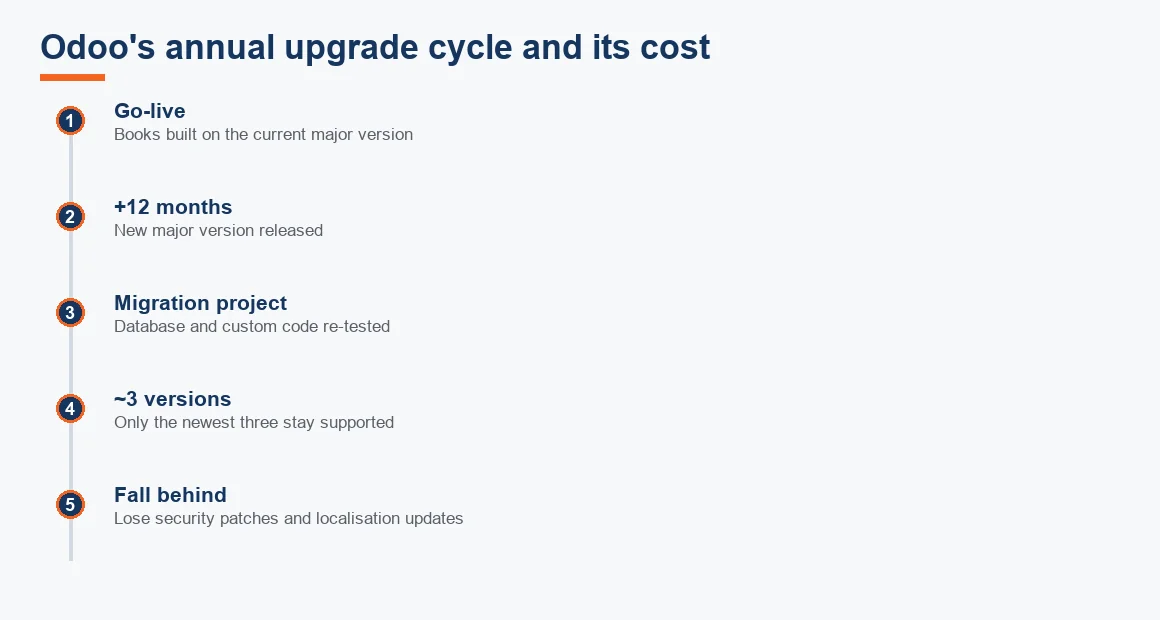
The upgrade cycle sharpens this. Odoo issues a major version each year and supports roughly the three most recent. Custom modules do not carry forward on their own, so custom GST or TDS code has to be re-tested and often rewritten at every upgrade, with the database migrated separately. Fall two or three versions behind and you lose security patches and localisation updates; keep current and you pay for a migration project roughly every year. Our note on how to set up GST in Odoo accounting shows how much of that setup is custom and therefore exposed to this churn.
How safe is Odoo, and does it satisfy Indian audit rules?
On raw security Odoo is sound: it is mature software, Odoo.sh and Odoo Online are professionally hosted, and a self-hosted install is only as safe as your own server management. The sharper question for an Indian company is the audit trail. Rule 3(1) of the Companies (Accounts) Rules 2014 requires accounting software to keep an edit log that records every change and cannot be switched off, and the auditor must report on it under Rule 11(g) of the Companies (Audit and Auditors) Rules 2014.
Odoo logs create and write timestamps on records, but the Community edition trail is thinner than auditors expect, and the fuller audit log features sit in Enterprise. So the honest position is that Odoo can meet the requirement, but often only on Enterprise and after configuration, not automatically on the free edition. Confirm the current rule text on the Ministry of Corporate Affairs site and have your auditor sign off on the setup before your first year end.
Cloud only, and what breaks Odoo when connectivity drops
Odoo Online and Odoo.sh are cloud only. When the internet is down, invoicing, approvals and posting stop; only a self-hosted on-premise install keeps running on a local network. That is a real operational risk at a factory or godown where an invoice and an e-way bill must be raised before a vehicle leaves the gate. Tally, running locally on the machine, keeps working through an outage. This is the practical answer to what breaks Odoo: not the software failing, but the connectivity model not matching a shop-floor reality. If you need offline resilience, either self host, which adds server administration to your maintenance burden, or keep a locally installed package for that site.
What is better than Odoo? Zoho, Xero and Tally compared
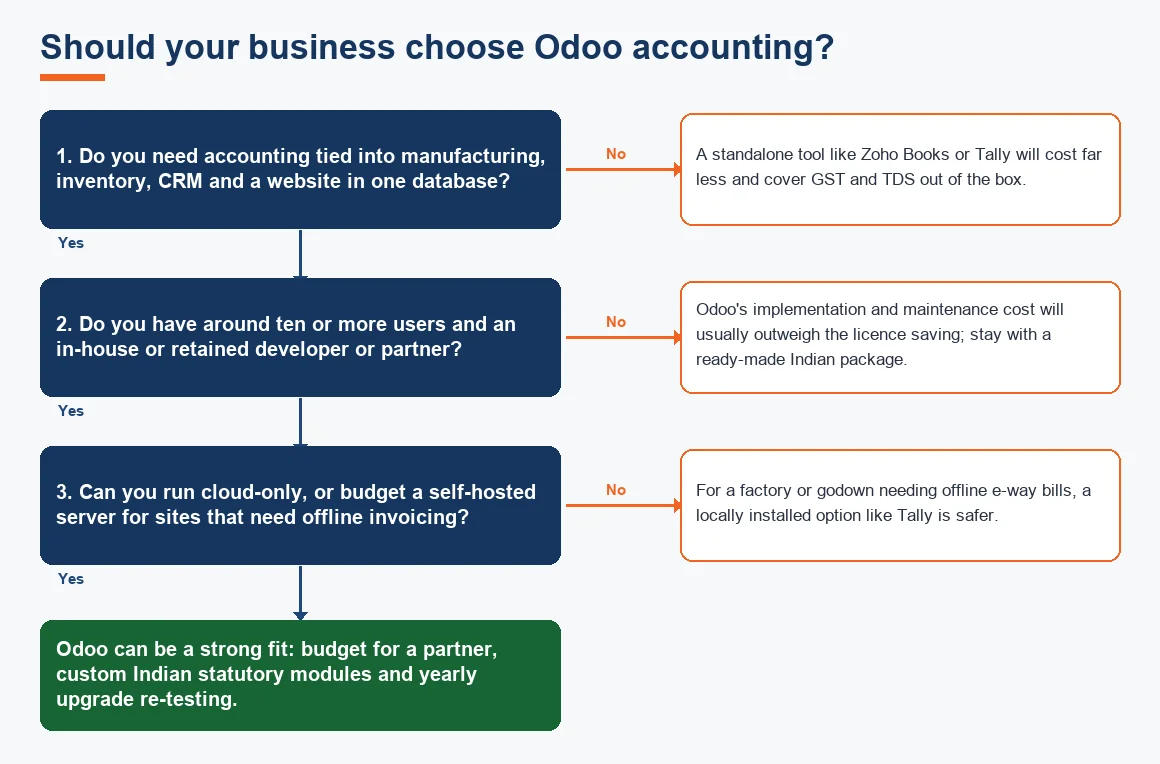
There is no single winner. The right tool depends on whether you are buying accounting software or an ERP. For most Indian SMEs that only need books, GST and TDS, a focused package is cheaper and faster. Odoo earns its cost where accounting must sit in one database alongside manufacturing, inventory, CRM and a website. The comparison below is a summary, not a scorecard; weigh it against your own user count and process complexity.
| Factor | Odoo | Zoho Books | Xero | Tally Prime |
|---|---|---|---|---|
| Best suited to | Full ERP across departments | SME accounting and GST | Global cloud accounting | Offline India-first accounting |
| Indian GST and TDS out of the box | Partial, needs configuration | Strong, ready made | Limited India focus | Strong, ready made |
| Works offline | Only if self hosted | No, cloud only | No, cloud only | Yes, local install |
| Developer or partner needed | Usually yes | Rarely | Rarely | Rarely |
| Yearly upgrade re-testing | Yes, for customisations | Automatic, no user effort | Automatic, no user effort | Minimal |
For deeper side-by-side detail, see Odoo vs Zoho Books: Which Suits an Indian SME?, and compare the service pages for Zoho Books Accounting, Xero Accounting Services and Tally Prime Accounting Services if you are moving off Odoo. Is Odoo better than Xero, or is Zoho better than Odoo? For a services firm that wants zero maintenance, Zoho Books or Xero usually wins; for a manufacturer that wants one system end to end, Odoo can justify itself.
Worked example: the true year-one cost of Odoo for a ten-user SME
Consider a Pune trading firm with ten users moving to Odoo Enterprise for accounting, purchase and inventory. The licence looks modest, but the added heads are where the cost sits. All figures are indicative and Exl GST; your partner's quote will differ.
| Cost head | Basis | Year 1 (indicative, Exl GST) |
|---|---|---|
| Enterprise licence | 10 users x approx. Rs 1,400/user/month x 12 | Rs 1,68,000 |
| Implementation partner | One-time setup, chart of accounts, training | Rs 2,00,000 |
| Indian localisation customisation | GST report layouts, TDS fields, e-invoice flow | Rs 80,000 |
| Annual support and AMC | Retainer for fixes and small changes | Rs 40,000 |
| Total year 1 | Rs 4,88,000 |
By contrast, a ready-made package covering the same GST and TDS for ten users typically lands in the low tens of thousands per year with no developer. The licence line for Odoo (Rs 1,68,000) is only 34% of the year-one total; the other Rs 3,20,000 is implementation, customisation and support. That gap is the honest cost of Odoo's flexibility, and it is why below about ten users, or for a pure services firm, the numbers rarely favour it. To model the depreciation on any server or hardware you self host, our Depreciation Calculator handles the Schedule II working, and the Ind AS Applicability Checker tells you which reporting framework your entity falls under before you configure the books.
Key terms
- Odoo Double-Entry Engine: the posting core that turns every Odoo transaction into balanced debits and credits.
- Odoo Fiscal Positions: Odoo's mechanism for auto-applying the right GST treatment by customer or vendor location.
- GSTR-2B Input Tax Credit Matching: reconciling purchase records against the auto-drafted GSTR-2B to claim eligible ITC.
- Section 194Q TDS on Goods: buyer's 0.1% TDS on purchases of goods above the fifty lakh threshold.
- Double-Entry Bookkeeping: the principle that every entry affects at least two accounts, underpinning any accounting tool.
Key takeaways
- Odoo is free to download but not free to run; budget for a partner, custom Indian modules and yearly upgrade re-testing.
- GST, TDS and e-invoicing are not fully ready made the way they are in Tally or Zoho Books.
- The audit-trail requirement under Rule 3(1) is met more reliably on Enterprise and after configuration; confirm with your auditor.
- Cloud editions do not work offline, which matters for factories and godowns raising e-way bills.
- Odoo suits multi-department ERP users with ten-plus users and technical support; smaller and services-only firms usually pay less elsewhere.
Decision guide