In this guide
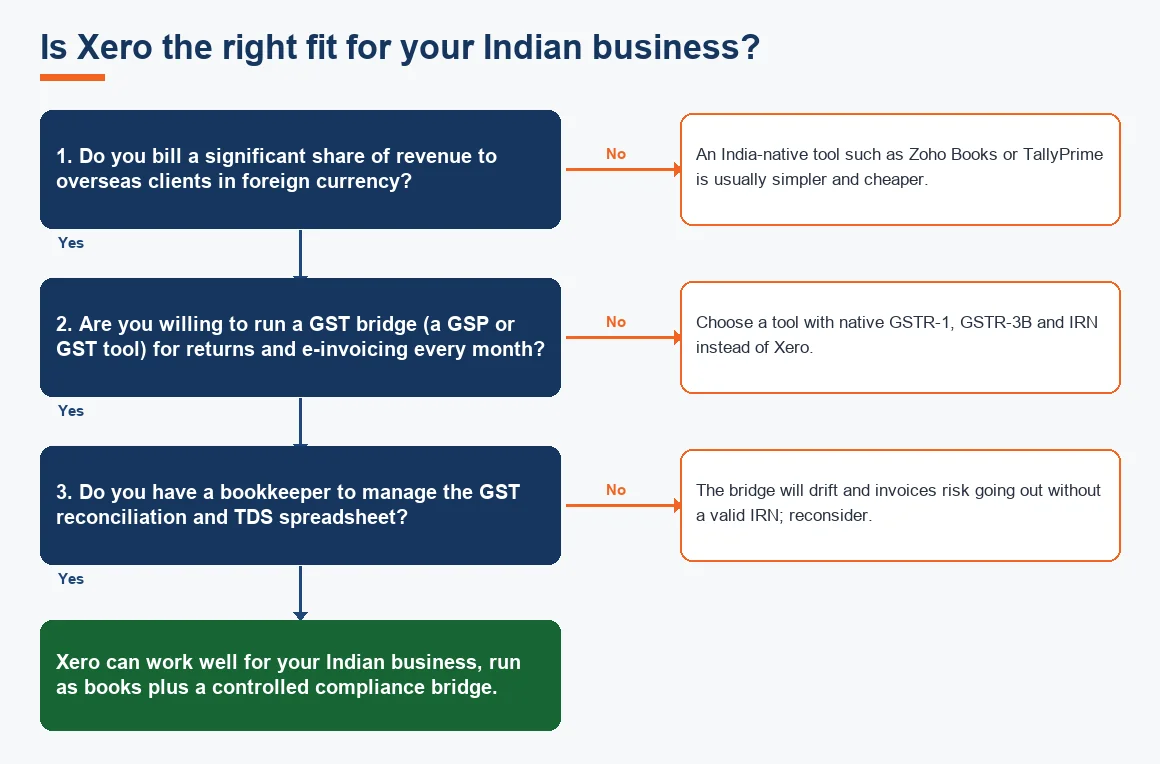
Xero works in India as a general ledger and invoicing platform, but the honest answer to xero in india gst is that GST is not built in the way it is in an India-first product. Xero has no localised Indian edition. You can record GST using custom tax rates and read it back on your reports, yet the statutory layer that decides compliance (GSTR-1, GSTR-3B, e-invoicing and e-way bills) sits outside the software and has to be bridged every month. This guide sets out exactly what Xero handles natively, what India needs bolted on, and the one number that usually settles the decision.
Is Xero available in India, and which country owns Xero?
Xero is a cloud accounting product from Xero Limited, a company headquartered in Wellington, New Zealand, and listed in Australia. It is sold globally and Indian businesses can subscribe without difficulty, usually on the Global edition. What India does not get is a country-specific version with pre-built GST returns, an e-invoicing connection or a TDS module, the way Australian users get BAS or UK users get Making Tax Digital. So Xero is available in India, but it arrives as a strong general ledger and bank-reconciliation engine rather than a ready-made Indian compliance suite. If native Indian filing is your first priority, the usual comparison is Xero versus Zoho Books, and for a serviced setup you would look at Zoho Books Accounting or Tally Prime Accounting Services.
Does Xero support GST, and what has to be bridged?
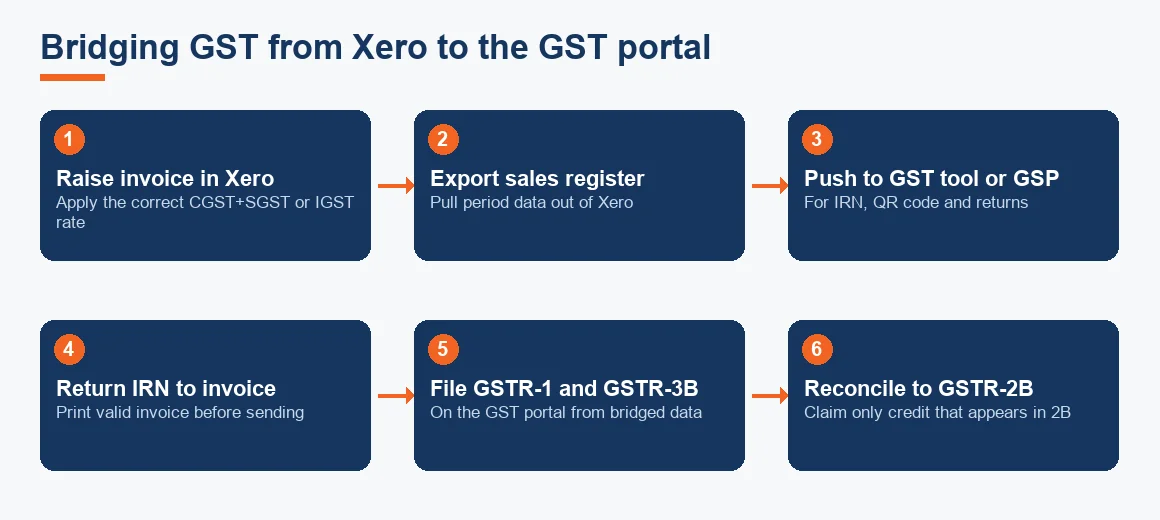
Xero supports the mechanics of GST but not the filing. You can create custom tax rates, apply them on invoices and bills, and see GST collected and GST paid on your reports. What Xero cannot do for the Indian market, out of the box, is the following.
- GSTR-1 and GSTR-3B: there is no India return that maps your ledgers to the GST portal, so returns are prepared in a separate GST tool from exported data.
- E-invoicing (IRN and QR code): Xero has no connection to the Invoice Registration Portal. Businesses above the Rs 5 crore turnover threshold have to push invoice data to a GST Suvidha Provider and bring the IRN and QR code back onto the printed invoice.
- E-way bills: generated outside Xero on the government portal or through the same bridge.
- TDS: there is no module for sections 194C, 194J or 194I, so deductions are tracked through liability ledgers plus a spreadsheet, and Form 26Q is filed separately.
The workflow below is what a bridged setup looks like in practice.
How to enable GST in Xero
Enabling GST in Xero is a matter of building the tax rates yourself, because there is no India default set. The steps are short but the accuracy of everything downstream depends on getting them right.
- Open Settings, then Advanced, then Tax rates.
- Create separate rates for the components you actually use: CGST and SGST as a paired rate for intra-state supply, IGST as a single rate for inter-state supply, and a 0% rate for zero-rated exports under an LUT.
- Build one paired rate per GST slab you sell at (typically 5%, 12%, 18% and 28%), naming them clearly so the person raising invoices cannot pick the wrong one.
- Map each rate to the correct ledger accounts in your chart of accounts so GST output and input land in the right control accounts.
- Set the default tax treatment on each contact (registered, unregistered, SEZ or overseas) so invoices default sensibly.
How to show GST on a Xero invoice and handle e-invoicing
Once your rates exist, GST shows on the invoice by selecting the correct paired or single rate on each line. Xero then displays the tax breakup and the invoice total. The gap is the IRN. For a business over the e-invoicing threshold, a printed invoice must carry a valid Invoice Reference Number and QR code, and Xero has no way to obtain these on its own. The invoice data has to go out to a GST Suvidha Provider or e-invoicing tool, the IRN and QR code come back, and only then is the invoice valid to send. That handoff is the single most fragile point in a Xero-in-India setup and has to be controlled by a defined process. The threshold and applicability are set by the CBIC and are worth confirming against the source at cbic-gst.gov.in.
How to get a GST report from Xero and reconcile GST
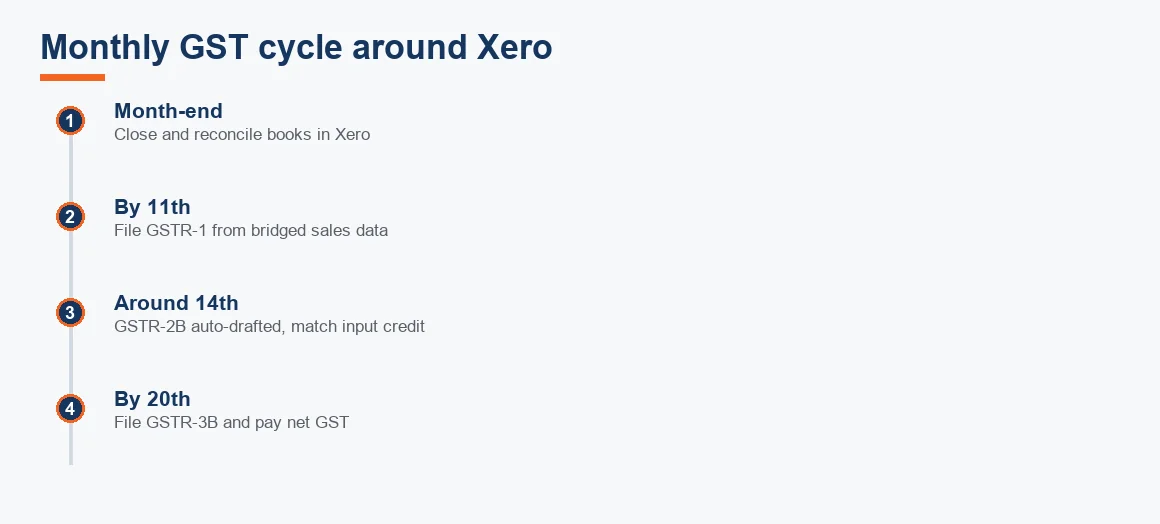
Xero will give you a GST summary from the tax rates you built, showing output and input tax for the period. You use that as working data, not as a filed return. Reconciling GST in Xero means three things: agreeing Xero's output tax to the sales register you file in GSTR-1, agreeing input tax to your GSTR-2B so you only claim credit that actually appears there, and agreeing the net to what you pay in GSTR-3B, a discipline that runs alongside your normal bank reconciliation. The GST portal itself is the reference for what has been filed and what 2B shows, at gst.gov.in. Xero's bank feeds and reconciliation keep the cash side clean, and its bank rules speed up coding, but the GST-to-portal reconciliation is a manual monthly discipline. The monthly rhythm looks like this.
Why is Xero not calculating GST correctly?
When Xero appears to get GST wrong, the cause is almost always a setup issue rather than a software fault, because Xero only calculates what you told it to.
- Wrong rate on the contact: an inter-state customer defaulted to CGST plus SGST instead of IGST, or an export contact not set to zero-rated.
- Rounding differences: Xero rounds tax per line, and the portal or your GST tool may round on the invoice total, creating paise-level gaps that add up.
- Rate mapped to the wrong ledger: the number is right on the invoice but sits in the wrong control account, so your reconciliation breaks.
- Reverse charge not modelled: Xero has no native reverse-charge handling, so GTA and other RCM liabilities have to be posted by a manual journal entry.
None of these are reasons to abandon Xero. They are reasons to lock the setup down and review it before each filing.
Worked example: GST on a domestic invoice versus an export under LUT
This is the case most Xero-in-India users care about, because they typically bill both an Indian customer and an overseas client. Assume a services firm raises two invoices, each with a taxable value of Rs 1,00,000 (indicative, Exl GST). The domestic supply is inter-state at the standard 18% slab; the export is zero-rated under a Letter of Undertaking. The arithmetic is what your Xero tax rates must reproduce.
| Item | Domestic inter-state supply | Export under LUT |
|---|---|---|
| Taxable value | Rs 1,00,000 | Rs 1,00,000 |
| GST treatment | IGST at 18% | Zero-rated (0%) |
| IGST amount | Rs 18,000 | Rs 0 |
| Invoice total | Rs 1,18,000 | Rs 1,00,000 |
| Reported in GSTR-1 | B2B, with GSTIN | Table 6A, export invoice |
Both invoices are correct in Xero if the rates are built properly, but only the export needs the LUT reference and, on collection in foreign currency, an exchange gain or loss posting. That is where Xero's multi-currency bank feed earns its place, and why foreign currency receivables are cleaner to manage here than in most India-native tools.
Xero versus the India-native options at a glance
The realistic comparison for an Indian buyer is Xero against Zoho Books and TallyPrime. QuickBooks does not belong on this list: Intuit withdrew from India and customer access ended on 30 April 2023, so it is a migration source, not a choice.
| Capability | Xero (Global) | Zoho Books | TallyPrime |
|---|---|---|---|
| Native GSTR-1 and GSTR-3B | No, bridge required | Yes | Yes |
| E-invoicing (IRN) | Via GSP only | Native | Native |
| TDS module | No | Yes | Yes |
| Multi-currency and overseas billing | Strong | Good | Limited |
| Bank feeds and app marketplace | Strong | Good | Basic |
| Best fit | Exporters wanting clean reporting | Domestic SMEs wanting native GST | Trading and inventory-led firms |
Is Xero free, and what does it cost to run in India?
Xero is not free; it is a paid monthly subscription, and in India the true cost is Xero plus the GST bridge tool plus the bookkeeping time to run the monthly reconciliation and TDS spreadsheet. Treat those three together when you compare it with a single native product. Depreciation and fixed assets are another area to plan, because Xero's fixed-asset register follows its own conventions and has to be reconciled to Schedule II of the Companies Act; our Depreciation Calculator helps square Xero's figures with the Indian schedule. For the commercial, serviced version of any of this, our Xero Accounting Services team runs the bridge for clients, and firms weighing an open-source route sometimes also look at Odoo Accounting Services.
Key terms
- GSTR-2B Input Tax Credit Matching: the monthly check that you only claim input credit that actually appears in your auto-drafted 2B statement.
- Xero Bank Rules: conditions that auto-code recurring bank transactions during reconciliation.
- Multi-Currency Bank Feed: a bank feed that handles foreign-currency accounts and posts exchange gain or loss automatically.
- Foreign Currency Receivables: invoices billed in a foreign currency and revalued to INR on collection.
Key takeaways
- Xero is available in India but is not India-localised: GST, e-invoicing and TDS are not native.
- You can record GST via custom rates, but GSTR-1, GSTR-3B, IRN and e-way bills must be bridged through a separate tool or GSP.
- The Rs 5 crore e-invoicing threshold is the number that usually decides how tightly you must control the bridge.
- Xero fits exporters and overseas-billing firms; domestic-only businesses are often simpler on Zoho Books or TallyPrime.
- QuickBooks is not an option in India after 30 April 2023.
Decision guide