In this guide
To automate repeating invoices and rules in Xero, you build a repeating invoice template that runs on a set cycle, and you create bank rules that code recurring bank transactions automatically. Both live in the standard Xero interface, both can be switched between fully automatic and review-first, and neither needs a paid add-on. This guide explains the automations that are genuinely worth turning on, the one setting that quietly creates rework, and how each behaves for an Indian business. For the commercial side of setup and ongoing bookkeeping, see our Xero Accounting Services.
What can Xero automate?
Xero automates far more than invoices. The main levers are repeating sales invoices and purchase bills, bank feeds paired with bank rules that code recurring transactions, invoice reminders that email a customer after a chosen number of overdue days, recurring journals for entries such as prepayment releases, and depreciation runs on fixed assets that post each period once the register is set. Payment matching during reconciliation is also semi-automated: Xero suggests the contact, account and tax treatment based on past coding. What Xero does not do in the Indian version is payroll and local tax filing, which are country-specific features. If you are weighing platforms, our note on whether Xero works for Indian businesses covers the GST gaps in detail.
How to set up repeating invoices in Xero
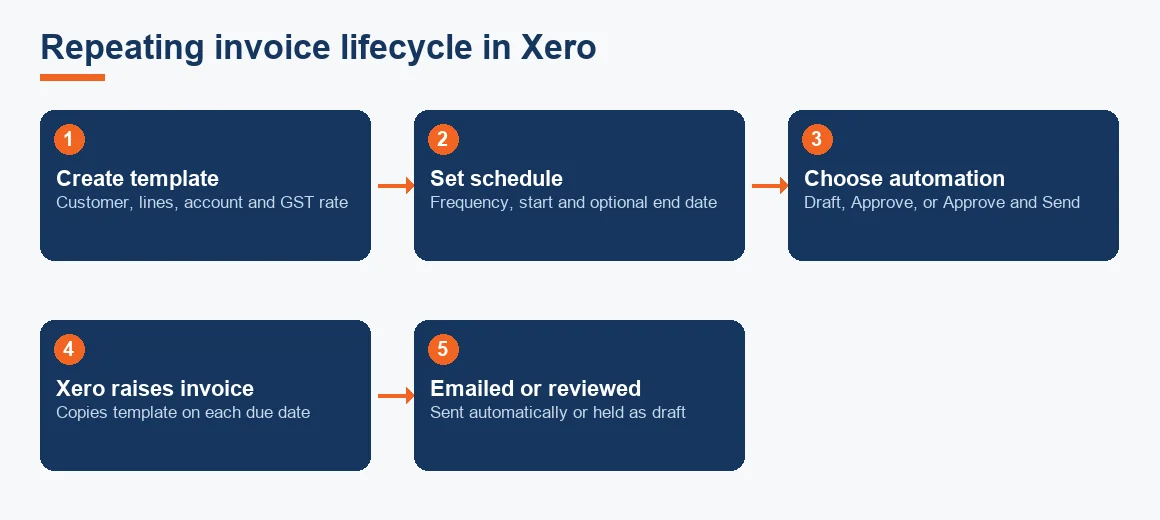
A repeating invoice is a template that generates a fresh invoice on a schedule you define, so you never re-key a monthly retainer or subscription. The setup runs in a few steps.
- Go to Business, then Invoices, and select New Repeating Invoice.
- Set the repeat frequency (daily, weekly, monthly or yearly) and the interval, for example every 1 month.
- Choose a start date and, optionally, an end date. Leave the end date blank for an open-ended retainer.
- Enter the customer, line items, account codes and the GST tax rate exactly as you would on a one-off invoice.
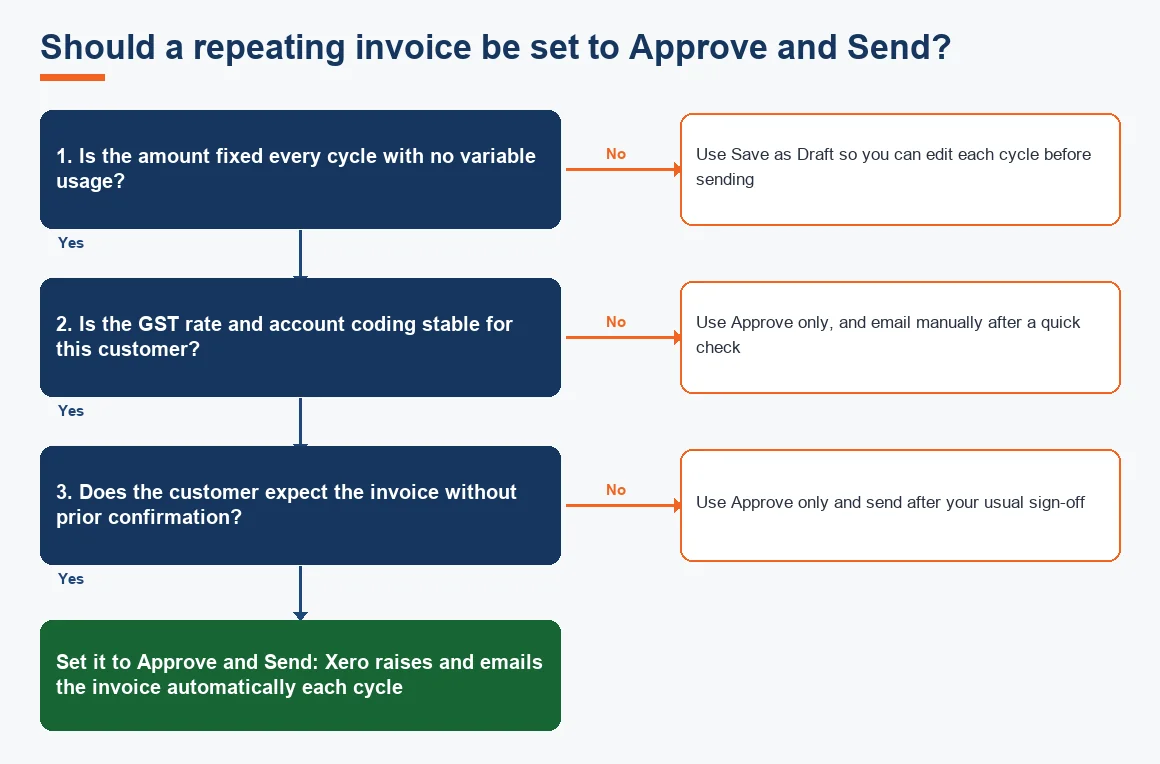
- Pick the automation level: Save as Draft for review each cycle, Approve to raise it automatically, or Approve and Send to email it to the customer without any manual action.
The same template engine drives repeating bills under Business, then Bills to Pay, which is useful for fixed rent or a monthly software subscription.
What is a repeating invoice, and how do recurring transactions work?
A repeating invoice holds no amount owed by itself; it is a set of instructions. On each due date Xero copies the template into a real invoice, dates it, numbers it and applies your chosen automation level. Recurring bills, repeating journals and scheduled depreciation all work on the same principle: a stored template plus a clock. Yes, Xero has recurring transactions across sales, purchases and the general ledger, and each type keeps its own schedule independent of the others.
How Xero bank rules work, and in what order they run
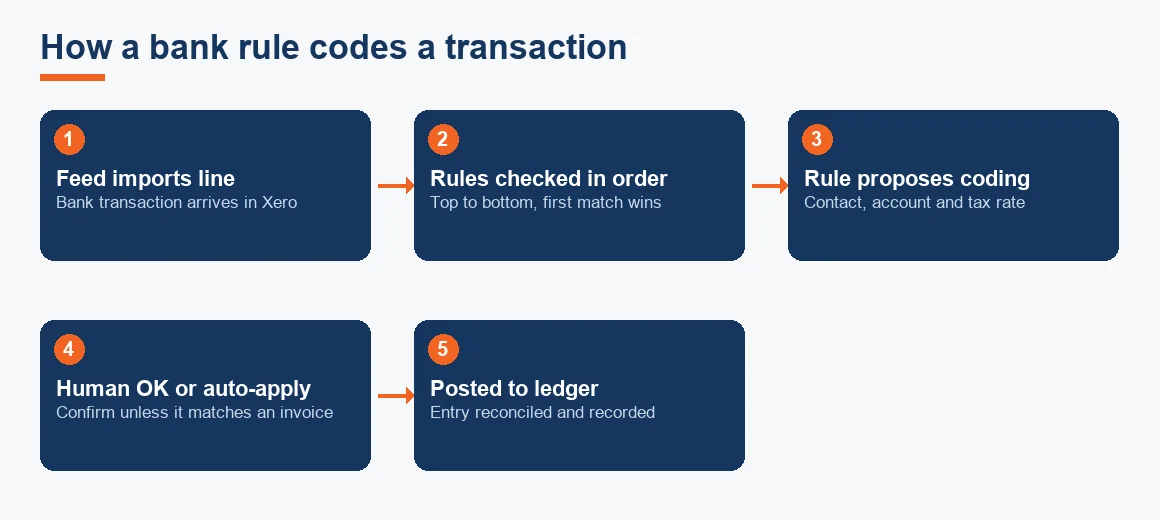
Bank rules are the second big automation. A rule watches your bank feed and, when a transaction matches its conditions, proposes a contact, account code and tax rate during reconciliation. Xero does not cap how many rules you create, and rules run in the order they are listed, top to bottom, with the first match winning. Reorder them under Bank Accounts, then Bank Rules, so that specific rules sit above general ones. Each rule targets spend money, receive money or transfer on a chosen account, and can be set to apply automatically or to ask for confirmation. Because the tax rate a rule applies feeds your GST working, code it against the correct rate under the current CBIC GST schedule rather than a default.
Rules cut coding time sharply on predictable items such as bank charges, payment gateway fees and recurring subscriptions. For the full reconciliation workflow, our guide on how bank feeds and reconciliation work in Xero walks through the matching screen step by step.
Can bank rules replace manual reconciliation?
No. A bank rule suggests coding; it does not post on its own. Each suggestion still needs a human OK before it hits the ledger, unless the transaction exactly matches an existing invoice or bill, in which case Xero can match it directly. This is a deliberate control. Reconciliation remains a review step, and the rule simply removes the typing. Treat rules as a first draft of the coding, not as a signed-off entry.
How to set up automatic invoice reminders in Xero
Invoice reminders chase overdue customers for you. Under Business, then Invoices, then Invoice Reminders, switch reminders on and set the schedule, for example a polite email 7 days after the due date and a firmer one at 14 and 30 days. You can exclude invoices below a rupee threshold so small balances do not trigger emails, and you can turn reminders off for a specific customer you would rather call. Reminders reduce the manual chasing that inflates your receivables ageing, though they do not replace a real conversation on a large overdue account.
Repeating journals, depreciation and bulk sending
Two more automations are worth knowing. A repeating journal posts a standing general ledger entry on a schedule, which suits prepaid expense releases or a fixed monthly accrual; set it up under Accounting, then Manual Journals, and tick the repeat option. Fixed asset depreciation runs post automatically once each asset is registered with a method and rate, so the depreciation charge lands every period without re-entry. And yes, you can bulk send invoices: select several approved invoices in the list and use Email to send them together, which pairs well with a batch of repeating invoices raised the same morning.
How can I use Zapier with Xero?
For automations Xero does not offer natively, Zapier connects Xero to other apps. A typical flow creates a Xero invoice when a form is submitted, or posts a Slack alert when a bill is approved. Zapier is useful for cross-app triggers, but it adds a moving part outside your ledger, so log what each connection does and review it when you change any linked app. For most Indian small businesses the built-in repeating invoices and bank rules cover the bulk of the need before any third-party tool is required.
Worked example: a monthly retainer on a repeating invoice
Suppose you raise a fixed monthly retainer of Rs 25,000 (indicative, Exl GST) to a domestic client, taxable at 18% GST. A single repeating invoice set to Approve and Send handles the whole year. The schedule below shows the arithmetic per cycle and across the year.
| Line | Per invoice (Rs) | 12 cycles (Rs) |
|---|---|---|
| Retainer (taxable value) | 25,000 | 3,00,000 |
| CGST at 9% | 2,250 | 27,000 |
| SGST at 9% | 2,250 | 27,000 |
| Invoice total | 29,500 | 3,54,000 |
The automation raises and emails twelve identical invoices worth Rs 3,54,000 in total without any re-keying. One caution: the repeating invoice does not generate a GST e-invoice IRN. If your turnover crosses the e-invoicing threshold, the IRN must still be produced through the GST portal or your integrated tool, so keep that step in the workflow.
Key terms
- Xero Bank Rules: conditions that auto-suggest contact, account and tax code on matching bank transactions.
- Automated Bank Feeds: the live import of bank transactions that rules then code.
- Hubdoc Automation: Xero's tool that captures bills and receipts and pushes the data into the ledger.
- Bank Reconciliation: matching ledger entries to the bank statement, the review step rules speed up.
- Journal Entry: the debit-and-credit record a repeating journal posts on a schedule.
How to turn off a repeating invoice in Xero
To stop a repeating invoice, open Business, then Repeating, select the template and either set an end date in the past or delete the template entirely. Setting an end date keeps the history and stops future cycles; deleting removes the template but leaves invoices already raised untouched. The same applies to repeating bills and journals. Before you switch off an automation that codes tax, confirm the last cycle posted correctly so you do not leave a gap in the period.
If you run more than one accounting platform or are comparing options, the same automation ideas apply differently across tools. Our comparisons of Xero versus Zoho Books, plus the service pages for Zoho Books Accounting, Odoo Accounting Services and Tally Prime Accounting Services, set out how each handles recurring transactions. For the depreciation runs mentioned above, our Depreciation Calculator helps you check the charge Xero will post under Schedule II.
Key takeaways
- Repeating invoices, bills and journals all run on a stored template plus a schedule, and you choose draft, approve, or approve-and-send.
- Bank rules code the feed but run top to bottom with first match winning, so order specific rules above general ones.
- Automation removes typing, not judgement: most rule hits still need a human OK before they post.
- Automated invoices do not create a GST e-invoice IRN, so keep the portal step in your workflow if e-invoicing applies.
- Review every template and rule each quarter, because rates, retainers and vendors change.
Decision guide