In this guide
To set up Xero bookkeeping for an Ahmedabad exporter, configure three things before you raise the first invoice: a chart of accounts that separates exports under LUT, exports on payment of IGST and domestic sales; a consistent reference field for the shipping bill number, date and port code; and multi-currency with the correct base currency and tax rates. Xero handles the daily ledger, bank feeds and foreign-currency invoicing well, but it carries no built-in Indian GST return or export field, so the export-specific structure has to be built in by hand. This guide walks through that structure for a goods exporter working out of Ahmedabad, and stays on the how-to. If you want the work done for you, that is a commercial question and belongs with our Xero Accounting Services team.
Why an Ahmedabad exporter configures Xero differently
Ahmedabad and the wider Gujarat belt run on outward trade: textiles and denim, chemicals and dyes, ceramics from Morbi, pharmaceuticals, engineering goods and agri commodities moving through Mundra and Kandla. An exporter here is not just keeping books; the books feed a GST refund claim, a bank realisation record and, often, a drawback claim. A generic Xero setup built for a domestic trader will book everything to one sales account and leave you unpicking the year at return time. The fix is to decide the structure up front so that every export invoice lands in the right revenue bucket and carries the customs data the refund depends on. Neighbouring topics such as a full books cleanup and GST reconciliation or your Gujarat professional tax and Shops Act obligations are covered separately; this piece stays on the Xero export build.
Step by step: building the chart of accounts for exports
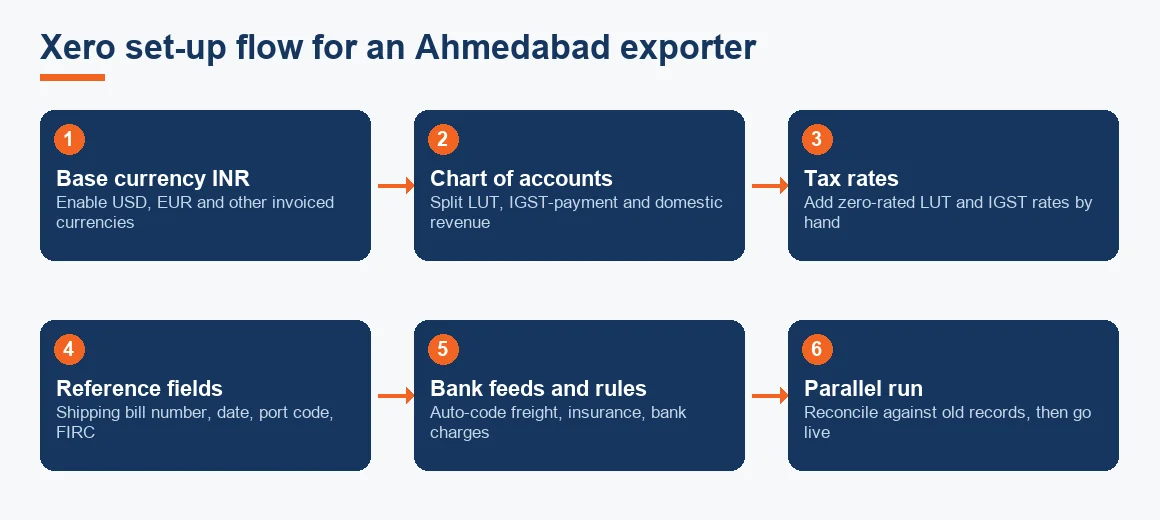
The chart of accounts is the one decision that shapes every report afterwards, so spend the time here.
- Split revenue three ways. Create "Export Sales under LUT", "Export Sales on payment of IGST" and "Domestic Sales". Exports under a Letter of Undertaking are zero-rated with no tax charged; exports on payment of IGST charge the tax and reclaim it as a refund. Each maps to a different part of GSTR-1, so keeping them apart at source saves the reconciliation later.
- Give export costs their own codes. Ocean and air freight, marine insurance, customs house agent charges and bank realisation charges each deserve a separate expense account. These are what you need for export costing and any duty drawback working.
- Set the tax rates. Add a zero-rated tax rate for LUT sales and an IGST rate for the on-payment route. Xero will not create Indian GST rates for you.
- Add tracking categories. Use a tracking category for country or buyer so realisation and margin can be followed per market without cluttering the ledger.
- Load opening balances. Agree the opening debtors, creditors and bank balances against the old records before you go live, using a fixed cut-off date.
Recording export sales under LUT versus on payment of IGST
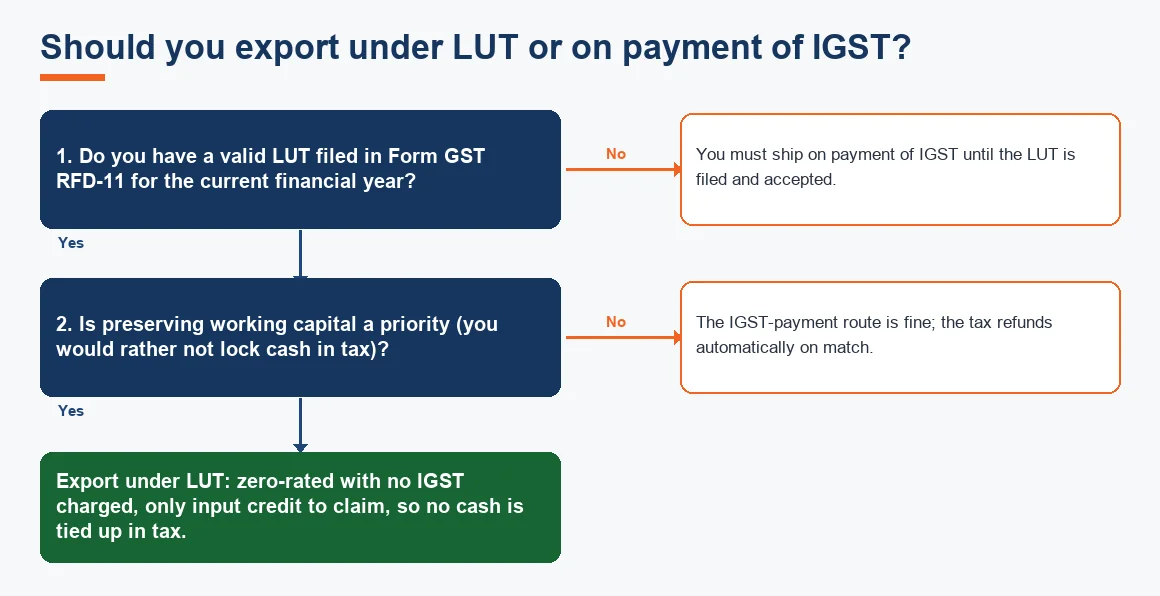
Both routes are zero-rated, but they book differently. Under a Letter of Undertaking (filed once each financial year in Form GST RFD-11 on the GST portal), you ship without charging IGST and claim no tax refund, only the input credit. On the payment route you charge IGST on the invoice, pay it, and the tax is refunded automatically once the return and shipping bill match. For a working-capital-sensitive exporter the LUT route usually wins because no cash is locked up in tax, which is why most Ahmedabad exporters renew their LUT before the year starts. Whichever route you use, the invoice must reach GSTR-1 with the shipping bill data intact, so the reference discipline below matters more than the route itself.
Tracking shipping bill and FIRC details for a GST refund
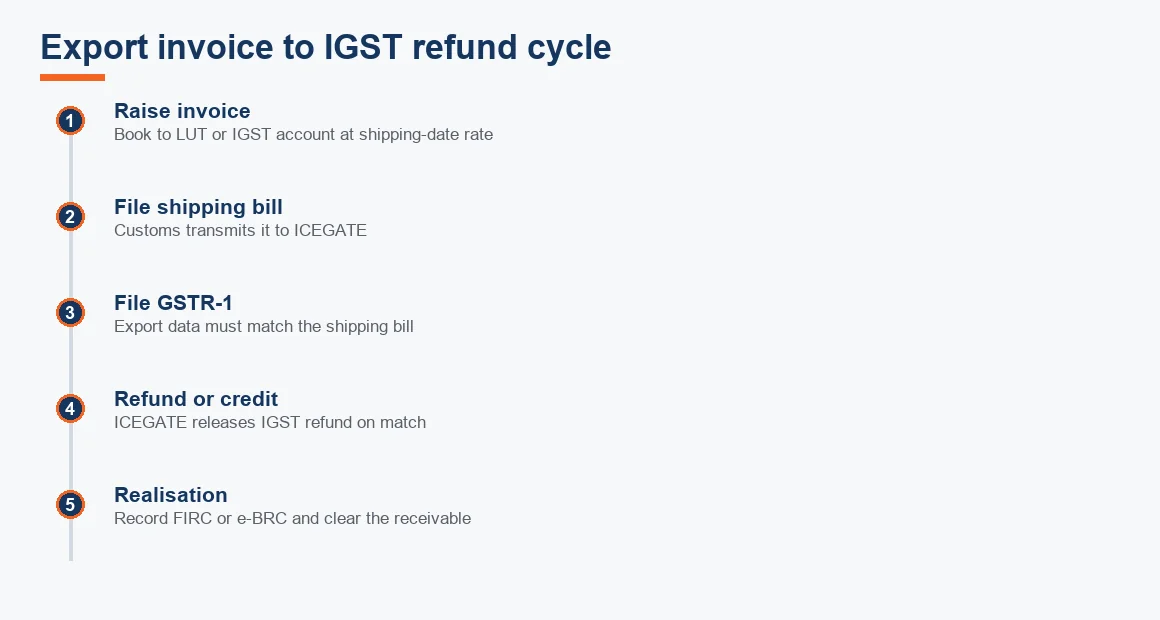
This is where a foreign tool needs local discipline. The IGST refund, or the credit accumulation under LUT, is released by ICEGATE only when the invoice data in GSTR-1 matches the shipping bill filed at the port. A mismatch in invoice number, value or GSTIN stalls the refund entirely, so the customs data must live in Xero from day one.
- Shipping bill number, date and port code recorded against every export invoice, in the reference field or a custom field used the same way every time.
- FIRC or the e-BRC (electronic Bank Realisation Certificate) reference once the money is realised, linking the invoice to the inward remittance the bank reports.
- Realisation status tracked so you can see which shipping bills are still awaiting payment, which the RBI expects to be closed within the prescribed realisation period.
Since Xero has no native field for any of this, agree one convention and never break it. An accounts receivable aging schedule filtered by tracking category then doubles as your realisation tracker.
Handling multi-currency and advance receipts from overseas buyers
Set your base currency to INR and enable the currencies you invoice in. Xero revalues foreign balances at period end and posts the difference to an unrealised gain or loss, which keeps your foreign currency receivables honest. Two rules keep the numbers clean:
- Advances are a prepayment, not revenue. Post an inward remittance received before shipment as a prepayment against the customer, at the exchange rate on the date of receipt. Recognise revenue only when the goods are shipped. The rate difference between receipt and shipment goes to exchange gain or loss. Note that GST is not payable on an advance received against goods, unlike an advance for services.
- Use one rate source consistently. Book the invoice at the rate on the shipping date and the realisation at the rate on the credit date; the gap is a genuine exchange gain or loss, not a pricing error.
Software exporters and IT firms have an extra layer here (SOFTEX and, from October 2026, monthly EDF filing); that sits outside this goods-exporter guide.
Worked example: an export invoice under LUT, from raise to realisation
Assume a Morbi ceramics exporter ships tiles worth USD 20,000 under LUT. The USD to INR rate is 83.50 on the shipping date and 84.20 when the buyer pays six weeks later. No IGST is charged because the sale is zero-rated under LUT. The entries, all amounts indicative, are:
| Date / event | Account | Debit (INR) | Credit (INR) |
|---|---|---|---|
| Shipping date (rate 83.50) | Accounts Receivable (Buyer, USD) | 16,70,000 | |
| Export Sales under LUT | 16,70,000 | ||
| Realisation date (rate 84.20) | Bank (EEFC / current account) | 16,84,000 | |
| Accounts Receivable (Buyer, USD) | 16,70,000 | ||
| Foreign Exchange Gain | 14,000 |
The invoice books at 20,000 x 83.50 = 16,70,000. The buyer pays 20,000 x 84.20 = 16,84,000, so the 14,000 difference is a realised exchange gain, not extra sales. Because the sale is under LUT, no IGST line appears, and the invoice still carries the shipping bill number so GSTR-1 will match at ICEGATE. If this were the IGST-payment route instead, you would add an IGST output line on the invoice and a corresponding refund receivable.
Does keeping books in Xero satisfy Indian record-keeping rules?
Cloud accounting is permitted, but permission is not the whole answer. Rule 3 of the Companies (Accounts) Rules requires books kept in electronic mode to remain accessible in India at all times, a backup of the books to be maintained on servers physically located in India on a daily basis, and the company to intimate the Registrar each year, at the time of filing financial statements, of the name and address of the service provider and the location of the servers where the data is kept. Xero's servers sit outside India, so a company (as opposed to a proprietorship or partnership, which are not under the Companies Act) must arrange a compliant daily India backup and make that annual intimation. The current rule text is on the MCA portal, and the zero-rated export position on the CBIC site.
Key terms
- Multi-Currency Bank Feed: an automated feed that imports foreign-currency bank transactions for coding and reconciliation.
- Xero Bank Rules: conditions that auto-code recurring transactions such as freight or bank charges as they arrive in the feed.
- Foreign Currency Receivables: export debtors held in a non-INR currency, revalued at period end to a gain or loss.
- Hubdoc Automation: document capture that pulls bills and shipping paperwork into the ledger with the source attached.
- Bank Reconciliation: matching the ledger against the bank statement, including EEFC and realisation entries.
Xero compared with other tools for an exporter
Xero is not the only option, and the right choice depends on how much Indian GST filing you want done inside the software versus through a bridge. The summary below is for a goods exporter; the deeper feature notes live on each service page.
| Consideration | Xero | Zoho Books | Tally Prime |
|---|---|---|---|
| Multi-currency invoicing | Strong, native | Strong, native | Available, less fluid |
| Indian GST return filing | Via bridge or manual | Built-in for India | Built-in, offline |
| Bank feeds | Wide, automated | Good in India | Manual or add-on |
| Best suited to | Global-facing, cloud-first exporters | India-first with export lines | Established Tally shops |
If a bridge feels like friction, our Zoho Books Accounting or Odoo Accounting Services pages set out the India-native alternatives, and long-standing Tally Prime Accounting Services users can weigh a move against staying put. For the commercial "Xero in Ahmedabad" question specifically, see Xero Accounting Services Ahmedabad.
How long the set-up takes and where a review helps
For a business with one bank account and under 200 monthly transactions, budget two to four weeks: roughly a week for the chart of accounts, tax rates and opening balances, a week for bank feed activation and coding rules, and the rest for parallel running against the old records before you rely on the new file. Migrating an existing Tally file adds time because opening stock and party balances have to be agreed line by line. Costs for local support are set out in our 2026 Ahmedabad benchmarks, and if you are still shortlisting, the guide to choosing an accountant in Ahmedabad covers what to ask. Broader local books support is on the Ahmedabad accounting and bookkeeping page, and Tally-first firms have a dedicated Tally Prime Ahmedabad page. For fixed-asset entries you will build during set-up, our depreciation calculator is a quick check, and provisioning on slow foreign receivables can be sized with the ECL estimator.
Key takeaways
- Configure the chart of accounts, tax rates and shipping-bill reference field before the first export invoice; Xero ships with none of the Indian export structure.
- Split revenue into LUT, IGST-payment and domestic accounts so GSTR-1 reconciles at ICEGATE without unpicking.
- Record shipping bill number, date, port code and the FIRC or e-BRC against every export invoice; a mismatch stalls the refund.
- Book overseas advances as a prepayment, recognise revenue on shipment, and keep exchange gains out of turnover; GST is not due on an advance for goods.
- Companies must still meet Rule 3: a daily India-located backup and an annual intimation to the Registrar of where the servers sit.
Decision guide